Overview
The following figure provides an overview of the components and the sorting into the respective security zones.
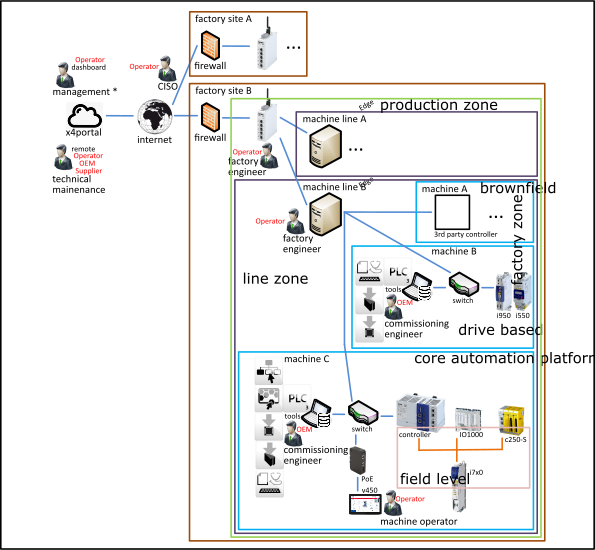
Overview of the components in the security zones
x5x0 IoT Gateway
The x5x0 components are configured through the X4 Portal and span a VPN tunnel between both. The component itself has no identification or authentication of human users.
Brownfield and drive based
This is not the focus of the documentation.
»EASY System Designer«
This cloud service has its own user management that can identify and authenticate users and grant them the necessary permissions. These mechanisms are described in the corresponding chapter.
»PLC Designer«
The PLC Designer has its own user management and provides related functions. Projects can be stored and protected, and users and their passwords can be managed centrally in a password manager. These mechanisms are described in the corresponding chapter.
»EASY UI Designer«
The "EASY UI Designer" manages users and their passwords for operators who will work on the visualization later. These users can be managed via the EASY UI Designer, but they can also be changed on the v4x0 web panel later. A user administration system runs on the controller. The mechanisms for this are described in the relevant chapter.
Controller
The controller contains two user administrations. The first is the user management of the controller access, where users and their passwords are managed with the help of the "PLC Designer" and stored on the controller. Access to the controller is via this mechanism. Second, the user administration for the v450 operators is on the controller. Operators can be created initially via the "EASY UI Designer" and changed at runtime on the v4x0 web panel. Both mechanisms are described in the corresponding
chapters.
Both mechanisms are described in the corresponding chapters.
v4x0 web panel
The v4x0 web panel has its own user management for its own functionality. This is described in the corresponding chapter. Additionally, the v4x0 web panel displays user management for operators. However, this is only an ad and not the functionality itself. The actual function runs on the controller.
»Easy Starter«, »Firmware Loader« and »Application Loader«
These three auxiliary tools do not have their own user management but must identify and authenticate themselves on the controller before they can establish a connection.
Field-Level-Components
The components at this level do not have their own identification and authentication strategy for human users and must therefore be protected by organizational measures.