Server state, capabilities, resources
Server State
The Server State parameter [0x2473:001] provides the state of the Lenze OPC UA Server according to the OPC UA specification Part 5 - "ServerState".
Server Error
The Server Error parameter [0x2473:002] provides the current Lenze error code of the OPC UA Server. The error code and countermeasures are listed in chapter OPC UA Server error codes and countermeasures.
Controller logbook
The Lenze OPC UA server reports its states to the controller logbook, which can be accessed via Lenze engineering tools such as EASY Starter or -PLC Designer-.
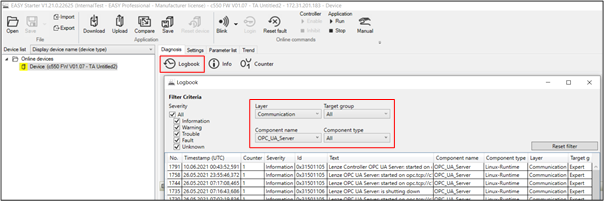
OPC UA Server error codes and countermeasures
The Lenze OPC UA Server can send the following messages to the controller logbook. Further notes on the error and corrective measures are described here.
|
ErrorCode |
Description |
|
|---|---|---|
|
0x1301 Error |
Out of memory |
|
|
Cause |
Not enough memory |
|
|
Remedy
|
Reduce the number of symbols in the symbol configuration in the PLC Designer. Further information about the handling of required resources for the PLCopen namespace can be found in chapter Resource limitations. |
|
|
0x1302 Error |
Failed to update address space |
|
|
Cause |
The address area "PLCopen" could not be updated |
|
|
Remedy |
Reduce the number of symbols in the symbol configuration in the PLC Designer. Further information about the handling of required resources for the PLCopen namespace can be found in chapter 2.2.3 can be found Resource limitations. |
|
|
0x1303 Error |
Internal error |
|
|
Cause |
An internal operation has failed - Firmware / server configuration inconsistent - Hardware error - RAM/ internal flash memory not sufficient - Configuration or certificate data not valid - PLC project or runtime dependency, if applicable |
|
|
Remedy |
Device restart / Update device firmware / Contact support and have trace created |
|
|
0x1304 Error |
Node set file %s could not be found |
|
|
Cause |
Referenced Nodeset file can-t be found. |
|
|
Remedy |
Nodeset file must be stored under /sdcard/plc/prg/pta/opc_ua_server/ Check Nodeset file name in Mapping file. |
|
|
0x1305 Error |
Mapping file at line %s, column %s is erroneous |
|
|
Cause |
Content of Mapping file is invalid. |
|
|
Remedy |
Check mapping information in mapping file. |
|
|
0x1306 Error |
Mapping file includes more nodesets than supported |
|
|
Cause |
The mapping file configures more nodesets than are supported. |
|
|
Remedy |
Reduce the number of nodesets according to chapter OPC UA Server capabilities. |
|
|
0x1201 Warning |
Update of address space is incomplete |
|
|
Cause |
The address area e.g. "PLCopen" is incomplete |
|
|
Remedy |
Reduce the number of symbols in the symbol configuration in the -PLC Designer-. Further information about the handling of required resources for the PLCopen namespace can be found in chapter Resource limitations. |
|
|
0x1202 Warning |
Client user authentification failed |
|
|
Cause |
Client user authentication has failed. |
|
|
Remedy |
Check user administration within PLC Designer (check existence of user and its password). Are the OPC UA client credentials correct? |
|
|
0x1203 Warning |
Client (%s) operation %s failed with status code %s |
|
|
Cause |
The client (e.g. urn:CDE279763:UnifiedAutomation:UaExpert) operation "Read" failed with status code e.g. "BAD_NODEID_UNKNOWN". |
|
|
Remedy |
Check existence of nodes and client rights. PLC project W Check symbol configuration and PLC status |
|
|
0x1204 Warning |
Too many Client requests on subsystem %s |
|
|
Cause |
The subsystem cannot handle all client requests. |
|
|
Remedy |
Check client interaction (check session count or access frequency). DOS attack? |
|
|
0x1205 Warning |
Client access denied on subsystem %s |
|
|
Cause |
Unauthorized access to parts of the information model was detected and denied. |
|
|
Remedy |
Check client rights. Match with error code "Client Operation Failed" 0x1203 |
|
|
0x1206 Warning |
Client has been rejected because the certificate is not trusted |
|
|
Cause |
Client connection was rejected by the server due to untrusted client certificate. |
|
|
Remedy |
Open PLC Designer security screen and check certificates. Trust or update the client certificate. |
|
|
0x1207 Warning |
Needed %s element for mapping of %s is missing or erroneous. |
|
|
Cause |
The mapping file contains incorrect entries (e.g. missing elements that are needed, wrong values like data type or NodeId). |
|
|
Remedy |
Correct mapping file and add/correct missing element. |
|
|
0x1208 Warning |
Namespace-ID for namespace-uri %s could not be found |
|
|
Cause |
The namespace uri for a mapping element is incorrect and cannot be mapped to the server's namespaces. |
|
|
Remedy |
Check and correct namespace uri |
|
|
0x1209 Warning |
Nodeid for csv name %s could not be found |
|
|
Cause |
The placeholder keyword for the nodeid is incorrect and could not be found. |
|
|
Remedy |
Check placeholder keyword or update CSV file. |
|
|
0x1210 Warning |
Nodeid %s of element %s not valid |
|
|
Cause |
The NodeId is either empty or has an incorrect value that does not comply with the Opc Ua specification (e.g. wrong identifier type). |
|
|
Remedy |
Check NodeId and align with the Nodeset. |
|
|
0x1211 Warning |
Element % is missing for mapping of %s. Skipping element |
|
|
Cause |
The mapping file contains a mapping element where the ParameterElement or VariableElement is missing. |
|
|
Remedy |
Correct mapping file and add missing element. |
|
|
0x1212 Warning |
CSV-File %s could not be found |
|
|
Cause |
Referenced csv file can-t be found. |
|
|
Remedy |
csv file must be stored under /sdcard/plc/prg/pta/opc_ua_server/ Check csv file name in mapping file. |
|
|
0x1213 Warning |
CSV-File %s at line %s is errornous |
|
|
Cause |
The CSV format of the CSV file is incorrect. |
|
|
Remedy |
Check CSV file again. |
|
|
0x1214 Warning |
Namecollision for %s in csv file %s |
|
|
Cause |
There are several entries with the same name in the CSV file. |
|
|
Remedy |
Fix name collision. |
|
|
0x1215 Warning |
The arguments of the node %s of the Mappingfile do not match the arguments of the nodeset file. Skipping element |
|
|
Cause |
Replace first argument with placeholder if necessary (methodargument, eventargument). The mapping file does not match the nodesets. Maybe different versions were used where the arguments do not match. |
|
|
Remedy |
Align mapping file and nodeset file and check methods/events |
|
|
0x1216 Warning |
The notifier %s for the node %s could not be found. Setting notifier to server node |
|
|
Cause |
The NodeId of the notifier could not be found in the nodeset. |
|
|
Remedy |
Synchronize mapping file and nodeset files and check OptionalPlaceholder/Events |
|
|
0x1217 Warning |
The method %s was called again, before the current execution was finalised |
|
|
Cause |
A mapped method was called again before the first call was completed. |
|
|
Remedy |
Wait until method has been finalized. Increase client timeout if necessary. |
|
|
0x1218 Warning |
Out of memory (%s) |
|
|
Cause |
Not enough memory |
|
|
Remedy |
Reduce number of sessions, monitored items, - |
|
|
0x1219 Warning |
Internal warning (%s) |
|
|
Cause |
An internal operation has failed. |
|
|
Remedy |
- |
|
|
0x1401 Info |
Started on %s |
|
|
Cause |
Server was started successfully. |
|
|
Remedy |
- |
|
|
0x1402 Info |
Is shutting down |
|
|
Cause |
Server is shut down. |
|
|
Remedy |
|
|
|
0x1403 Info |
Certificate store changed |
|
|
Cause |
The certificate store has been updated. |
|
|
Remedy |
- |
|
|
0x1404 Info |
User database changed |
|
|
Cause |
The user database has been updated. |
|
|
Remedy |
- |
|
|
0x1405 Info |
Client %s connected |
|
|
Cause |
Client (e.g. urn:CDE279763:UnifiedAutomation:UaExpert) has connected to server. |
|
|
Remedy |
- |
|
|
0x1406 Info |
Client %s disconnected |
|
|
Cause |
Client (e.g. urn:CDE279763:UnifiedAutomation:UaExpert) has disconnected from the server. |
|
|
Remedy |
- |
|
|
0x1407 Info |
Client %s rejected |
|
|
Cause |
Client (e.g. urn:CDE279763:UnifiedAutomation:UaExpert) was rejected by the server. |
|
|
Remedy |
The client connection was rejected, due to the occupied session count (all reserved sessions are in use). |
|
|
0x1408 Info |
Address space %s changed |
|
|
Cause |
The address area, e. g. "PLCopen" has been changed. |
|
|
Remedy |
- |
|
|
0x1409 Info |
The mapping was loaded. %s elements have been skipped due to mapping errors. |
|
|
Cause |
The mapping was loaded. X Elements were skipped due to mapping errors |
|
|
Remedy |
- |
|
|
0x1410 Info |
No nodeset files are specified in mapping file. Disabling provider. |
|
|
Cause |
No nodeset files were specified in the mapping file. The provider is disabled. |
|
|
Remedy |
- |
|
Subscriptions and monitored items
As a server utilization indication, Lenze parameters are available for-
-
maximum [0x2472:011] and used [0x2473:011] number of subscriptions and
-
maximum [0x2472:012] and used [0x2473:011] number of monitored items.
Publishing and sampling intervall
In case of performance problems, the minimum possible publishing and sampling interval can be increased. For this purpose, following Lenze parameter setting parameters are available-
-
minimum publishing interval [0x2471:013]
-
minimum sampling interval [0x2471:014]
Expert settings
For certain applications, it may be helpful to adapt the server’s basic configuration with regard to capabilities and resource management. Certain configurations can be enabled using the parameter Expert setting [0x2471:200]:
-
resource-quota [0x2471:200 bit0] - If this bit is set, the request-buffer limitation is active per session.This guarantees a certain number of requests for every possible session. If this bit is not set, a request- buffer limitation is active over all sessions. In this case all the sessions share the memory pool.
-
reserved [0x2471:200 bit1-15]
To get the settings active, a Server restart is necessary via the parameter [0x2470:001]. After the restart the active values are represented in the corresponding parameters [0x2472:013] and [0x2472:014].