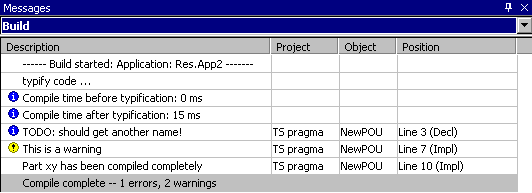
Message pragmas force the display of messages in the message view during the compile process.
Insertion location: Separate or existing line in the text editor of a POU.
Table 22. 4 types of message pragmas
|
Pragma |
Message type |
|||
|---|---|---|---|---|
|
|
Text Output of the text |
|||
|
|
Output of the information |
|||
|
|
Output of the warning Unlike the attribute pragma
|
|||
|
|
Output of the error |


|
Tip |
|---|---|
|
In the CODESYS messages view, you can use the Next Message and Previous Message commands to jump from one message in the Information, Warning, or Error category to the source position of the message. This means you jump to the position where the pragma is added in the source code. |
Example 253.
VAR
    ivar : INT; {info 'TODO: should get another name'}
    bvar : BOOL;
    arrTest : ARRAY [0..10] OF INT;
    i:INT;
END_VAR
arrTest[i] := arrTest[i]+1;
ivar:=ivar+1;

{warning 'This is a warning'}
{text 'Part xy has been compiled completely'}
Display in the message view: