The example "Two-hand control with EDM" from the document "PLCopen – Technical Committee 5 Safety Software Technical Specification Part 2: User Examples Version 1.01 – Official Release" is used as a CODESYS Safety Extension programming example for a program in the Basic Level and illustrated as a CODESYS Safety Extension FBD implementation.

|
Tip |
|---|---|
|
For more information about programming in the Basic Level, see the document "PLCopen - Technical Committee 5 Safety Software". |
The following safety functions are used in this example:
-
When the emergency stop button is pressed, all dangerous movements must be stopped (via
SF_EmergencyStop)Emergency stop has the highest priority. After releasing the
EStoppushbutton, a reset via S0 reset is required. -
The safety output is activated by pressing both pushbuttons of the two-hand control. Releasing any of the two-hand pushbuttons deactivates the safety output and stops the hazardous movement via the switching devices
K1andK2(viaSF_TwoHandControlTypeII) -
The basic state and the operating state of the connected switching devices are monitored. If an error is detected, then the safety output cannot become operational. (via
SF_EDM) -
After switching on the safety or functional application, or after an emergency stop condition, the two-hand control has to be released and actuated again to reactivate the safety output (via
SF_OutControl). To ensure this for the functional restart, the process signal of the functional application is connected to theActivateinput of the two-hand control FBTHC_S2_S3. (If the application process is restarted while the two-hand control is activated, then the device goes to statusC0003, which signals the error that both pushbuttons are pressed when activated and prevents a restart.)
In this example, only one operating state exists.
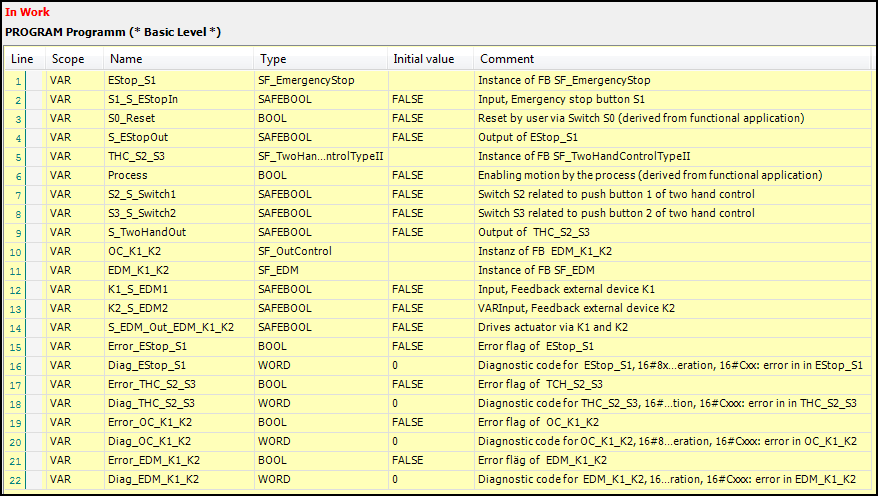
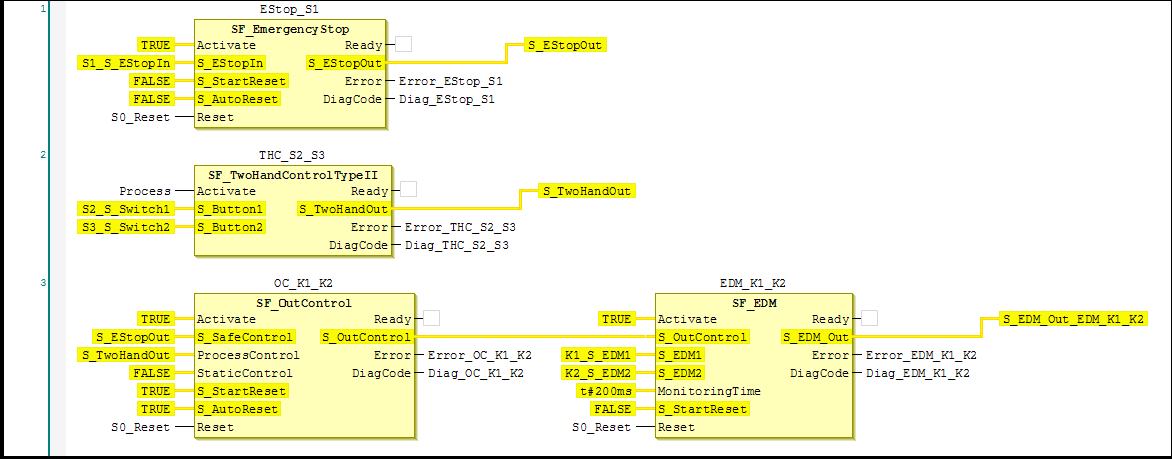
Table 104. Inputs:
|
Name |
Data Type |
Description |
|---|---|---|
|
|
|
Emergency stop button S1 |
|
|
|
Switch S2 connected with pushbutton 1 of two-hand control |
|
|
|
Switch S3 connected with pushbutton 2 of two-hand control |
|
|
|
Feedback external device K1 |
|
|
|
Feedback external device K2 |
|
|
|
Reset by developer with switch S0 (derived from functional application) |
|
|
|
Release of the movement by the process (derived from the functional application) |
Table 105. Outputs:
|
Name |
Data Type |
Description |
|---|---|---|
|
|
|
Controls the actuator via |
|
|
|
Error flag of |
|
|
|
Error flag of |
|
|
|
Error flag of |
|
|
|
Diagnostic code for
|
|
|
|
Diagnostic code for
|
|
|
|
Diagnostic code for
|
This example can also be used with SF_TwoHandControlTypeIII.
The input of Activate was set to TRUE for the sake of simplicity. This can be replaced by a variable in the application.
Table 106. Information about used FB parameters
|
Function Block |
Input |
Constant Value |
Description |
|---|---|---|---|
|
|
|
|
No automatic reset when the S-PLC is started. |
|
|
|
No automatic reset, reset/confirmation by developer necessary |
|
|
|
|
|
Automatic reset is allowed when the S-PLC is started. |
|
|
|
Automatic reset, no reset/confirmation by developer necessary |
|
|
|
|
A dynamic change of the Appl_Control signal (rising edge) is requested after function block activation or a triggered safety function ( |
|
|
|
|
|
No automatic reset when the S-PLC is started. |
|
|
|
The maximum response time of the two feedback signals
|