The Objects tab of the safety application object is the object list. In this view the current project is compared with the last-pinned version of the project.
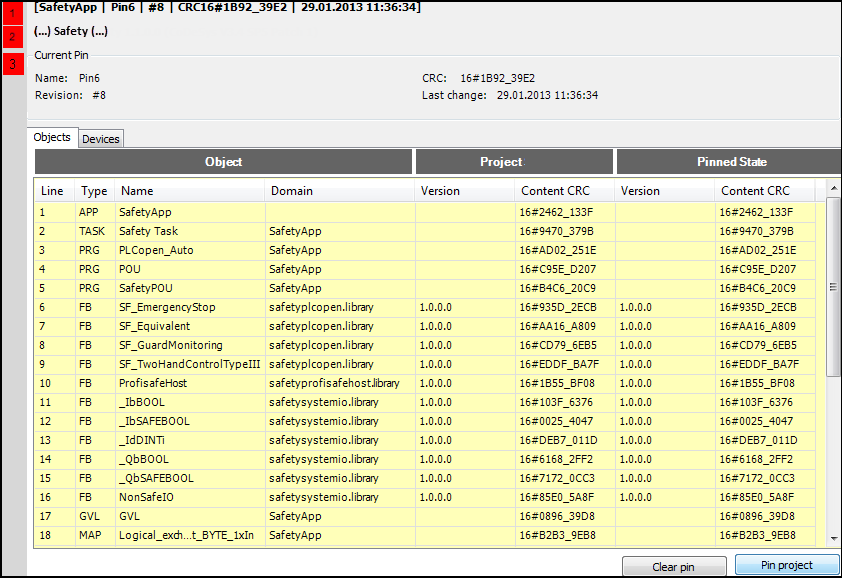
Area with Pin information
-
 : Pin information or, if the application has been changed: In Work
-
 : Current CODESYS Safety Extension version
-
 : Current Pin of the safety application, consisting of:
-
Name
-
CRC (pin CRC)
-
Revision
-
Last change
-
For detailed information about the pin information, see Pinning

|
Pin CRC |
|---|---|
|
The pin CRC is a CRC for all objects of the safety application including the library blocks employed. |
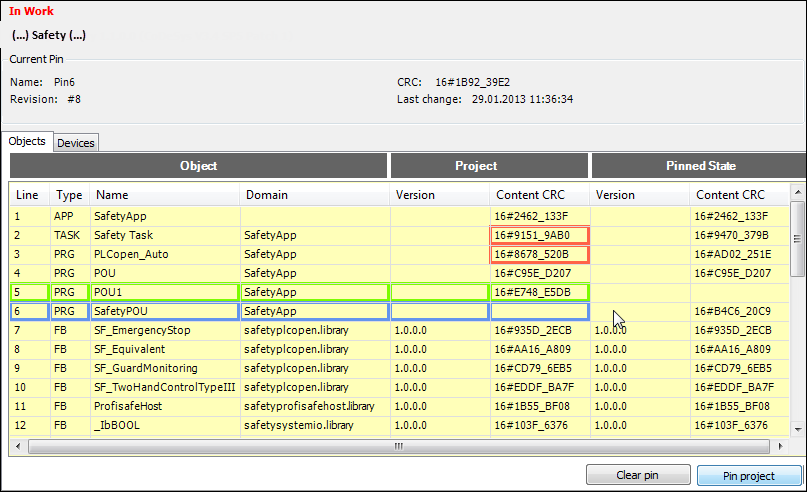
The comparison view ("Objects" tab) shows the following information:
Listing of the objects belonging to the safety application with
-
Object
-
Line
Sequential numbers of the entries
-
Type
Object type (see table)
-
Name
Name of the object
-
Domain
-
-
Project
-
Version and Content CRC
Version and CRC of the object in the current project (Project state column)
-
-
Pinned State
-
Version and Content CRC
Version and CRC of the last-pinned object
-
-
Buttons
|
|
Tip |
|---|---|
|
The object list also contains entries for all safety objects from the libraries which the application integrates. Only those referenced from the objects of the application are included. However, this also includes objects from the libraries that are not called from the user code, but from the system code, in particular from the I/O drivers. |
Table 1. Displayed values for type and name in the object list (depending on the type of object)
|
Object type |
Type |
Name |
|---|---|---|
|
Application |
|
Name of the application object |
|
Task |
|
Name of the task object |
|
POU program |
|
Name of the program POU |
|
POU function block |
|
Name of the POU object of the function block |
|
Global variable list |
|
Name of the GVL object |
|
I/O mapping |
|
Name of the logical device object/application parameter |
|
Safe configuration |
|
Name of the logical device object/application parameter |
|
Safe parameterization |
|
Name of the logical device object |
In addition, the object list contains the Clear pin and Pin project buttons. You can find a detailed description of these commands in Pinning.
Differences detected during the comparison are displayed as follows:
-
The contents of an object were changed, and the Content CRC of the Project State is marked red.
-
A new object was added, and the Object and Project State are marked green.
-
An object was deleted: The Object is marked blue.
The object list is automatically updated on opening the editor and executing the Pin project and Clear pin commands.