Symbol: 
Shortcut: Ctrl + A
Function: The command inserts an Assignment in the Safety FBD Editor.
Call:
-
Menu: Safety FBD
-
Context menu in the Safety FBD Editor
In the FBD editor, an assignment is inserted as an empty text field ( ).
The insertion position in the network depends on the cursor position where the command is executed.
Cursor position:
-
Empty network: An initial empty operand and an initial empty output are automatically generated (
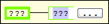 ).
-
Network: The assignment is inserted at the root of the network. If there is already an assignment there, then this is extended by a further empty assignment target.
-
Box output: The assignment is connected to the box output.
-
Box input: The signal flow at the input is divided.
-
Existing assignment: A multiple assignment is created where the new assignment was added as the last one. All variables of the multiple assignment have the same value.
-
Existing jump/return or assignment with jump/return: The assignment is inserted above the jump/return.