CODESYS Safety Extension provides the following variants for PROFINET Device:
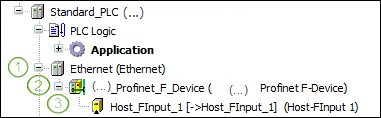
Your CODESYS standard controller and safety controller constitute a PROFIsafe F-Device which can exchange the safe signals of an F-Module of the safety controller with the superordinate safety controller via the PROFINET device connection of the standard controller. The following instructions explain how to add an F-Module to your safety controller and configure the PROFIsafe parameters and the I/O mapping.
-
Select the standard controller in the device tree and click Add Device in the context menu.
-
In the Add Device dialog, select the EtherNet Adapter from the category . Then click Add Device.
-
Select the EtherNet Adapter in the device tree and click Add Device in the context menu.
-
In the Add Device dialog, select the suitable PROFINET F-Device from the category . Then click Add Device.
-
Add the desired F-Module to the PROFINET F-Device. In the Add Device dialog, you will find the available F-Modules in .
Table 124. Available F-Modules
F-Module
Function of the controller
Data
Host-FInput 1Digital F-Input for the F-Host
8 bits to the host
Host-FInput 12Large mixed F-Input for the F-Host
4 bytes + 2 INT + 1 DINT safe signals to the F-Host
Host-FInput 123Maximum F-Input for the F-Host
27 bytes + 16 INT + 16 DINT safe signals to the F-Host (total 123 bytes)
Host-FOutput 1Digital F-Output for the F-Host
8 bits safe signals from the F-Host
Host-FOutput 12Large mixed F-Output for the F-Host
4 bytes + 2 INT + 1 DINT safe signals from the F-Host
Host-FOutput 123Maximum F-Output for the F-Host
27 bytes + 16 INT + 16 DINT safe signals from the F-Host
Host-FInOut 8/1Mixed digital F-Input and F-Output for the F-Host
2 x 32 bits safe signals to the F-Host + 8 bits safe signals from the F-Host
Host-FInOut 2/2 PROFIdriveImplementation of a PROFIdrive for the F-Host
16 bits PROFIdrive status signals to the F-Host + 16 bits PROFIdrive control signals from the F-Host
When you add an F-Module to PROFINET F-Device, the corresponding logical I/Os are added automatically to the safety application of the safety controller.
-
Double-click the logical I/O of the F-Module.
On the Safe Configuration tab, enter the address as the
Source Addressparameter that the F-Host has to set as the F-ParameterF_Source_Addin order to be able to use the F-Module.Notice: Please refer to the instructions regarding the address
F_Source_Addin the Safety User Manual. -
On the Safe Configuration tab, enter the address as the
Destination Addressparameter that the F-Host has to set as the F-ParameterF_Dest_Addin order to be able to use the F-Module.Notice: Please refer to the instructions regarding the address
F_Dest_Addin the Safety User Manual. -
Configure the mapping on the I/O Mapping tab of the logical I/O of the F-Module.
-
Insert the driver block
PSDeviceModuleinto a POU of your application and implement the control of the status and control bits.Notice: Please refer to the instructions for the implementation of F-Modules in the CODESYS Safety User Manual.