Execution of geometry and logic commands
Commands like L_TC2P_CmdMoveLinearAbsolute or L_TC2P_CmdMoveLinearRelative are used to define the geometry with the profile parameters how the TCP should be moved. This kind of commands is called geometry command..
The other type of commands are the Logic commands. The Logic commands activate additional functions of the geometry commands that follow immediately.
For example, the command L_TC2P_CmdToolControl can be used to provide information about the tool for the selected points and thus to specific geometry commands. Further example can be realized with command "L_TC2P_CmdAckRequest" the premature acknowledgement of the waiting time in the target point. This means that the program stops in the target point and waits for an acknowledgement via the command L_TC2P_CmdAckRequest before continuing the departure of further geometry commands.
The activation of the Logic commands:
The activation (call of the Execute() method) of the Logic commands must be done beforehand as the activation of the corresponding Geometry command.
Example:
A breakpoint can be defined for a specific target point. In the following example the four commands are activated in the same PLC cycle (call of the Execute() method).
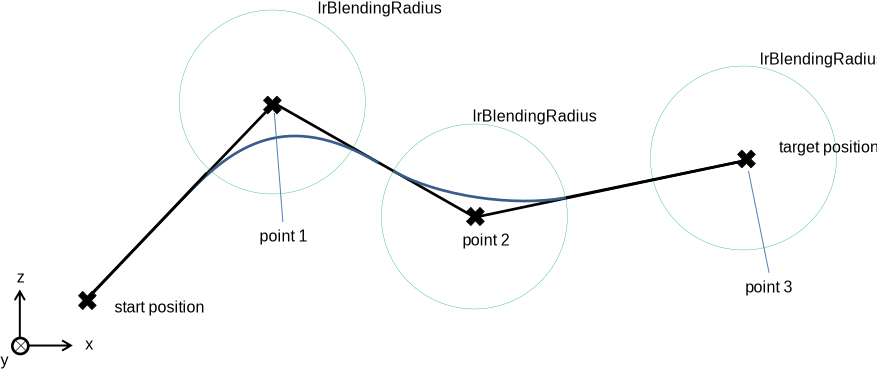
The path consists of a total of three intermediate points. After the second point the path should be stopped and wait for the acknowledgement. For the approach of the points the Geometry command L_TC2P_CmdMoveLinearAbsolute is used. The approach to the point 1 and to the point 2 is instructed by calling the method Execute() at the command L_TC2P_CmdMoveLinearAbsolute. With the command L_TC2P_CmdWaitTime the waiting time in point 2 is set. Thus the point 2 is a breakpoint. With the negative value Cmd_MoveWait.lrWaitTime < 0 the waiting time of infinity is set. The path is held at point 2 until it is acknowledged with the command "L_TC2P_CmdAckRequest". The approach to point 3 is also done with the command L_TC2P_CmdMoveLinearAbsolute.
VAR
/// Technology module:
TM_CoordMotion: L_TC2P_CoordinatedMotionState;
/// Commands:
Cmd_MoveLinAbs : L_TC2P_CmdMoveLinearAbsolute
:=( itfCmdReceiver := TM_CoordMotion);
Cmd_MoveWait : L_TC2P_CmdWaitTime
:= itfCmdReceiver := TM_CoordMotion);
Cmd_AckRequest : L_TC2P_CmdAckRequest
:=( itfCmdReceiver := TM_CoordMotion);
/// state
wState : WORD;
/// acknowledgement of the waiting time:
xAcknowledge : BOOL;
END_VAR
CASE wState OF
10: /// send command of 3x points
/// general parameters for move linear abs
Cmd_MoveLinAbs.lrBlendingRadius := 50;
Cmd_MoveLinAbs. eCoordSystem := L_MC4P_CoordSystem.WCS;
/// execute point 1
Cmd_MoveLinAbs.alrPosition[1] := 100; // x pos
Cmd_MoveLinAbs.alrPosition[2] := 0; // y pos
Cmd_MoveLinAbs.alrPosition[3] := 100; // z pos
Cmd_MoveLinAbs.Execute();
//// execute point 2
Cmd_MoveLinAbs.alrPosition[1] := 150; // x pos
Cmd_MoveLinAbs.alrPosition[2] := 0; // y pos
Cmd_MoveLinAbs.alrPosition[3] := 50; // z pos
Cmd_MoveLinAbs.Execute();
/// execute wait time
Cmd_MoveWait.lrWaitTime := -1;
Cmd_MoveWait.Execute();
//// execute point 3
Cmd_MoveLinAbs.alrPosition[1] := 200; // x pos
Cmd_MoveLinAbs.alrPosition[2] := 0; // y pos
Cmd_MoveLinAbs.alrPosition[3] := 80; // z pos
Cmd_MoveLinAbs.Execute();
wState := 20;
20: /// wait for acknowledge
IF xAcknowledge THEN
/// execute the command for acknowledge the wait time
command
Cmd_AckRequest.Execute();
wState := 30;
END_IF
END_CASE