Continuous travel with a defined velocity
Prerequisite
-
The axis is enabled (xReadyForMotion = TRUE).
Execution
With a rising edge (FALSEäTRUE) at the xMoveVelExecute input, the continuous travel is started on the basis of the parameters for the motion profile (see below). The technology module changes to the "MOVEVEL" state.
The axis travels until a software limit position has been reached or a hardware limit switch has been approached:
-
Input xDisableSWLimit = FALSE
-
Output xSwLimitEnabled = TRUE
-
Output xSwLimitSwitchPos/Neg = TRUE
-
Output xHwLimitSwitchPos/Neg = TRUE
When a software limit position has been reached, the axis is brought to a standstill via the lrDec parameter.
When a hardware limit switch has been reached, the axis is brought to a standstill via the QSP application deceleration ramp.
Then the state is changed back to "STANDBY".
Travel diagram
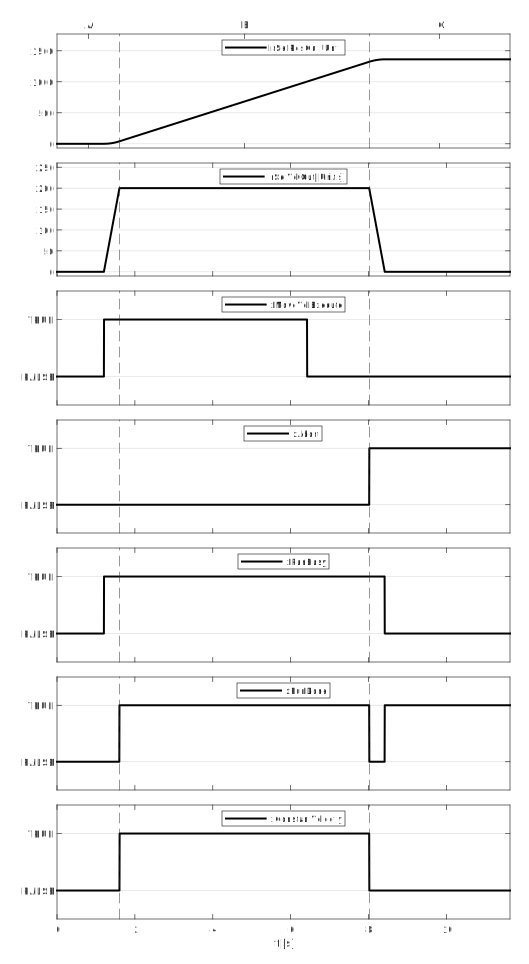
|
No |
xMoveVel Execute |
xAbort |
xFuncBusy |
xFunDone |
xConstant Velocity |
eTMState |
Info |
|---|---|---|---|---|---|---|---|
|
A |
FALSEä TRUEæ FALSE |
FALSE |
FALSE ä TRUE |
FALSE |
FALSE |
STANDBYW MOVEVEL |
The axis accelerates to the target speed of 200 units/s. |
|
B |
FALSE |
FALSE |
TRUE |
FALSE ä TRUE |
FALSE ä TRUE |
MOVEVEL |
After reaching the target speed, xFunDone changes from FALSEäTRUE and xConstantVelocity changes from FALSEäTRUE. |
|
C |
FALSE |
TRUE |
TRUEæ FALSE |
FALSEä TRUEæ FALSE |
TRUEæ FALSE |
MOVEVELW STANDBY |
The speed run is terminated by xAbort = TRUE and brought to a standstill with the profile deceleration. When standstill has been reached, xFunBusy is set = FALSE. |
Parameters to be set
Further parameters for continuous travel can be found in the AXIS_REF in subindex 50 ... 53 and subindex 104 ... 105.