Order and manage licence
The "EASY licence" can be ordered like any other Lenze product with a material number. Once the order has been placed, a licence certificate containing all licence-relevant data for the product in question is sent to the customer.
Archive this certificate.
The data contained is required if, for example, a single user licence is to be used again after a PC has been replaced.
The "EASY Navigator" provides a dialogue under "Licence" in which this data can be entered and saved:
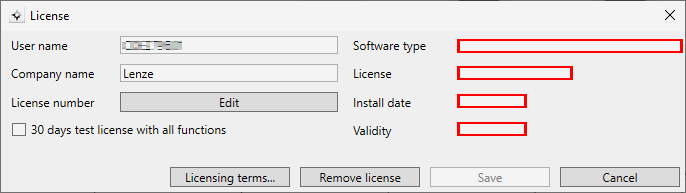
You can also use the interface to
-
to display the installed licence,
-
Save the registered licence,
-
call up the licence conditions,
-
to display the installed licence and subsequently edit it to extend the available licence level.
If this is a higher licence level, more functions are available in the engineering tools. The licence level affects all installed Lenze Engineering Tools. After entering the licence number, the marked fields are automatically filled with the corresponding information.
Avoid loss of licence!
If you remove the licence number from the text field and then save this setting, the licence level will be lost.
As the licence affects all installed Lenze Engineering Tools, certain functions linked to the licence level are no longer available.