System requirements
-
Microsoft® Windows® 10 (incl. Windows® 10 IoT Enterprise)
-
PC with Intel® compatible processor from min. 2.2 GHz (dual core), min. 4 GB RAM, 1.5 GB HDD or equivalent
-
Screen resolution minimum 1600 x 1200 pixels (recommended 1920 x 1080)
-
Internet connection for file transfer from https://update.lenze.com
-
Graphics hardware acceleration: DirectX 9 or higher
A Lenze controller from the c5xx or c430 device series is required to create a web application, as the FAST UI Runtime is integrated on these devices.
Lenze offers the WebPanel v450 and v430.
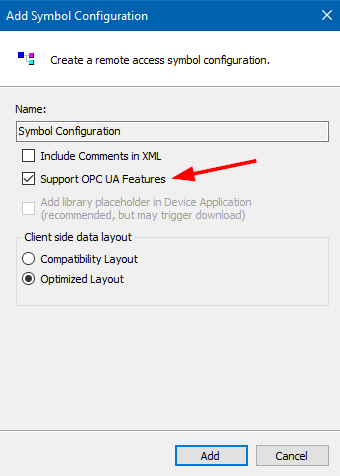
Communication with the controller takes place exclusively via OPC UA. The functionalities required for this must be activated in the "PLC Designer" underSettingsSupport OPCUA functionalities. The check mark must also be set when creating the symbol configuration.
Both a c5xx series or c430 controller and a display device are required to run the web visualisation. Lenze offers the WebPanel v450 or v430 for the latter.
However, your engineering PC with a Chromium-based browser is sufficient for project planning in the first step.
From a technological perspective, the web visualisation can be displayed in all common browsers. However, we advise against using versions that are too old (Internet Explorer 11 or older) in order to avoid possible display problems. We recommend using Google Chrome or the Chromium-based Microsoft Edge.