Override for speed
Prerequisite
-
The axis is enabled (xReadyForMotion = TRUE).
Execution
In order to be able to set overrides for the active profile data, the following inputs are available at the technology module:
-
lrOverride, initial value: 1.0
-
scCtrlBasicMotion.lrOverrideAcc, initial value: 1.0 (100 %)
-
scCtrlBasicMotion.lrOverrideJerk, initial value: 1.0 (100 %)
For profile-generating functions, separate overrides for speed, acceleration, deceleration and jerk can be set.
The values set act as a factor and are multiplied with the value active in each case.
Example
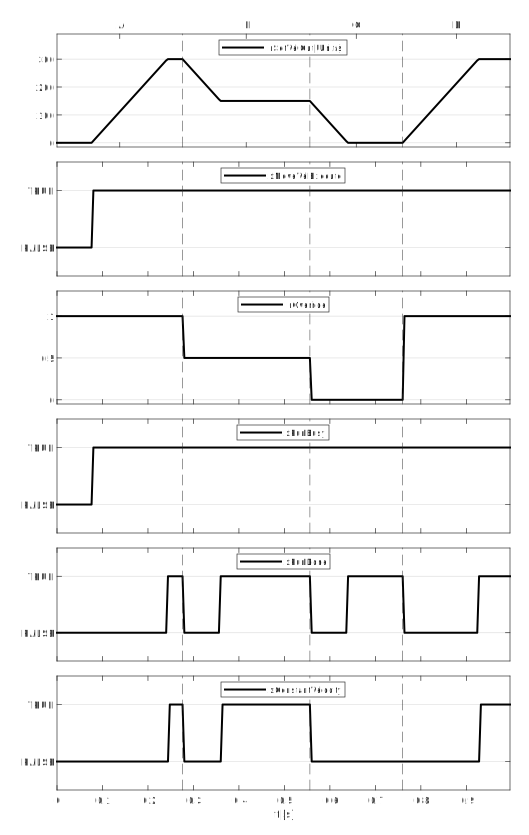
In this example, the use of the lrOverride input is shown.
|
No |
xMoveVel Execute |
IrOverride |
xFuncBusy |
xFunDone |
xConstant Velocity |
eTMState |
Info |
|---|---|---|---|---|---|---|---|
|
A |
FALSE ä TRUE |
1 |
FALSE ä TRUE |
FALSE ä TRUE |
FALSE ä TRUE |
STANDBYW MOVEVEL |
The axis accelerates to the target speed of 300 units/s. |
|
B |
TRUE |
0.5 |
TRUE |
TRUEæ FALSEä TRUE |
TRUEæ FALSEä TRUE |
MOVEVEL |
The override value is set to 0.5 and the axis decelerates to 150 unit/s with the profile deceleration |
|
C |
TRUE |
0 |
TRUE |
TRUEæ FALSEä TRUE |
TRUEæ FALSE |
MOVEVEL |
The override value is set to 0 and the axis is brought to a standstill to 0 unit/s with the profile deceleration |
|
D |
TRUE |
1 |
TRUE |
TRUEæ FALSEä TRUE |
FALSE ä TRUE |
MOVEVEL |
The override value is set to 1 and the axis accelerates to 300 unit/s with the profile deceleration |