Specify the switching sequence for cams
A switching sequence makes it possible to execute several cams in succession.
The switching sequence is activated with the input xCamSequencer = TRUE. The output xCamSequencerActive returns the status, showing whether the switching sequence is executed.
With the parameter
eCamSequenceMode
(
|
Setting in |
Description |
|
|---|---|---|
|
eCamSequenceMode |
xCamSequencer |
|
|
0 |
TRUE |
Cam 1 is executed cyclically. |
|
1 |
TRUE |
Cam 3 is executed cyclically. |
|
2 |
TRUE |
Cam 1 is executed once; then cam 3 is executed cyclically. |
|
TRUEæFALSE |
After cam 3, cam 1 is executed once. |
|
|
3 |
TRUE |
Cams 1 and 2 are executed once in succession; then cam 3 is executed cyclically. |
|
TRUEæFALSE |
After cam 3, cam 4 is executed once; then cam 1 is executed cyclically. |
|
The wActiveCamTable output names the active cam in each case.
If the switching sequence is off ( xCamSequencer = FALSE), the wSetCamTable input can be used to switch the cam between CamTable1 ( wSetCamTable = 1), CamTable2 ( wSetCamTable = 2), CamTable3 ( wSetCamTable = 3) and CamTable4 ( wSetCamTable = 4).
If a cam is selected via the wSetCamTable input, the cam is automatically changed after xEndOfProfile .
If there is a rising edge at the xCamChangeInstant input, there can be a changeover to the cam selected via the wSetCamTable input.
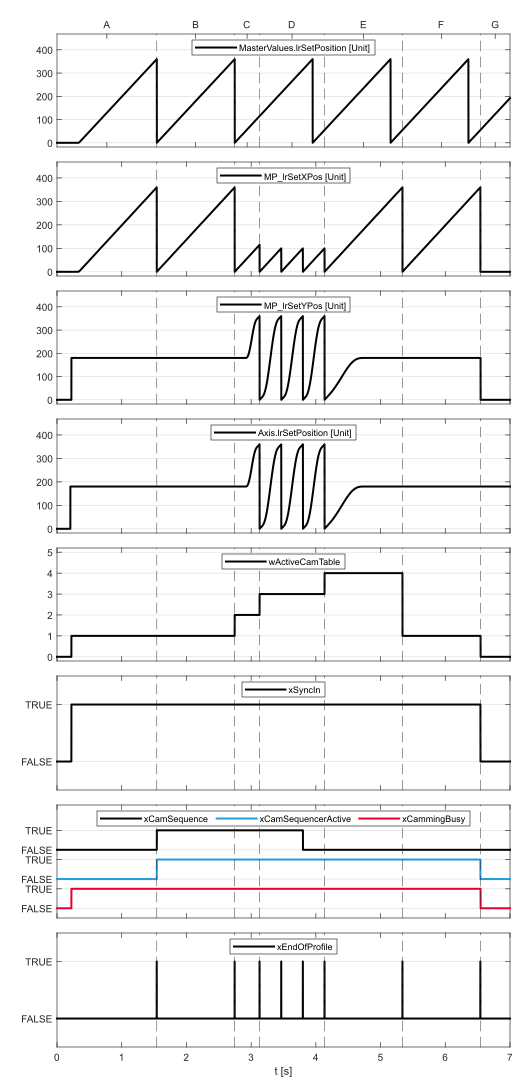
Switching sequence for cams ( eCamSequenceMode = 3)
|
No |
xSyncIn |
xCamSequencer |
xCamSequencerActive |
xCammingBusy |
Info |
|---|---|---|---|---|---|
|
A |
TRUE |
TRUE |
FALSE |
TRUE |
The slave axis is clutched in to the cam via xSyncIn . 4 cam tables are connected: CamTable1: StandstillCAM: The y position is kept at 180° CamTable2: StartCam: The y position is brought from 180° to synchronous speed with the x axis CamTable3: SyncCam: The y position covers a distance of 360° while the x axis only moves 100 mm. CamTable4: StopCam: The y position is taken out of synchronous travel with the x axis and brought to a standstill at position y = 180°. As long as no switching sequence is activated, CamTable1 is executed cyclically. |
|
B |
TRUE |
TRUE |
TRUE |
TRUE |
The switching sequence for the cams is activated. The scPar.eCamSequenceMode mode is set to 3. CamTable1 is completed. |
|
C |
TRUE |
TRUE |
TRUE |
TRUE |
After CamTable1, CamTable2 is automatically activated. |
|
D |
TRUE |
TRUEæFALSE |
TRUE |
TRUE |
CamTable2 is completed once and CamTable3 is activated. CamTable3 is executed cyclically. |
|
E |
TRUE |
FALSE |
TRUE |
TRUE |
If the switching sequence is deactivated, CamTable3 is completed. Then CamTable4 is activated. |
|
F |
TRUE |
FALSE |
TRUE |
TRUE |
After CamTable4, CamTable1 is once again executed cyclically. |
|
G |
FALSE |
FALSE |
FALSE |
FALSE |
If xSyncIn = FALSE, the slave axis is declutched from the cam. |