Diagnostic visualization on the machine
The controller offers diagnostics via web access. The web server is accessed via the Internet browser by entering an IP address.
After calling up the web diagnosis, the login dialog box is displayed.
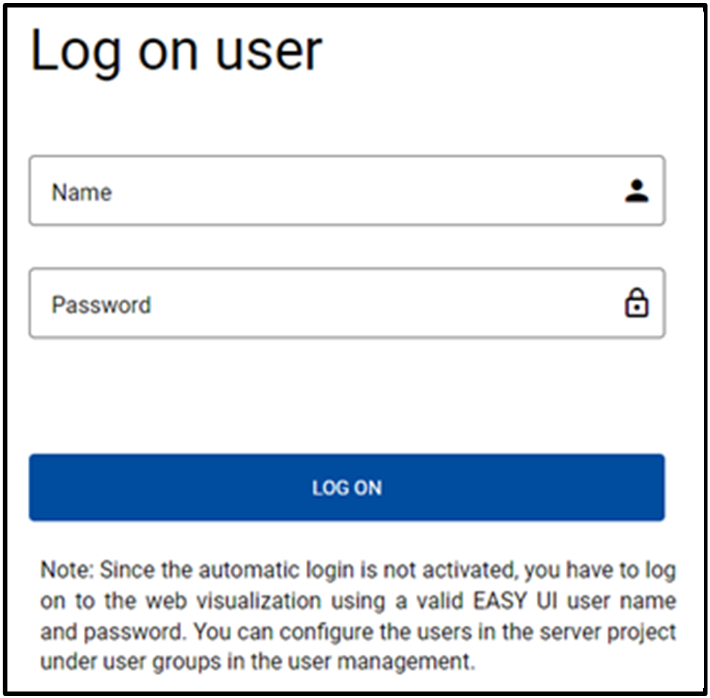
Login dialog box
By default, two groups are created, each with a user and password:
-
Group: Guests
User: guest
Password: guest
-
Group: Advanced
User: advanced
Password: default
Rights of the "Guests" group
-
Read-only rights on the controller
-
Cannot change data
Can execute the "Global Reset" function
Rights of the "Advanced" group
-
Can change controller data (e.g. delete the logbook)
-
Can execute the "Global Reset" function
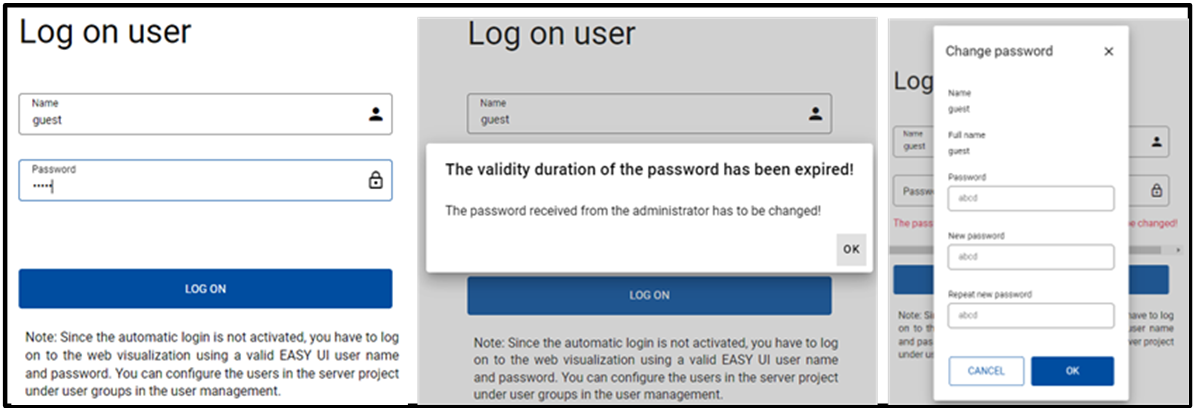
First login with password change
The password must be changed when the "guest" and "advanced" users log in for the first time.
-
Go to "User settings" to change the password.
-
The user "guest" is fixed and cannot be deleted.
Auto-Logon
With auto-logon, authorization is skipped when logging in to web diagnostics. This removes the password protection.
-
To set up an auto-logon, you must be registered as an "advanced" user.
-
A new user with the following data must be created for the auto-logon:
-
User: autologin
-
Group: Guests
(The user can only be a member of the "Guests" group and only has the corresponding rights.
-
Keyword: autologin
-
Status: Active
-