L_IMHP_WriteComponentList
This function block (FB) creates a snapshot of the modules registered on the LMH. The snapshot is stored in an XML file. The file name and storage path can be specified via the function block interface.
Depending on the firmware version, the XML file is stored in different directories.
|
|
|
|
L_IMHP_WriteComponentList |
|
|
|
|
|---|---|---|---|---|---|---|---|
|
BOOL |
- |
xExecute |
xBusy |
- |
BOOL |
||
|
STRING |
- |
sFileName |
xDone |
- |
BOOL |
||
|
xError |
- |
BOOL |
|||||
|
eErrorID |
- |
L_IE1P_Error |
|||||
|
|
|
|
|
|
|
|
|
Inputs
|
Name Datentyp |
Information/possible settings |
|
|---|---|---|
|
xExecute BOOL |
FALSE ä TRUE |
The generation of the component list is requested. |
|
sFileName STRING |
STRING |
Path and name of the file to be written |
Outputs
|
Name Datentyp |
Value/meaning |
|
|---|---|---|
|
xBusy BOOL |
TRUE |
Processing running. |
|
xDone BOOL |
TRUE |
The command was executed successfully. |
|
xError BOOL |
TRUE |
An error has occured. For details see eErrorID . |
|
eErrorID
|
If xError = TRUE: Error number for the error that occurred within the FB. Reference Manual " FAST Technology Modules ": Here you will find information on error or warning messages. |
|
Firmware V1.5.x
The XML file is stored in the /tmp/ directory.
Accessing the File Using PLC Designer
PLC Designer allows direct access to the file storage area of the connected controller. When establishing an online connection to the controller, ensure that all applicable security guidelines are followed.
-
Establish an online connection to the controller using PLC Designer.
-
In the device tree, select "Device" and open the Device Editor by double-clicking it.
-
In the Device Editor, select the "Files" tab. The left-hand side displays the local file system of the PC, while the right-hand side displays the file storage area of the connected controller.
-
Click "Update" to refresh the file list on the controller.
-
The /tmp/ directory is opened automatically. The generated XML file is displayed in the file list.
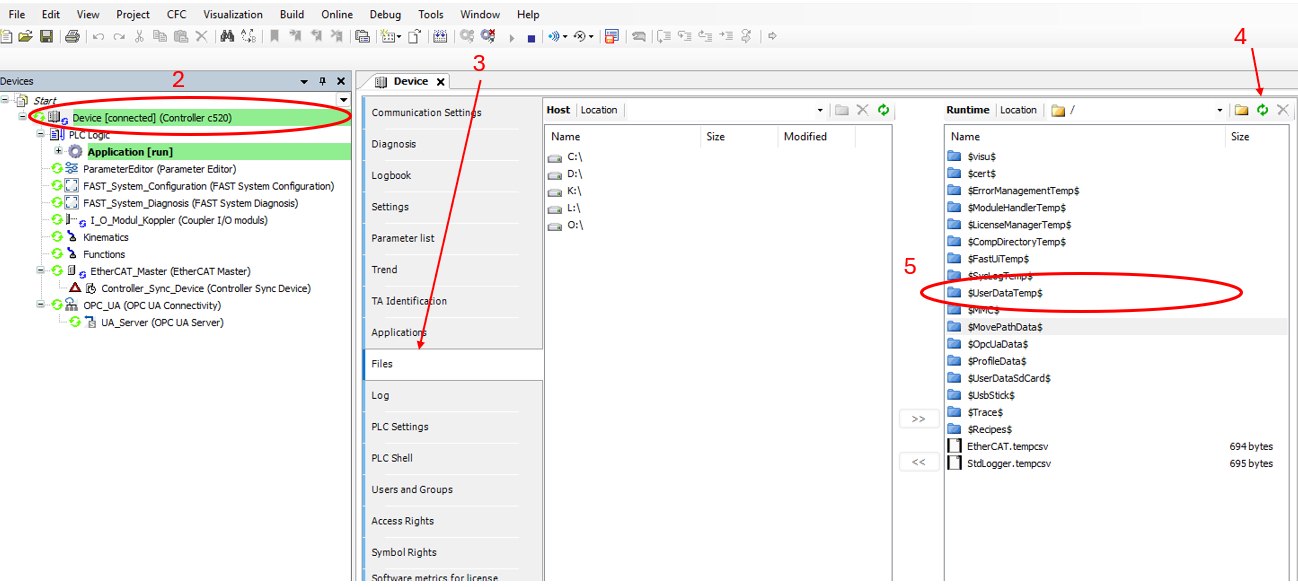
Firmware V2.x
The XML file is stored in the $UserDataTemp$ directory.
Accessing the File Using PLC Designer
PLC Designer allows direct access to the file storage area of the connected controller. When establishing an online connection to the controller, ensure that all applicable security guidelines are followed. For further information, refer to the "Cyber Security" section.
-
Establish an online connection to the controller using PLC Designer.
-
In the device tree, select "Device" and open the Device Editor by double-clicking it.
-
In the Device Editor, select the "Files" tab. The left-hand side displays the local file system of the PC, while the right-hand side displays the file storage area of the connected controller.
-
Click "Update" to refresh the file list on the controller.
-
Open the "$UserDataTemp$" directory by double-clicking it.
-
The generated XML file is displayed in this directory and can be copied to the local PC.
|
Note |
||||||
|---|---|---|---|---|---|---|
|
The storage location differs between firmware versions:
|