Clutch-in process
The slave axis is automatically clutched in to the curve position (resulting Y position of the curve including the slave extension/compression and slave offset) when the FB is started. A change of the slave offset and the slave extension/compression factor during the clutch-in process to the curve position is not accepted. When the clutch-in process is started, these parameters are "frozen" internally and only enabled again after the slave axis has been coupled successfully to the Y position of the cam.
The clutch-in type can be defined via the StartMode parameter:
- mcAbsolute: Direct acceptance of the work curve
- mcRelative: Direct acceptance of the work curve with relative reference to the current slave position
- mcPosition: Position-controlled clutch-in
- mcPositionNoReverse: Position-controlled clutch-in without reversing
- mcTime: Time-controlled clutch-in
- mcLimited: Clutch-in via compensating movement
Direct acceptance of the work curve
The slave values (position, velocity and acceleration) are directly set to the resulting Y position of the cam. In order to prevent discontinuities in the drive motion, the slave should be moved to the resulting Y position of the cam before or should be already positioned there. If this cannot be ensured, use a ( mcPosition , mcPositionNoReverse , mcTime or mcLimited ) clutch-in mode.
Relevant parameters/settings for the example:
|
Parameter |
Data type |
Setting |
|---|---|---|
|
StartMode |
MC_START_MODE |
MC_START_MODE.mcAbsolute |
|
|
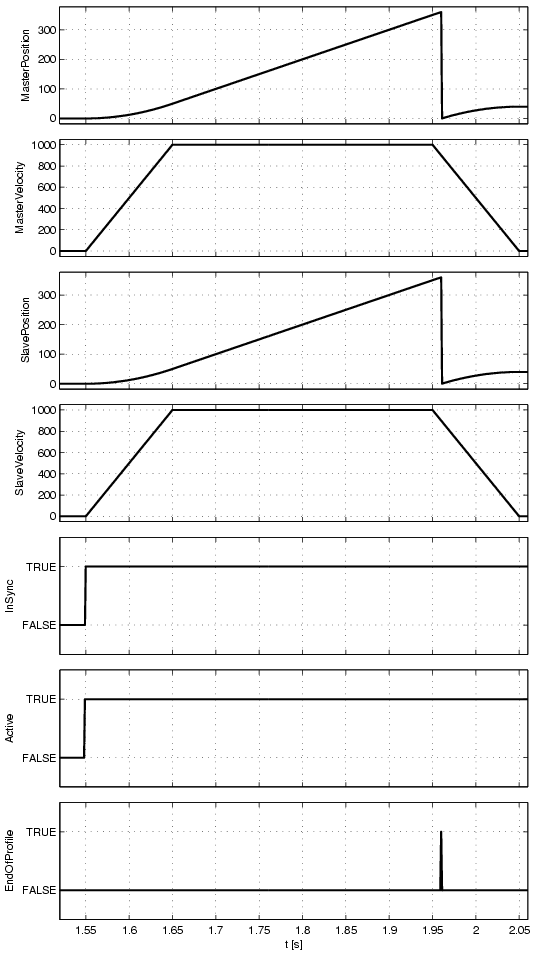
Example of direct acceptance of the work curve (StartMode = mcAbsolute)
Direct acceptance of the work curve with relative reference to the current slave position
In this mode, it is directly changed over to cam operation, too. However, the slave position remains unchanged. This causes a remaining offset between the slave position and the resulting Y curve position. In order to prevent discontinuities in speed and acceleration, the master axis should be at standstill during the clutch-in process.
Relevant parameters/settings for the example:
|
Parameter |
Data type |
Setting |
|---|---|---|
|
StartMode |
MC_START_MODE |
MC_START_MODE.mcRelative |
|
|
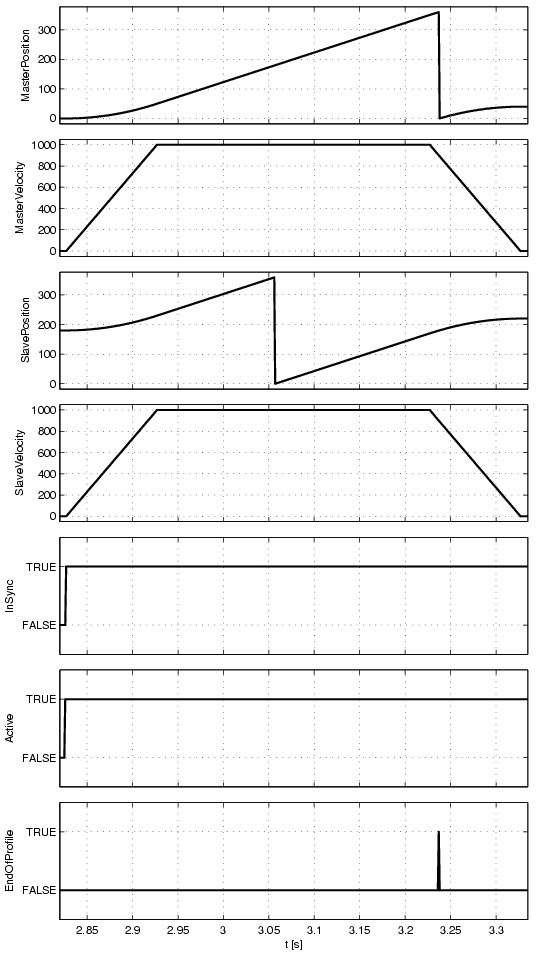
Example of direct acceptance of the work curve with relative reference (StartMode = mcRelative)
Position-controlled clutch-in
The slave drive moves from its current position to the resulting Y curve position via a polynomial of 5th order in a path-based manner. Thus, no direct changeover takes place in the curve operation but the transition to the curve operation takes some time.
Special feature: In this mode, the slave axis can synchronise to an already running cam motion while the clutch-in process may be executed via several cycles of the cam. Reversing can be prevented by selecting the mcPositionNoReverse mode instead of the mcPosition .
Relevant parameters/settings for the example:
|
Parameter |
Data type |
Setting |
|---|---|---|
|
StartMode |
MC_START_MODE |
MC_START_MODE.mcPosition
or MC_START_MODE.
|
|
MasterStartDistance |
LREAL |
200 |
|
MasterSyncPosition |
LREAL |
300 |
|
|
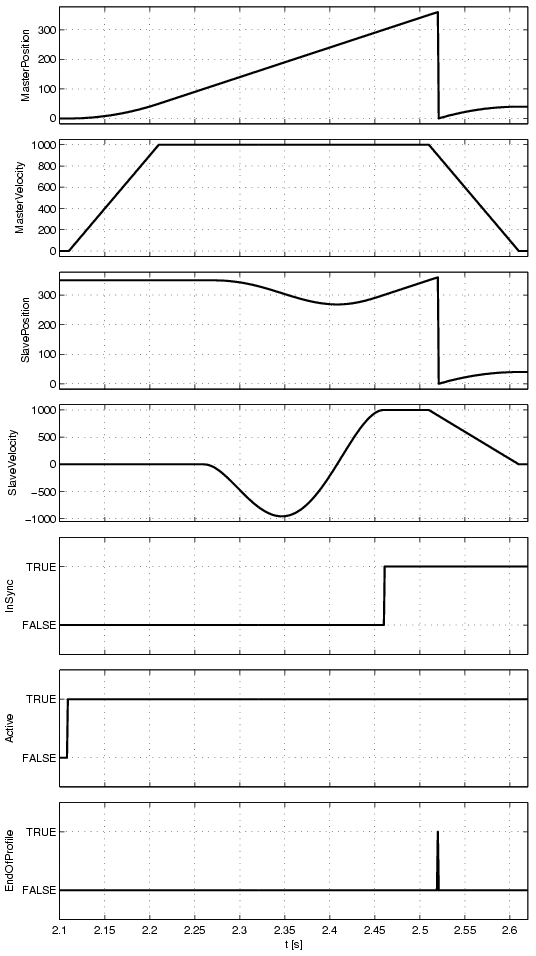
Example of position-controlled clutch-in (StartMode = mcPositionNoReverse)
Position-controlled clutch-in with Master Offset
The slave axis moves from its current position to the resulting Y curve position in a path-based manner. Thus, no direct changeover takes place in the cam operation but the transition to the cam operation takes some time.
Special feature:
In this mode, the slave axis can synchronise to an already running cam motion while the clutch-in process may be executed via several cycles of the cam. Reversing can be prevented by selecting the mcPositionNoReverse mode instead of the mcPosition mode.
Relevant parameters/settings for the example:
|
Parameter |
Data type |
Setting |
|---|---|---|
|
StartMode |
mcPosition |
mcPositionNoReverse |
|
MasterOffset |
LREAL |
200 |
|
MasterStartDistance |
LREAL |
200 |
|
MasterSyncPosition |
LREAL |
300 |
|
|
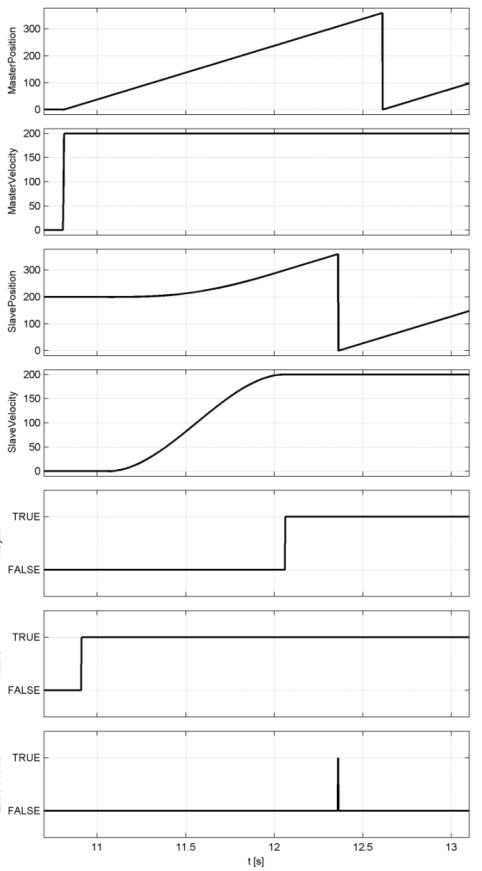
Example for position-controlled clutch-in with MasterOffset (StartMode = mcPositionNoReverse)
Engaging the clutch in a time-controlled manner
In a time-based manner, the slave axis couples from its current position to the resulting Y curve position within the ClutchTime via a polynomial of 5th order. The movement is executed within the clock in case of modulo axes.
This mode does not depend on the motion of the master axis. The synchronisation of the slave axis to the Y position of the cam is also executed when the master axis is at standstill.
Relevant parameters/settings for the example:
|
Parameter |
Data type |
Setting |
|---|---|---|
|
StartMode |
MC_START_MODE |
MC_START_MODE.mcTime |
|
ClutchTime |
LREAL |
0.2 |
|
|

Example of time-controlled clutch-in (StartMode = mcTime)
Clutch-in via compensating movement
The slave axis clutches in from its current position to the cam via a compensating movement which is executed via the profile generator.
This mode does not depend on the motion of the master axis. The synchronisation of the slave axis to the Y position of the cam is also executed when the master axis is at standstill.
Relevant parameters/settings for the example:
|
Parameter |
Data type |
Setting |
|---|---|---|
|
StartMode |
MC_START_MODE |
MC_START_MODE.mcLimited |
|
VelocityDiff |
LREAL |
10000 |
|
Acceleration |
LREAL |
40000 |
|
Deceleration |
LREAL |
40000 |
|
|
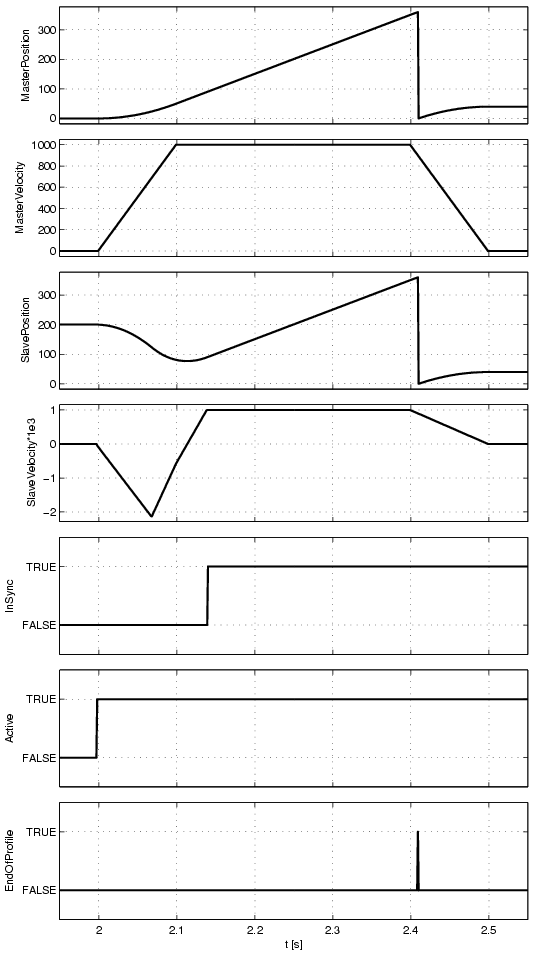
Example of clutch-in via compensating movement (StartMode = mcLimited)