Event Notifier
OPC UA provides many types of events. The event type hierarchy can be extended by loaded base models (companion specifications).
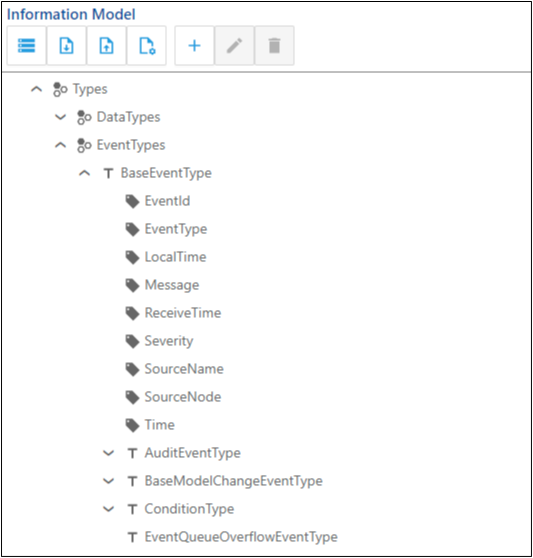
In contrast to Objects, Variables and Methods, simple Events cannot be represented as an instance in the OPC UA information model. Simple events are generated dynamically when they occur and are sent from the OPC UA Server to a client.
In OPC UA these events can be sent not only by the Server Node but also by specific object instances.
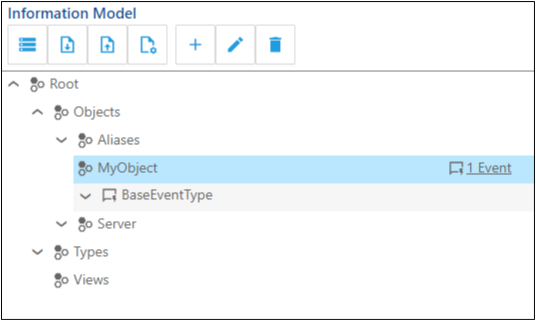
With the Mapping Editor it is possible to configure object instances of the user information model as an event notifier. Multiple EventType-Notifier can be added via the context menu with the "Add Event Notifier" dialog.
The EventType-Notifier is not an instance in the OPC UA information model. The "EventType-Notifier" below an object has only usability purposes. Thus, the EventType-Notifier does not have an OPC UA NodeID.
To distinguish EventTyp-Notifier from the instances, they are displayed directly below the associated object via an expandable section.
A single EventType-Notifier is expandable to disclose additional event fields (properties) which will be published when the event occurs. The event field provided by the BaseEventType are not displayed.
Add Event Notifier
If an object instance of the user information model is selected, an EventType-Notifier can be added by the "Add Event Notifier" command.
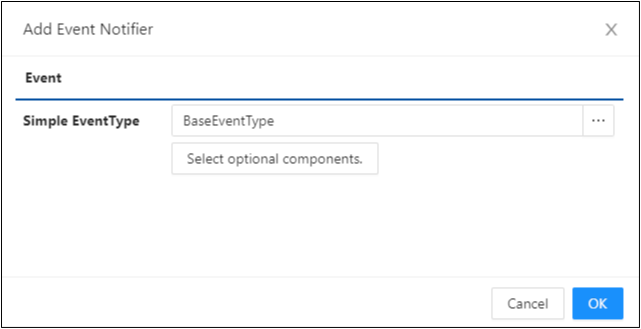
Simple EventType-Parameter
The Simple EventType parameter defines the event type to be sent when the event occurs.
It is possible to add multiple EventType-Notifier of different type definition to an object instance.
More than one EventType-Notifier of the same type definition are not allowed.
If an EventType-Notifier is selected, it can be deleted by the general "Delete" command of the context menu or the command bar.