OPC UA: FileType
The Lenze OPC UA Server supports following methods in the information model to handle files:
Open()
The Open method is used to open an existing file for a special purpose. It-s possible to open an single file several times simultaneously.
|
|
DataType |
Argument |
Description |
|---|---|---|---|
|
[in] |
Byte |
Mode |
Indicates whether the file should be opened only for read operations or for read and write operations and where the initial position is set. The mode is an 8-bit unsigned integer used as bit mask with the structure defined in the following: Bit 0: Read The file is opened for reading. If this bit is not set the Read Method cannot be executed. Bit 1: Write The file is opened for writing. If this bit is not set the Write Method cannot be executed. Bit 2: EraseExisting This bit can only be set if the file is opened for writing (Write bit is set). The existing content of the file is erased and an empty file is provided. Bit 3: Append When the Append bit is set the file is opened at end of the file, otherwise at begin of the file. The Set Position Method can be used to change the position. Bit 4-7: Reserved Reserved for future use. Shall always be zero. |
|
[out] |
UInt32 |
fileHandle |
A handle for the file used in other method calls indicating not the file (this is done by the Object of the Method call) but the access request and thus the position in the file. |
Close()
The Close method is used to close a file. When a client closes a file, the handle becomes invalid.
|
|
DataType |
Argument |
Description |
|---|---|---|---|
|
[in] |
UInt32 |
fileHandle |
A handle for the file to be closed. Provided by the Open method |
Read()
The Read method is used to read a part of the file starting from the current file position. The file position is advanced by the number of bytes read.
|
|
DataType |
Argument |
Description |
|---|---|---|---|
|
[in] |
UInt32 |
fileHandle |
A handle indicating the access request and thus indirectly the position inside the file. |
|
[in] |
Int32 |
length |
Defines the length in bytes that should be returned in data, starting from the current position of the file handle. If the end of file is reached all data until the end of the file is returned. Only positive values are allowed. The maximum buffer size to read data in one request is 16kBytes. |
|
[out] |
ByteString |
data |
Contains the returned data of the file. If the Byte String is empty it indicates that the end of the file is reached. |
Write()
The Write method is used to write a part of the file starting from the current file position. The file position is advanced by the number of bytes written.
|
|
DataType |
Argument |
Description |
|---|---|---|---|
|
[in] |
UInt32 |
fileHandle |
A handle indicating the access request and thus indirectly the position inside the file. |
|
[in] |
ByteString |
data |
Contains the data to be written at the position of the file. The maximum buffer size to write data in one request is 16kBytes. |
GetPosition()
The GetPosition method is used to provide the current position of the file handle.
|
|
DataType |
Argument |
Description |
|---|---|---|---|
|
[in] |
UInt32 |
fileHandle |
A handle indicating the access request and thus indirectly the position inside the file. |
|
[out] |
UInt64 |
position |
The position of the file Handle in the file. If a Read or Write is called it starts at that position. |
SetPosition()
The SetPosition method is used to set the current position of the file handle.
|
|
DataType |
Argument |
Description |
|---|---|---|---|
|
[in] |
UInt32 |
fileHandle |
A handle indicating the access request and thus indirectly the position inside the file. |
|
[in] |
UInt64 |
position |
The position to be set for the file Handle in the file. If a Read or Write is called it starts at that position. If the position is higher than the file size the position is set to the end of the file. |
The representation of a files is defined by the OPC UA FileType type definition. For more details see the following specification -OPC 10000-20 - UA Specification Part 20 - File Transfer-.
The UaExpert (V1.7.2) provides -Read to local file-- and -Write from local file-- as comfort functions for file access by the context menu on a FileType object. Is the file bigger than 16kBytes (internal buffer limit), this feature is able to split the file access into multiple read() or write() requests automatically.
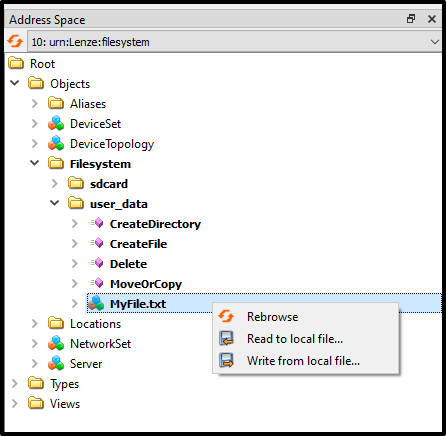
With FW >= V2.0, the entry point to the file system is under "Objects.Server.Resources.Filesystem". It-s also referenced by the DI device node under the "Objects.DeviceSet".