Select base models
OPC UA information models are based on each other. To use type definitions of existing models the corresponding nodesets.xml files have to be loaded as base models.
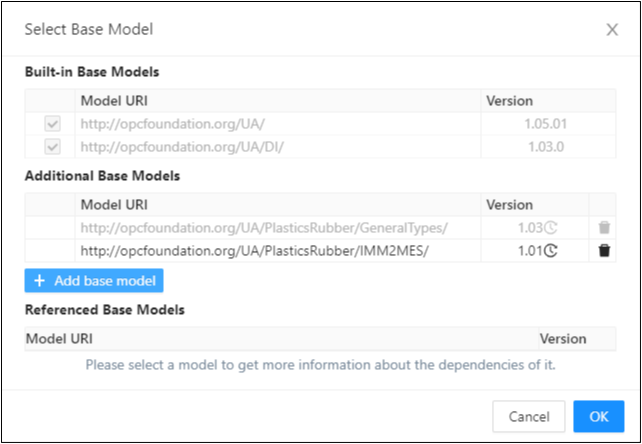
The Lenze Mapping Editor differentiates between already used models on the server target (build-in models) and external models (additional models).
The built-in models are used by the OPC UA server to model Lenze specific services.
-
These models are listed in the "Built-in Base Models"-table and can't be deleted.
-
The versions of these models are fix with the host version.
-
The built-in models can be selected as base models by checkbox.
-
The http://opcfoundation.org/UA/ model is always activated.
The additional models can be external companion specifications which shall be used for the user specific information model.
-
These models can be added via an operating system specific file dialog by click on the "Add base model" - button.
-
These models can be deleted by click on the "garbage bin"-icon.
-
These models are updateable via an operating system specific file dialog by click on the "update" - icon. It is only possible to select a new information model with the same Namespace URI and a sufficient higher version for other loaded base models.
Built-In and additional base models are grayed-out and not delete- or updateable if they are referenced by other loaded base models.