Setup of symbol configuration
An PLC application holds various variables and object instances. The symbol configuration is used to publish individual instances via OPC UA.
-
Insert a Symbol configuration object below the application node in the device-tree of the -PLC Designer-.
-
Activate the option Support OPC UA functionalities in the dialog "Add symbol configuration".
-
Open the symbol configuration in the editor.
-
Select the "Build" command.
The variables are displayed in a tree structure
-
Select the variables that you want to publish via OPC UA.
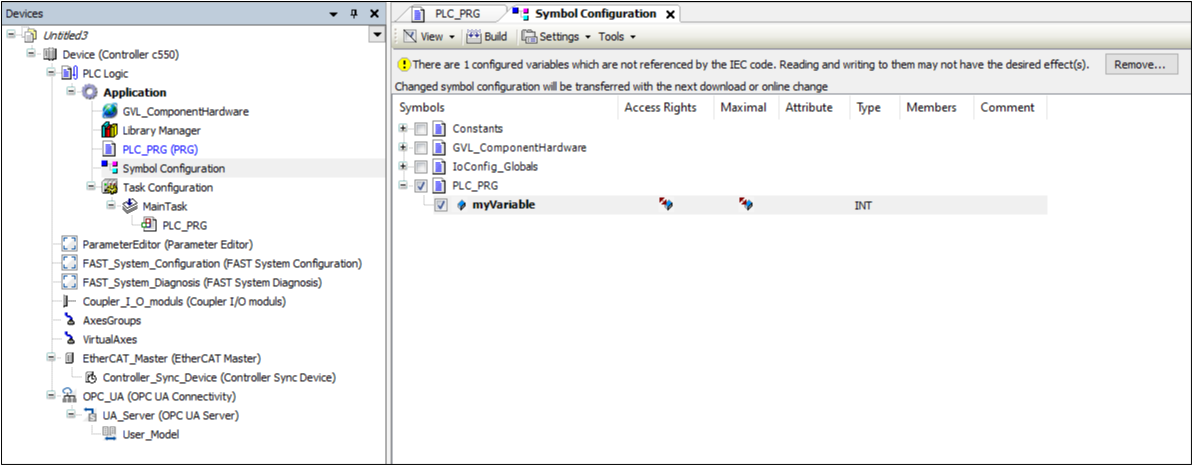
The handling of the symbol configuration is described in detail under the following link: CODESYS Online Help
-
Make sure that only the IEC variables are selected that are required for the use case and are therefore to be published. If a variable is selected in the symbol configuration, the subordinate member variables are also automatically activated for OPC UA access.
-
If you have a user management active on the controller, IEC variables can be assigned to symbol sets and these in turn to user groups. Thus, a certain user has access only to the IEC variables intended for.
-
It is possible to setup various symbol sets to grant specific user groups access to the data. In the Mapping Editor just the general (overall) symbol configuration is provided as a Data Source and not individual symbol sets.