Assigning drive axes and auxiliary axis to a kinematics
Assignment of axes to axis groups
In order for the axis group to be used, it must be linked to the drive axis used.
This is done either at runtime of the PLC program via the PLCopen FBs MC_AddAxisToGroup, MC_RemoveAxisFromGroup and MC_UngroupAllAxes or statically via axis group parameters (Offset 0-Sub 51-62).
It is important to ensure that the parameterization of the drives has been set correctly in advance. This applies in particular to the motor, feedback and controller settings (we recommend using the autotuner function of the individual axis for this) as well as the mechanical settings of the AxisRef. In particular, ensure that the feed constants are selected so that linear drive axes are moved in [mm] and rotary drive axes in [°].

|
Note!
An axis group can only be switched on and used once all the required ACS axes have been assigned to the axis group. The virtual Cartesian axes (WCS axes) are always permanently linked to the axis group and can neither be removed nor can further WCS axes be added. |
|
|
Note!
An axis can only be assigned to or removed from an axis group if both the axis is in the Disabled state and the axis group is in the GroupDisabled state. |
Static assignment
The drive axes and auxiliary axes are assigned to a kinematics on the Overview / Connected drives tab of the corresponding kinematics axes group (in this example the "Delta3_3dof" delta kinematics):
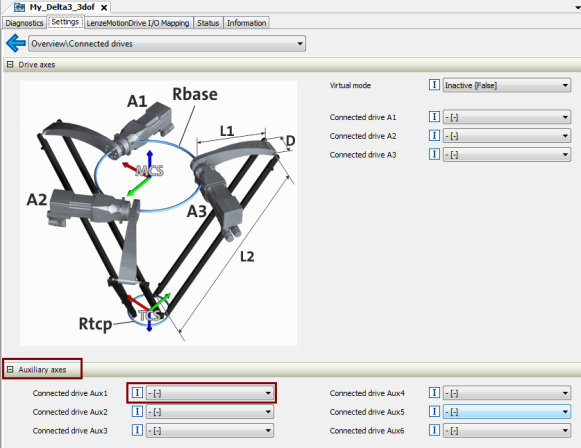
Assignment of axes at runtime
If the assignment of the drives to the axis group is only fixed at runtime or if the assignment of axes changes at runtime, the three function blocks MC_AddAxisToGroup, MC_RemoveAxisFromGroup and MC_UngroupAllAxes are available for this purpose, with which the assignment can be changed from the PLC program.
 Auxiliary axes