Manual jog (jogging)
Prerequisite
-
The axis is enabled (xReadyForMotion = TRUE).
Execution
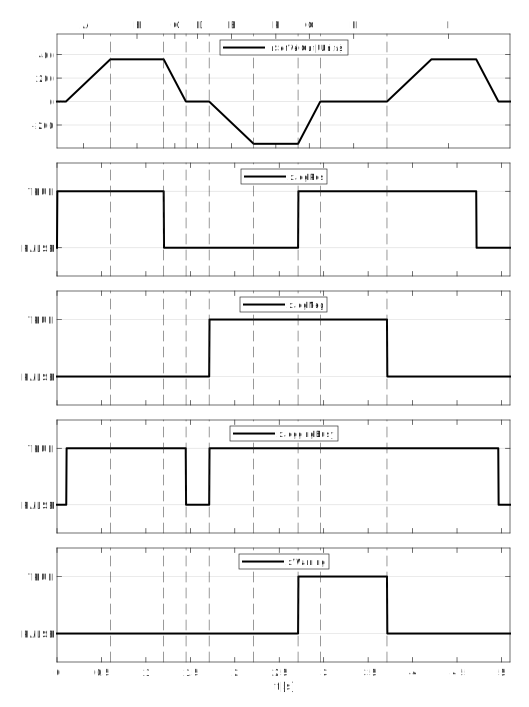
With the xJogPos input = TRUE, the axis is traversed in the positive direction and with the
xJogNeg input = TRUE, it is traversed in the negative direction. The axis is traversed as long as xJogPos or xJogNeg remain set to TRUE.
The current travel command cannot be replaced by the other jog command. If xJogPos = TRUE and xJogNegPos = TRUE, the axis brakes into standstill and the eTMState status output changes to the "ERROR" state.
Only if both inputs have been reset, the technology module changes back to the "STANDBY" state.
Travel diagram
|
No |
xJogPos |
xJogNeg |
xJogging Busy |
eTMState |
Info |
|---|---|---|---|---|---|
|
A |
FALSEäTRUE |
FALSE |
FALSEäTRUE |
STANDBYW JOGGING |
The axis accelerates to the positive manual speed 360 units/s with 180 unit/s². |
|
B |
TRUE |
FALSE |
TRUE |
JOGGING |
The axis travels constantly with 360 units/s. |
|
C |
TRUEæ FALSE |
FALSE |
TRUE |
JOGGING |
The axis decelerates to a standstill with 360 unit/s². |
|
D |
FALSE |
FALSE |
TRUEæFALSE |
JOGGINGW STANDBY |
The axis has reached a standstill. |
|
E |
FALSE |
FALSEäTRUE |
FALSEäTRUE |
STANDBYW JOGGING |
The axis accelerates to the negative manual speed -360 units/s with 180 unit/s². |
|
F |
FALSE |
TRUE |
TRUE |
JOGGING |
The axis travels constantly with -360 units/s. |
|
G |
TRUE |
TRUE |
TRUE |
ERROR |
The axis decelerates to a standstill with 360 unit/s². |
|
H |
TRUE |
TRUE |
TRUE |
ERROR |
The axis is at a standstill and changes to "STANDBY" if both inputs xJogPos and xJogNeg have the value FALSE. |
|
I |
TRUE |
TRUEæFALSE |
TRUE |
JOGGING |
The axis accelerates to the positive manual speed 360 units/s with 180 unit/s². |
Parameters to be set
The parameters for manual jog can be found in the AXIS_REF in subindex 181 ... 184.
The parameter values can be changed during operation. They are accepted and become effective immediately when setting the inputs xJogPos = TRUE or xJogNeg = TRUE.
The manual jog parameters from the PLC program can also be written via the L_MC1P_SetBasicParameter block.