Search/replace dialogue (table editor)
The Find/Replace dialogue is called up when you have opened the table editor and select the "Replace" function from the "Start" menu. Alternatively, you can trigger this function via the context menu of the table editor or the key combination Ctrl+H.
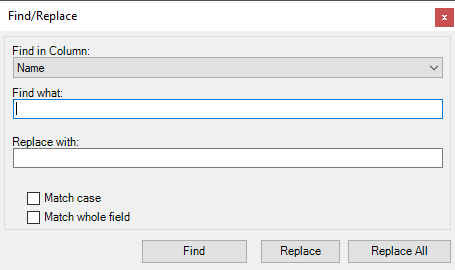
Search/replace dialogue of the table editor
You can make the following settings:
-
From the "Search in column" list, select the column in the table editor in which you want to search.
-
Enter the character string you want to search for in the Search term field.
-
In the Replace with field, enter the character string with which the character string you are looking for is to be replaced.
-
If required, set the following search criteria:
-
Case sensitive
Lower and upper case letters are relevant for the search. If you activate this option for the search term "text", for example, "text" (first letter upper case) will be found, but not "text" (first letter lower case).
-
Search entire column
The search only returns results if the search word is not part of another word. If you activate this option for the search word "name", for example, "name" will be found, but not "namespace".
-