Edit project
When you start »EASY UI Designer«, the project configurator is displayed first. Under Current projects, you will see an overview of all existing projects.
On the start page of the project configurator, the following options are available for all projects by right-clicking on the project tile:
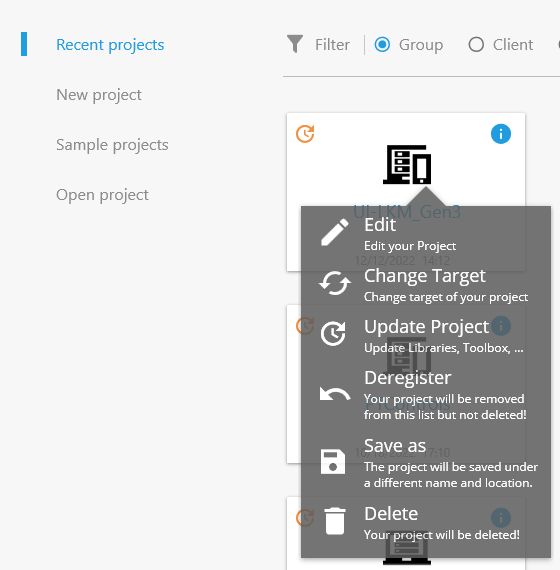
If you want to change your project at a later date, you will find these options under Edit project.
If the project needs to be adapted by changing the target device, this can be configured using Change target device. After the selection, the configuration page for the device opens. By selecting a different controller and confirming the following steps, the target device is updated in the project.
If new features are to be used, the project can be updated with Update project. This option is only available for older projects and is indicated by the orange icon in the project tile.
Log out - If the project should no longer appear in the list of projects but should not be deleted, you can log it out.
The final deletion of a project from the hard drive is achieved by clicking on Delete.
The following options are available here:
-
Open project
Click on one of the projects on the start page. The project is opened in the EASY UI Designer.
-
Search project
If the project list is extensive, you can also search by project name, customer, project description or date in the search field.
-
Delete project
Right-click on the project and select the corresponding command in the context menu.