Security
The Security tab provides settings that parameterise the security of the connection and communication to the OPC UA server.
The security settings used are negotiated during the initialisation phase of the connection between the client (visualisation) and OPC UA server. Whether a certificate exchange and encryption are agreed between the client and server depends on which procedures the client and server allow and in which order the comparison between the procedures is carried out.
In the Security dialogue, the permitted security levels and permitted encryptions areas are used to define which procedures the client permits. A list entry deactivated here is not permitted by the client. The order of the list entries is to be interpreted as a ranking in columns from top to bottom.
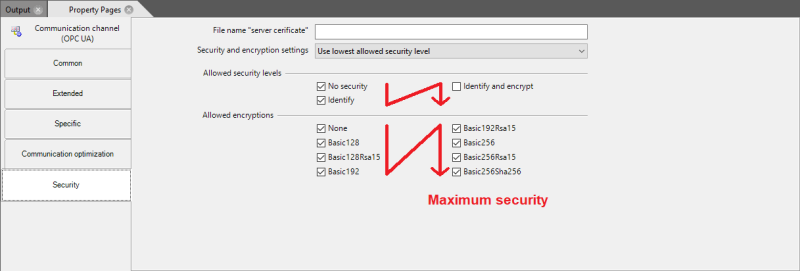
The order in which the client and server negotiate the permissibility of a procedure is defined in the Security and encryption options selection list. The first procedure for which the client and server agree is then used.
The following settings are permitted here:
|
Setting |
Description of the |
|---|---|
|
Use the lowest authorised security level |
The Permitted security levels and Permitted encryption lists are run through in the specified order when the connection is established in order to negotiate the procedures. The first procedure that both sides agree to is used. |
|
Use the highest approved security level |
The Permitted security levels and Permitted encryption lists are run through in reverse order to negotiate the procedures when the connection is established. |
If no match is found for permitted procedures, the connection cannot be established. This is reported as an error in the system log file.
File name Server certificate
Identification between the OPC UA server and client involves the exchange of a certificate. When the connection is first established, a certificate is requested from the server if the corresponding procedure setting is Identify or Identify and encrypt. When the certificate is received, the system asks whether it should be categorised as trustworthy. If this is confirmed, the certificate received is saved under the name specified in the Server certificate file name field in the Cert subfolder of the project directory. From this point onwards, the saved certificate is used to identify the OPC UA server.
The client also generates a certificate itself, which may need to be entered as authentic on the server. Errors when comparing the certificate are noted in the system's log file.
Parameters for module: