Buffer status (recipe data)
Displaysthe status of the recipe data in the recipe buffer.
The central location for processing the recipe data is the recipe buffer. From here, the data can be saved to a recipe file or written to the process. If the recipe data in the buffer has been changed, two flags in the buffer status indicate this. These flags are comparable to the * in other programmes. If, for example, a text file is loaded into an editor and then edited, the editor indicates this in the title bar with an *. There are two flags in the recipe buffer, as there are also two storage targets for the recipe data and the data can be transferred independently to one or the other target: to the recipe file and to the process (variable server).
The two flags can only be retrieved via the VisiWin API using the recipeclass objectRecipeClass.
- HasChangesForProcess
- There are changes in the recipe buffer that have not yet been written to the process.
- HasChangesForFile
- There are changes in the recipe buffer that have not yet been saved in a recipe file.
These flags are influenced differently by different actions:
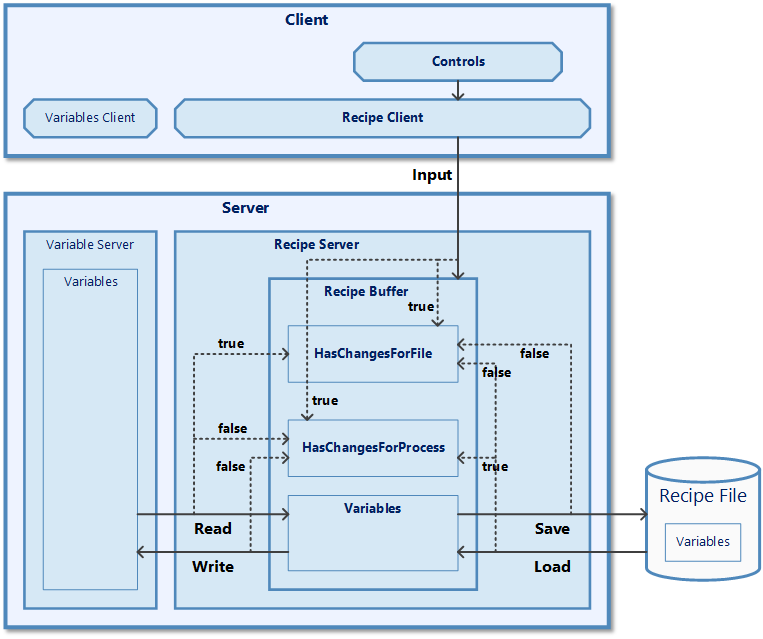
- Operator inputs
- Data is written to the recipe buffer via the recipe client, e.g. by operator input in control elements. Both flags are set to
true, as these values have not yet been written to the variable server or to a file. - Read
- The variable values are transferred from the variable server to the recipe buffer via the Read action. This means that they match the process data, i.e.
HasChangesForProcess=false. However, the values have not yet been saved to a file, i.e.HasChangesForFile=true. - Writing
- The Write action is used to transfer the variable values from the recipe buffer to the variable server so that both match, i.e.
HasChangesForProcess=false. The flag for the file is not changed. - Save
- The variable values are saved from the recipe buffer to a file using the Save action. Therefore, there are no changes with regard to files, i.e.
HasChangesForFile=false. The flag for the process is not changed. - Loading
- The Load action is used to load the content of a file into the recipe buffer. This means that the recipe buffer values match the file values, i.e.
HasChangesForFile=false. However, the values have not yet been written to the process, i.e.HasChangesForProcess=true. - Initialise
- The Initialise action (not shown in the image) is used to preset the variables in the recipe buffer with specific values. This action is triggered by the operator via a button and therefore leads to the same results as the Operator input action.