- Variable values in different formats
- Other texts from the language switching system module
- Date and time
- Texts from alarm definitions or alarm type definitions
The integration takes place with the help of formatting instructions. A formatting instruction in VisiWin begins and ends with an @ character and contains parameters, separators and formatting characters. At runtime, the formatting instructions are resolved and, for example, the current value of the variable is displayed.
| Text at development time | Current temperature: @1n@ |
|---|---|
| Text at runtime | Current temperature: 98 °C |
To call up the dialogue, open a definition in the table editor and click on the  button next to the Text parameter in the Property pages window.
In principle, you can insert one or more formatting instructions into any localizable text. The Edit local isable text dialogue is therefore available in all VisiWin system modules that work with localizable texts.
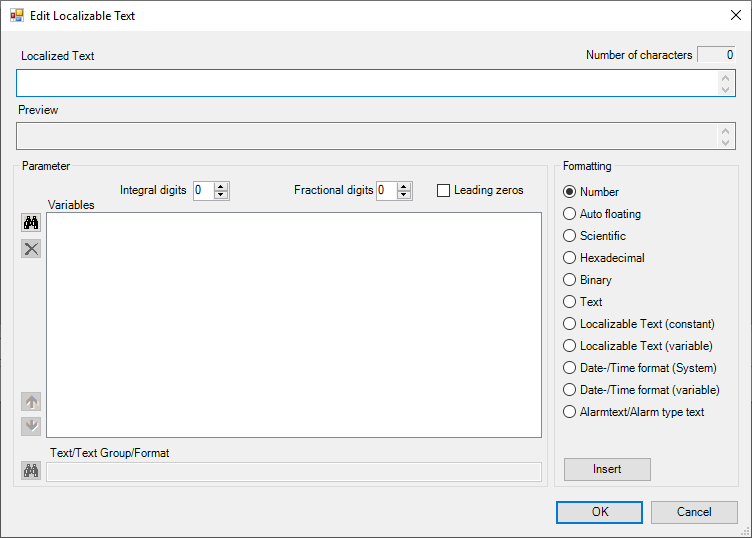
Elements of the dialogue
The dialogue for editing a localizable text contains the following control elements:
- Localised text
- The text field contains the localised text including the format instructions.
- Preview
- The text field displays the content of the localizable text with interpreted format instructions.
- Parameters
- This area contains optional parameters that are used during formatting.
- Formatting
- This area contains the formatting options for integrating dynamic data into localizable texts.
The Parameters area contains the following operating elements:
-
 (add variable)
 - Opens the dialogue for selecting a process variable. The variable selected there is added to the Variableslist as an element.
-
 (remove variable)
 - Deletes the element selected in the Variables list.
-
 (move variable upwards)
 - Moves the element selected in the Variables list up one entry.
-
 (move variable down)
 - Moves the element selected in the Variables list down by one entry.
- Variables
- Contains all variable names whose values are to be dynamically integrated into the text at runtime.
- Pre-decimal places
- Defines the number of digits before the decimal point for numerical values.
- Decimal places
- Defines the number of digits after the decimal point for numerical values.
- Leading zeros
- Specifies that the number of digits before the decimal point are filled with leading zeros for numerical values to be included.
- Text/text group/format
- Depending on the formatting selected, the input field either offers the option of integrating further localizable texts or date/time formatting. If the formatting is set to Localisable text (fixed)/Localisabletext (variable), existing texts can be inserted into this text. Fixed texts are to be adopted directly. Variable texts can be inserted by selecting a text group and a process variable. The value of the process variable determines the text to be displayed in the selected text group at runtime. The date/time format (system)/date/time format(variable) formats enable the display of formatted date/time information. The date/time format (system ) format displays the current system time in the text at runtime. The date/time format ( variable) format is used to convert the value of the process variable selected in the Parameter field into a date/time format.
The Formatting area contains the following controls:
- Number
- With this formatting, the specifications in the fields before and after the decimal point are observed.
- Car. Floating point
- Displays dynamically integrated values (as they are) with decimal places.
- Scientific
- Sets the output format of a dynamically included value to scientific notation.
- Hexadecimal
- Sets the output format of a dynamically included value to hexadecimal notation.
- Binary
- Sets the output format of a dynamically included value to binary notation.
- Text
- Enables the output of a process variable value of data type
VT_BSTR. - Localisable text (fixed)
- Enables the static integration of another text definition. If this setting is selected as formatting, the Text/text group/format input field is enabled. The dialogue for selecting a text opens via the
 button.
 - Localisable text (variable)
- The dynamic integration of texts is made possible by selecting a text group and a process variable. The dialogue for selecting a text group opens via the button.
- Date/time format (system)
- Fades the system time with the selected formatting into the text at runtime. Click the button
 to open the dialogue for selecting a date/time format.
 - Date/time format (variable)
- Displays the value of the selected process variable as a date/time format with the selected formatting in the text at runtime. The dialogue for selecting a date/time format opens via the button.
- Alarm text/alarm type text
- Enters the formatting string
@J@in the localizable text. - Insert
- Inserts the selected formatting instruction with the set parameters into the localizable text.
Integrate dynamic data into a text
To insert a dynamic process variable value into the text, carry out the following steps in the Edit localizable textdialogue:
- Click on the button next to the (empty) Variables list. Select a process variable in the Select variable dialogue that opens. The selected process variable then appears in the Variables list.
- Under Formatting, select the display type of the process variable.
- Place the cursor in the Localisedtext field (at the top of the dialogue) at the position in the text where the process variable value should appear at runtime.
- Click on Insert.
A format block is inserted into the text.
To insert a dynamic localizable text into the text, carry out the following steps:
- Under Formatting, select the Localisable text (variable) option.
- Click on the button next to the Text/text group/format field and select a text group.
- Click on the button next to the Variables list and select a process variable. The value of the process variable set here is used at runtime to select the text definition in the selected text group. However, this also means that all text definitions must have purely numerical names.
- Place the cursor in the Localised text field at the position in the text where the text to be dynamically switched should appear.
- Click on Insert.
A format block is inserted into the text.
Format block resolution
The format block is made up of the following components: @ABC.D@
Example: @1m4.5@
| Format symbol | Example | Meaning |
|---|---|---|
| @ | @ | Format block start character |
| A | 1 | Order number of the variable in the parameter list |
| B | m | Format character, result from the settings Number and Leading zeros |
| C | 4 | Pre-decimal places |
| . | . | Separation for the setting for digits before and after the decimal point |
| D | 5 | Decimal places |
| @ | @ | Format block end character |