Definition: Unit conversion
Unit conversions at »EASY UI Designer« are based on conversions of process variable values using linear equations. A typical example of this is the physical variable "temperature", which is specified country-specifically in Europe using the unit Celsius, but is represented in the US using Fahrenheit.
Conversion of physical quantities
The following formulae are used to convert "temperature" from Celsius to Fahrenheit and vice versa:
°C = (°F - 32)/1.8
°F = °C × 1.8 + 32
In »EASY UI Designer«, this linear equation is specified via two points of a linear curve. For this purpose, the values of two calculated points are specified in a unit definition. Based on the value °C, the calculation looks as follows as an example:
For 0 °C this results in: 0 × 1.8 + 32 = 32 (°F)
For 100 °C this results in: 100 × 1.8 + 32 = 212 (°F)
The values of the calculation output variable (°C) are then to be entered as X coordinates, here as 0 and 100. The respective calculated values are entered as Y coordinates (i.e. 32 and 212).
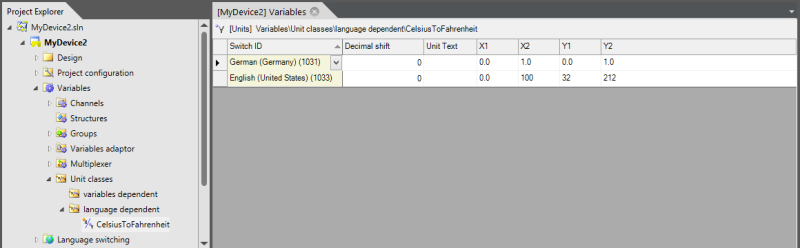
Two unit conversions are defined in the image above. For "German", the value is virtually unaffected as the X/Y value pairs are identical.
The progression of the linear equation over the two coordinates (0:0) and (1:1) results in a straight line that passes through the zero point with a gradient of 1, i.e. X and Y are identical for all points on the line.
In the conversion for "English", the values calculated above have been entered in the corresponding parameter fields.
However, this example only works if the process variables to be converted directly return the temperature value as °C. If this is not the case, the specific sensor resolution must be included in the calculation via a sensor adjustment.
Example: Sensor customisation
A distance of 0 ... 1000 mm recorded by the PLC is to be displayed in the application. Two different sensor types with the following output ranges are available:
|
Type |
Measuring range |
Output value range |
|---|---|---|
|
A |
0..2000 mm |
0..32000 |
|
B |
0..100 inch |
0..32000 |
The conversion for [mm] in [inch] is:
1 in. = 25.4 mm
The expected value ranges for the distance 0..1000 mm are therefore for:
-
Type A: 0 ... 16000 (1000/2000 =x/32000)
-
Type B: 0 ... 12599 (1000/100 × 25.4 = x/32000)
The two sensors have different value ranges. An adjustment in the visualisation can be implemented via a variable-dependent unit class. The conversion should take place between the communication component and the variable server so that a sensor-independent measured value is made available in the variable server.
The corresponding unit description looks like this in the development environment:
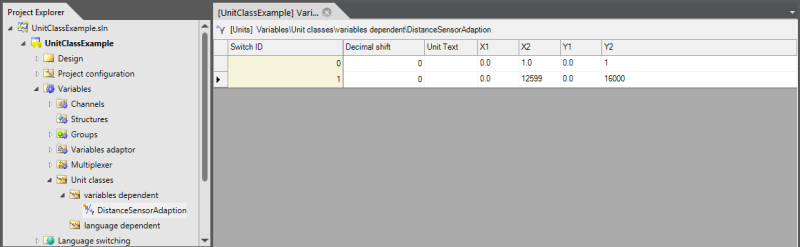
Again, virtually no conversion is specified for a state because the X and Y value pairs are the same. The second changeover contains the values calculated above.
In this way, sensor-specific value adjustments can be realised.
For the time being, it is only a matter of synchronising the PLC values for the different sensors in the variable server so that it does not matter which sensor is connected for further processing. A language-switched conversion has not yet been realised here. The country-specific switchover between mm and inch for the application can then be carried out via an additional conversion.
If you do not perform this separation, you cannot, for example, use the value independently of the sensor in systems that are connected directly to the variable server (e.g. recording as a trend).
Conversion of units
In »EASY UI Designer«, the configured unit conversions are summarised into so-called unit classes. A unit class contains several conversions and a switch that activates one of the contained conversions.
-
For language-dependent unit classes, the switch is the active language in the project. Each unit conversion contained is assigned to a language. Switching the language at runtime automatically switches to the corresponding unit conversion.
-
Variable-dependent unit classes contain a process variable as a switch. Here, each unit conversion contains the Switching state parameter, which is compared at runtime with the value of the process variable specified as a switch. In the above example of sensor adjustment, the switchover variable is usually an internal variable that is configured to the corresponding value for the sensor used when setting up the visualisation.
Functional linking
In »EASY UI Designer«, the process variable definitions are linked directly to unit classes. It is implicitly assumed here that the definition of a process variable already includes the characteristic of a physical unit. For example, if the process variable represents a temperature value, the physical quantity with unit text and country-specific conversion formula can be specified directly when defining the variable.
This has the advantage that the unit information is always included as part of the variable when displaying the process variables, whether as a value output, as a trend recording or as part of a report, without any further configuration effort.
The unit classes to be used are specified in the variable definition in the parameters Unit class (process) and Unit class (display).
-
The unit class (process) specifies the calculation formulas that are used when transferring the variable value between the communication component and the variable server. These formulas are usually used if different sensor types are to be adapted to a standardised value range. These conversion formulas can only be obtained from unit classes of the type "variable-dependent". Switching between the individual conversion formulas can therefore only take place via a variable value.
-
The unit class (display) is used by the system when transferring the variable value between the variable server and the visualisation interface. It can be both language-dependent and variable-dependent. The typical switching of country-specific unit conversions is realised by using language-dependent unit classes. By using variable-dependent unit classes as "Unit class (display)", specific special requirements can also be realised in the application interface. If, for example, a distance is to be specified in the application in mm, cm, inch and mil, this cannot be realised by switching the language alone.
Decimal point shift/decimal places
The following applies to integer variable types (VT_I2, VT_I4 etc.): The decimal point shift is a good solution to avoid rounding errors. Internally, the system treats an integer process variable value that is linked to a unit changeover as a floating point value. When the value is read, the value from the PLC is converted to a floating point variable in the variable server using linear conversion. When entering the value, this conversion must be performed in reverse. If the linear equation is used here, the value may have to be rounded. In the application, the user may then write a value to a control element and after sending the value in the control element jumps to the next higher/lower value. This phenomenon does not occur when using the decimal point shift alone.
The function of the comma shift parameter specified in the unit definition depends on the data type of the process variable used by the unit class:
-
The following applies to integer process variables: The decimal point shift can be used to realise a decimal shift of integer values. The value 112, for example, is displayed as 11.2 if the decimal point shift was specified as 1. If an integer data type from the PLC specifies a temperature in 100ths of a degree, for example, the decimal point can be shifted to the correct position in the display using decimal point shift 2.
-
If a process variable is defined as a floating point number, the comma shift as a formatting instruction specifies the number of decimal places to be displayed.
Representation
All controls with a process variable connection contain the "RawValue" property in addition to the "Value" property.
-
"Value" shows the value of the variable converted via the unit class (display).
-
"RawValue" directly displays the value from the variable server.
Some control elements contain the "UseRawValue" property. If this property is set to "true", no conversion is performed in "Value". The values of "RawValue" and "Value" are then identical.
Further features of the unit conversion
-
The default language parameter is available in a definition of the unit class type (language-dependent). This parameter specifies which unit conversion is to be used if no unit conversion has been configured for a project language. For example, if you require a metric unit conversion that is commonly used in Europe, only configure the unit definition for one language and specify its switchover identifier as the default language.
-
In the client-server system, you should note that switching variables are labelled as "client-internal".
-
In addition to "Value" and "RawValue", there are other property pairs that take unit conversion into account or explicitly exclude it (e.g. "MaxValue"/"RawMaxValue", "MinValue"/"RawMinValue").