In the VisiWin process connection, structures describe a coherent memory area in the PLC in which individual process variables of the same or different data types follow one another.
- Controller: The individual controller parameters are mapped in a physically contiguous memory area.
- Recipes: All values that parameterise a batch production, for example, are arranged one after the other in the PLC memory.
- System components: If the machine to be visualised consists of several (possibly identical) components whose functions are each displayed on a single application page (form), corresponding memory blocks should be provided by the PLC programmer.
- If a read request is active for one or more elements of a structure, all elements of the structure are read from the PLC using block access.
- Writing to a structure element in a protocol frame is only carried out on the corresponding memory cell in the PLC.
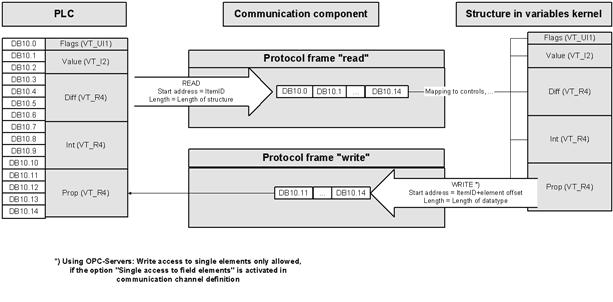
In the example above, the process variables "Flags", "Value", "Diff", "Int" and "Prop" form a contiguous memory area in the PLC. In the visualisation, the entire data block is fetched via a protocol frame when reading. In the variable server, the bytes read are assigned to the corresponding variables in the process image. From here, the values are mapped on the visualisation interface (e.g. via control element connections). If a value is changed within the visualisation application, the variable server calculates the address for the write request using the offset of the variable within the structure and the start address, i.e. the ItemID of the variable definition.
It is always up to the PLC programmer to arrange the process variables sensibly in data blocks. This has a decisive influence on the performance of communication between the PLC and visualisation, as structures are exchanged as data blocks.
The PLC programmer has various means of arranging the process variables in blocks:
- Definition of structures in the PLC (e.g. CoDeSys, Allen Bradley): Access is usually possible to the entire structure or to the individual elements.
- Declaration sequence within a data block (e.g. STEP 7): Variables declared one after the other occupy a contiguous memory area.
- Declaration of variable fields: Certainly the least convenient solution, because the PLC programmer only has indexed access to the field elements and therefore has to manage the resolution into the various contained data types himself.
- VisiWin driver: The use of structures is almost mandatory. The drivers do not know any blocking/no protocol optimisation. Variables that are arranged one after the other in a physically contiguous memory area can be transferred as a block (byte/word array). In the visualisation, the individual bytes are reassigned to the corresponding data types via the structure definition.
- OPC server: A memory area transferred as a byte array is divided into variables in the visualisation via a structure definition. This is not always absolutely necessary if, for example, the OPC server internally supports blocking (summarising the individual read/write requests into data blocks). The OPC server must also support transmission as a byte array.
- VisiWin(.NET) drivers: For drivers that do not support blocking, the data exchange can be optimised as with the classic VisiWin drivers. Whether the driver supports blocking is listed in the driver-specific help file.
In the development environment, structures are to be used as data type specifications for variables, i.e. the structures defined in the project extend the list of simple data types of process variables. Project planning is divided into two steps:
| Definition of the structure | A structure is defined in the VisiWin project explorer. A structure essentially contains a name and, of course, elements that use the elementary data types and thus determine the structure of the data block. If the length of the individual elements (in bytes) is totalled, the result must correspond to the data block length in the PLC.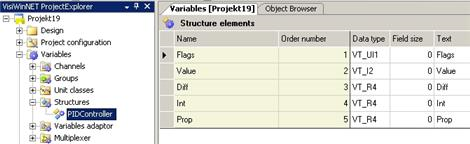 |
|---|---|
| Creating a variable | A variable must be created within the corresponding communication channel. The ItemID of the process variable defines the start address of the data block in the PLC. The position of the individual variables in the data block is determined by selecting the structure in the Data type field.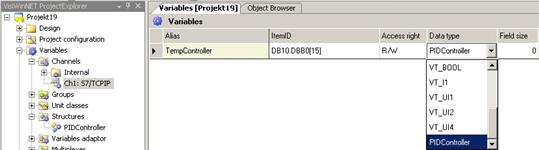 |
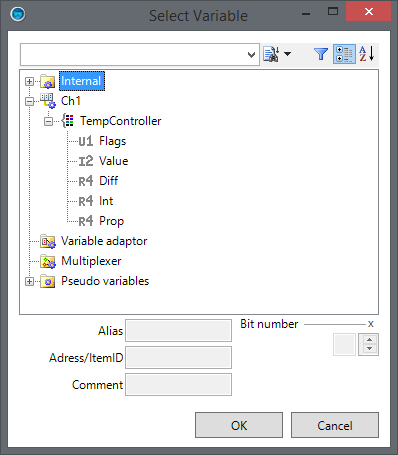
- Structures may be nested, i.e. a structure element may also be of the data type of a structure. The maximum nesting depth is 10.
- When defining the structures and data blocks, the so-called alignment (the shifting of memory cells to even addresses, e.g. a hole often occurs in the linear memory area if a word (VT_I2) should actually be shifted to an odd address because it follows a byte on an even address) must be taken into account in the PLC. Structure definitions in VisiWinNET may contain holes (quasi unused bytes). The offset of an element can be specified directly as a byte offset via the parameter Order number as byte offset in the structure definition.
- Another problem is the PLC-specific interpretation of the "Most Significant Byte" in variables that consist of several bytes. Various parameters are provided in the definition of the communication channel to swap the bytes (e.g. in words). These parameters apply both to individual variables and to structural elements.
FAQ
What is the difference between a field and a structure?
While variable fields can only contain elements of the same data type, a structure is a mix of elements of different data types.
Why are the two words in my structural element defined as VT_I4 obviously swapped?
The typical data organisation problem. Some PLCs organise the two 16-bit words of a long word the wrong way round from the perspective of the operating system. A corresponding setting to correct this error can be found A) either in the configuration of the communication component or B) in the definition of the communication channel.
What is the performance gain when using structures compared to accessing individual variables?
We cannot make a statement. But here is an extreme example: reading 1000 words. If, for example, a read command consists of 1 byte of instruction, 2 bytes of address, 2 bytes of length and the corresponding response of 5 bytes for each read call, 10kB of data is transferred for the request for 1000 words. Of this, 2kB is user data (ratio 5/1). The ratio of protocol data to data utilisation is reduced to almost 1 by the block-wise transmission. As a contiguous block via a common read command, the 2kB user data can be transferred with just one protocol access. With a slow connection (e.g. serial communication at 9600 baud), the performance gain can be decisive.
When browsing via the S7 OPC server, I get all variables individually in my project.DoI still enjoy the advantage of block-wise access?
Not if the OPC server does not support blocking internally. In this case, a structure definition must be created manually in the project that reflects the structure of the corresponding data block. Block access must first be enabled again by defining a variable of the structure type and the address that describes the data block (data block, start address and length, see OPC server documentation).
Something is wrong with the structure of my structure. Values that obviously change in the PLC are not displayed in the visualisation or changes affect the wrong structure element.
If the parameter Order number as byte offset is active in the structure definition, double assignment of the parameter Order number in the structure elements is no longer checked. Check this parameter carefully (also with regard to the alignment).