Technology
Web UI is based on the technologies HTML5, CSS and JavaScript. Any modern browser can be used to display a web app, such as Chrome, Firefox, Edge, Opera or Safari. Here you can find out which components work together and how.
Where does the data come from?
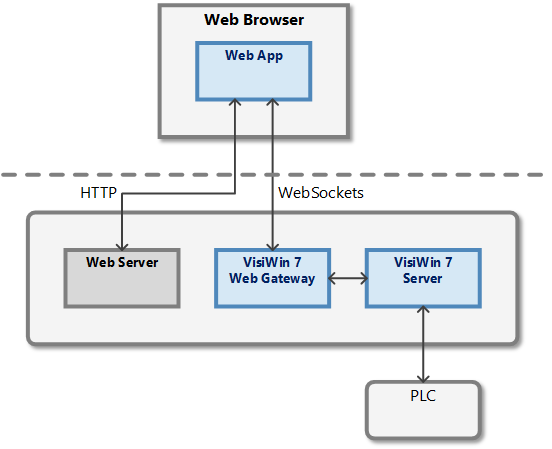
EASY UI Designer Server
The »EASY UI Designer« server exchanges data with the PLC via a communication channel. Various client projects created with the Classic UI or Modern UI interface technology can be connected directly to the server.
EASY UI Designer web gateway
The »EASY UI Designer« web gateway is another client that can connect to the »EASY UI Designer« server. However, it has been expanded to include a communication option with a web app. It also manages multiple web app instances when different users connect from different devices.
The web gateway must be activated manually before a web app project is started (see chapter Starting the web gateway).
Web server
The web server delivers the requested web page with all associated files to the browser. On the one hand, this is the HTML page with the definition of the control elements. However, this also includes CSS files for styling, font files, graphics files, JavaScript files, etc.
Web app
In the web app, a WebSocket communication with the »EASY UI Designer« web gateway is established via JavaScript. Data is exchanged with the EASY UI Designer server via this communication.
How is the data displayed?
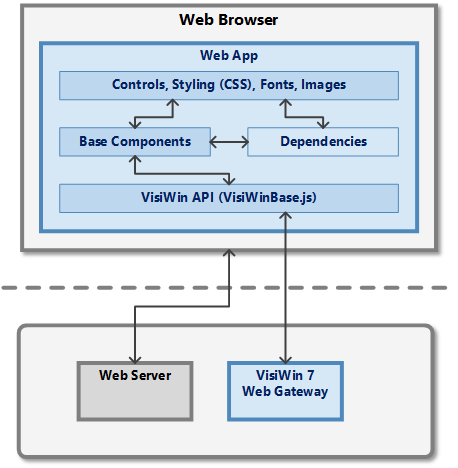
Web browser
The web browser requests an HTML page from the web server.
Control elements
The graphical user interface is created using the »EASY UI Designer« controls. The appearance of the controls is set using properties and can also be controlled using CSS (Cascading Style Sheets).
Basic components
The »EASY UI Designer« basic components provide important elements and functions for the layout and navigation.