
|
This function block provides a comprehensive PID controller with setpoint and actual value conditioning and a characteristic function.
|
|
|
|
L_CT1P_ProcessController |
|
|
|
|
|---|---|---|---|---|---|---|---|
|
LREAL |
- |
|
lrSetValue |
lrOut |
|
- |
LREAL |
|
BOOL |
- |
|
xLoadActvalue |
lrOutRed |
|
- |
LREAL |
|
LREAL |
- |
|
lrActValue |
lrSetRampValueOut |
|
- |
LREAL |
|
LREAL |
- |
|
lrDelayTime |
lrDeviation |
|
- |
LREAL |
|
LREAL |
- |
|
lrGain |
xLimitActive |
|
- |
BOOL |
|
LREAL |
- |
|
lrGainAdapt |
xError |
|
- |
BOOL |
|
LREAL |
- |
|
lrResetTime |
eErrorID |
|
- |
L_IE1P_Error |
|
LREAL |
- |
|
lrRateTime |
|
|
|
|
|
BOOL |
- |
|
xReset |
|
|
|
|
|
BOOL |
- |
|
xLoadIntValue |
|
|
|
|
|
LREAL |
- |
|
lrIntValue |
|
|
|
|
|
LREAL |
- |
|
lrAcc |
|
|
|
|
|
LREAL |
- |
|
lrDec |
|
|
|
|
|
LREAL |
- |
|
lrInfluence |
|
|
|
|
|
LREAL |
- |
|
lrRedRange |
|
|
|
|
|
LREAL |
- |
|
lrRedGain |
|
|
|
|
|
LREAL |
- |
|
lrPosLimitValue |
|
|
|
|
|
LREAL |
- |
|
lrNegLimitValue |
|
|
|
|
|
ARRAY [...] OF LREAL |
- |
|
alrXValues |
|
|
|
|
|
ARRAY [...] OF LREAL |
- |
|
alrYValues |
|
|
|
|
|
|
|
|
|
|
|
|
|
|
Name Data type |
Information/possible settings |
|
|---|---|---|
|
lrSetValue LREAL |
Process setpoint |
|
|
xLoadActvalue BOOL |
|
|
|
TRUE |
The actual value lrActValue is loaded to the ramp function generator and PT1 filter. The current system deviation is zero. |
|
|
FALSE |
The ramp function generator runs from the actual value loaded via lrActValue to the setpoint pending at lrSetValue with the acceleration/deceleration set. |
|
|
lrActValue LREAL |
Actual process value |
|
|
lrDelayTime LREAL |
Filter time constant for the actual value
|
|
|
lrGain LREAL |
|
|
|
lrGainAdapt LREAL |
Value for adapting the controller gain
|
|
|
lrResetTime LREAL |
|
|
|
lrRateTime LREAL |
|
|
|
xReset BOOL |
Reset PID controller to zero. |
|
|
TRUE |
PID controller is reset to zero. |
|
|
FALSE |
PID controller is activated. |
|
|
xLoadIntValue BOOL |
TRUE |
Load integrator: the I component of the PID controller is set to the value pending at the lrIntValue input. |
|
lrIntValue LREAL |
Scaled value to which the I component of the PID controller is set by setting xLoadIntValue to TRUE. |
|
|
lrAcc LREAL |
Acceleration for ramp generation
|
|
|
lrDec LREAL |
Deceleration for ramp generation
|
|
|
lrInfluence LREAL |
Value for the evaluation of the lrOut output signal
|
|
|
lrRedRange LREAL |
Range of system deviation with reduced gain/sensitivity
|
|
|
lrRedGain LREAL |
Gain of the system deviation in the range of reduced sensitivity
|
|
|
lrPosLimitValue LREAL |
Positive output limit value for lrOut
|
|
|
lrNegLimitValue LREAL |
Negative output limit value for lrOut
|
|
|
alrXValues ARRAY [1...5] OF LREAL |
X values of the characteristic function
|
|
|
alrYValues ARRAY [1...5] OF LREAL |
Y values of the characteristic function
|
|
|
Name Data type |
Value/meaning |
|
|---|---|---|
|
lrOut LREAL |
Output signal
|
|
|
lrOutRed LREAL |
Output signal evaluated via input signal lrInfluence |
|
|
lrSetRampValueOut LREAL |
Current setpoint of the ramp function generator |
|
|
lrDeviation LREAL |
System deviation |
|
|
xLimitActive LREAL |
TRUE |
Limitation of the output signal is activated. |
|
xError BOOL |
TRUE |
An error has occurred. For details see eErrorID . |
|
eErrorID |
If xError = TRUE: Error number for the error that has occurred.
|
|
Controller characteristic:
Controller gain is set via the lrGain input.
Setting "0.0000" resets the controller.
The controller gain can be adapted via the lrGainAdapt input and a parameterisable characteristic function.
The reset time is set via the lrResetTime input.
The setting "0.0000 s" deactivates the I component.
By setting the xLoadIntValue input to TRUE, the I component of the controller is set to the value pending at the lrIntValue input.
The rate time is set via the lrRateTime input.
The setting "0.000 s" deactivates the D component (Lenze setting).
This turns the PID controller into a PI controller or, if the I component has also been deactivated, into a P controller.
The controller gain can be adapted via the lrGainAdapt input and a parameterisable characteristic function.
In the characteristic default setting (Y = 1.0), lrGainAdapt has no effect; the controller gain ( lrGain ) has a direct impact:
|
|
Only with the characteristic settings X1 = 0.0, Y1 = 0.0, X2 = 1.0, and Y2= 1.0, lrGainAdapt has a direct impact on the controller gain:

|
By changing the characteristic, the impact of lrGainAdapt on the controller gain can be evaluated in percent:

|
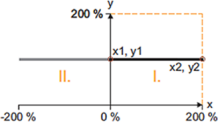
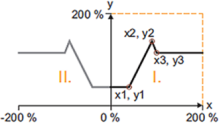
The characteristic can consist of up to five interpolation points which are defined by the arrays of alrXValues and alrYValues .
Between the points a linear interpolation takes place.
The characteristic is selected for quadrant I. and is mirrored at the y axis.
The same array numbers of alrXValues[n] and alrYValues[n] correspond to one pair of values/interpolation point (X n , Y n ).
The first pair of values ( alrXValues[1] and alrYValues[1] ) always applies.
The X values of the characteristic must be entered in ascending order (X1 < X2 < ... < X5).
If the ascending chain of X values is interrupted, this corresponds to the end of the characteristic (see the following examples).
Based on the pair of values that was valid last, extrapolation takes place on both sides.
|
|
1 |
2 |
3 |
4 |
5 |
|---|---|---|---|---|---|
|
X |
0 % |
100 % |
0 % |
0 % |
0 % |
|
Y |
100 % |
100 % |
0 % |
0 % |
0 % |
|
|||||
Example 1 (standard setting)
|
|
1 |
2 |
3 |
4 |
5 |
|---|---|---|---|---|---|
|
X |
40 % |
90 % |
100 % |
0 % |
0 % |
|
Y |
40 % |
140 % |
115 % |
0 % |
0 % |
|
|||||
Example 2
A reduced controller dynamics at low system deviations serves to have a positive effect on the damping behaviour of the control loop.
A tolerance zone within which the system deviation is transferred to the controller with a lower gain can be set via the lrRedRange input.
The percentage to which the gain is to be reduced within the tolerance zone specified is set in lrRedGain .
The lrInfluence input serves to evaluate the lrOut controller output in percent. The output signal evaluated is provided at lrOutRed .
The lrSetValue input setpoint can be led via a ramp function generator with linear ramps to prevent setpoint step-changes at the input.
The positive and negative acceleration for the ramp generation are set in lrAcc and lrDec .
In the standard setting, the ramp function generator is deactivated.
By setting the xLoadActValue input to TRUE, the ramp function generator is initialised with the value pending at the lrActValue input. This produces a zero system deviation.
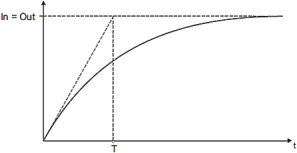
The actual value lrActValue that is loaded by setting xLoadActValue to TRUE can be controlled via a PT1 filter.
The filter time T is set via the lrDelayTime input.
In the standard setting, the filter is deactivated.
|
PT1 filter function