Description of the lrTorqueOverride input

 How to use the lrTorqueOverride input during the commissioning phase:
-
lrTorqueOverride input = 0%
-
Compare the lrSetTorqueOut feedforward control torque with the actual lrActTorque axis torque (for typical axis movements, use the trace)
-
In case of almost identical curves:
-
Switch on feedforward control step by step, e.g. in 10 % steps
-
Check effectiveness on the basis of the following error
-
In case of non-identical curves:
-
Check the system parameters provided at the FB.
-
Pay attention to correct units.
-
Pay attention to the reference to the gearbox output.
In case of not enough known system parameters, it is possible during the normal operating phase to adapt the calculated feedforward control torque to the actually existing axis torque. Depending on the application, it may be sensible for reaching a minimum following error to calculate only a part of the axis torque (e.g. 80 %) by the feedforward control.
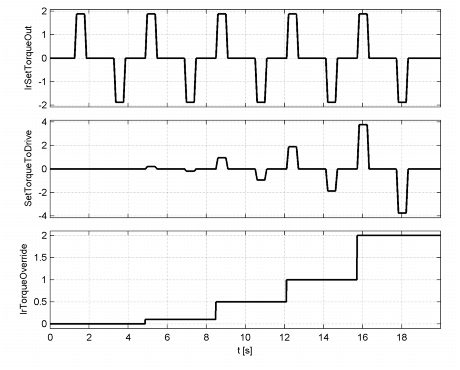
The following example shows the curve
- of the lrSetTorqueOut feedforward control torque and
- the SetTorqueToDrive setpoint torque transmitted to the axis during a continuous movement
The override value, input lrTorqueOverride, was increased stepwise from 0% to 200% in this process:
|