Homing mode (HomeMode)
For the HomeMode enumeration type, the following constants (INT) are defined:
|
Name |
Initial value
|
Signals/sensors evaluated |
|||
|---|---|---|---|---|---|
|
TP sensor / encoder zero pulse |
xLimitSwitchNeg |
xLimitSwitchPos |
Reference switch HomeAbsSwitch |
||
|
SetPositionDirect |
0 |
Directly set reference
|
|||
|
1 |
|
|
|
|
|
|
2 |
|
|
|
|
|
|
3 |
|
|
|
|
|
|
5 |
|
|
|
|
|
|
17 |
|
|
|
|
|
|
18 |
|
|
|
|
|
|
19 |
|
|
|
|
|
|
21 |
|
|
|
|
|
|
33 |
|
|
|
|
|
|
34 |
|
|
|
|
|
|
SetPositionInAnyState |
97 |
Set reference position directly, independent of the state of the axis (even with controller inhibit or a movement) |
|||
|
SetOffsetInAnyState |
98 |
Set reference offset directly, independent of the state of the axis (also in case of controller inhibit or a movement) |
|||
|
ResetHomeInfo |
99 |
The "Reference known" state is reset. |
|||
|
-2 |
Positive direction to torque limit. |
||||
|
-1 |
Negative direction to torque limit. |
||||
|
DriveBased |
100 |
Use homing mode of the drive
Note: If the selected homing mode is not supported by the drive, the general error message "Home_WriteHomeParameter" is generated due to the incorrect SDO access. Solution: Use a homing mode supported by the drive (see documentation of the inverter). |
|||

In the following sections, the procedures of the homing modes are described.
HomeMode 1: CcwLimitSwitchCwTP
|
Negative direction - reversing to limit switch - to touch probe 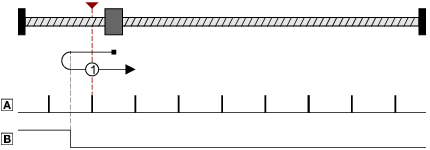
|


Procedure:
- Movement in negative direction with profile data set 1.
- Reversing to negative travel range limit switch and change-over to profile data set 2.
- Negative edge of the travel range limit switch activates touch probe recognition.
- The following positive edge of the encoder zero pulse/touch probe sensor sets the reference.
- Further action ( HomeStopMode ) can be selected:
- Drive stops (default setting)
- Relative positioning by a set target position.
- Absolute positioning to a set target position.
HomeMode 2: CwLimitSwitchCcwTP
|
Positive direction - reversing to limit switch - to touch probe 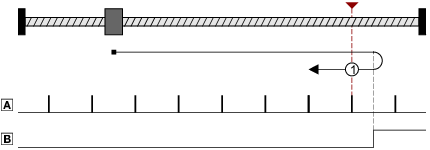
|
Procedure:
- Movement in positive direction with profile data set 1.
- Reversing to positive travel range limit switch and change-over to profile data set 2.
- Negative edge of the travel range limit switch activates touch probe recognition.
- The following positive edge of the encoder zero pulse/touch probe sensor sets the reference.
- Further action ( HomeStopMode ) can be selected:
- Drive stops (default setting)
- Relative positioning by a set target position.
- Absolute positioning to a set target position.
HomeMode 3: CwRpCcwRnTP
|
Positive direction - reversing to reference switch - negative edge of reference switch - to touch probe 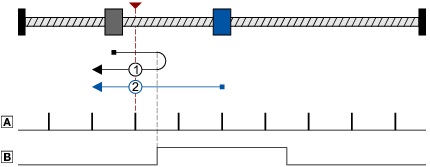
|
Procedures:
Case 1:
Axis has not activated reference switch yet:
- Movement in positive direction with profile data set 1.
- Reversing with positive edge of the reference switch and change-over to profile data set 2.
- Negative edge of the reference switch activates touch probe recognition.
- The following positive edge of the encoder zero pulse/touch probe sensor sets the reference.
- Further action ( HomeStopMode ) can be selected:
- Drive stops (default setting)
- Relative positioning by a set target position.
- Absolute positioning to a set target position.
Case 2:
Axis is already positioned on reference switch:
- Movement in negative direction with profile data set 2.
- Negative edge of the reference switch activates touch probe recognition.
- The following positive edge of the encoder zero pulse/touch probe sensor sets the reference.
- Further action ( HomeStopMode ) can be selected:
- Drive stops (default setting)
- Relative positioning by a set target position.
- Absolute positioning to a set target position.
HomeMode 5: CcwRpCwRnTP
|
Negative direction - reversing to reference switch - negative edge of reference switch - to touch probe 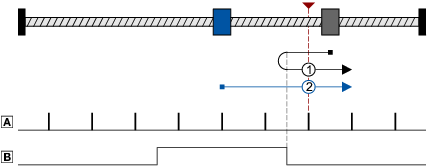
|
Procedures:
Case 1:
Axis has not activated reference switch yet:
- Movement in negative direction with profile data set 1.
- Reversing with positive edge of the reference switch and change-over to profile data set 2.
- Negative edge of the reference switch activates touch probe recognition.
- The following positive edge of the encoder zero pulse/touch probe sensor sets the reference.
- Further action ( HomeStopMode ) can be selected:
- Drive stops (default setting)
- Relative positioning by a set target position.
- Absolute positioning to a set target position.
Case 2:
Axis is already positioned on reference switch:
- Movement in positive direction with profile data set 2.
- Negative edge of the reference switch activates touch probe recognition.
- The following positive edge of the encoder zero pulse/touch probe sensor sets the reference.
- Further action ( HomeStopMode ) can be selected:
- Drive stops (default setting)
- Relative positioning by a set target position.
- Absolute positioning to a set target position.
HomeMode 17: CcwLimitSwitch
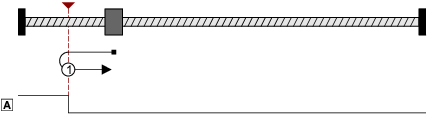
Procedure:
- Movement in negative direction with profile data set 1.
- Reversing to negative travel range limit switch and change-over to profile data set 2.
- The following negative edge of the travel range limit switch sets the reference.
- Further action ( HomeStopMode ) can be selected:
- Drive stops (default setting)
- Relative positioning by a set target position.
- Absolute positioning to a set target position.
HomeMode 18: CwLimitSwitch
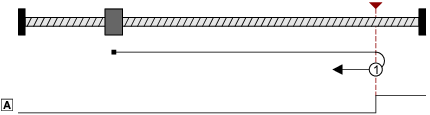
Procedure:
- Movement in positive direction with profile data set 1.
- Reversing to positive travel range limit switch and change-over to profile data set 2.
- The following negative edge of the travel range limit switch sets the reference.
- Further action ( HomeStopMode ) can be selected:
- Drive stops (default setting)
- Relative positioning by a set target position.
- Absolute positioning to a set target position.
HomeMode 19: CwRpCcwRn
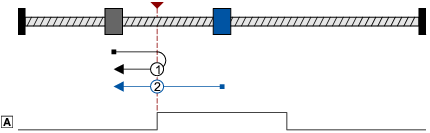
Case 1: Axis has not activated the reference switch yet:
- Movement in positive direction with profile data set 1.
- Reversing with positive edge of the reference switch and change-over to profile data set 2.
- Negative edge of the reference switch sets reference.
- Further action (HomeStopMode) can be selected:
- Drive stops (default setting)
- Relative positioning by a set target position.
- Absolute positioning to a set target position.
Case 2: Axis is already positioned on the reference switch
- Movement in negative direction with profile data set 2.
- Negative edge of the reference switch sets reference.
- Further action (HomeStopMode) can be selected:
- Drive stops (default setting)
- Relative positioning by a set target position.
- Absolute positioning to a set target position.
HomeMode 21: CcwRpCwRn
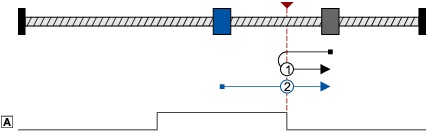
Case 1: Axis has not activated the reference switch yet:
- Movement in negative direction with profile data set 1.
- Reversing with positive edge of the reference switch and change-over to profile data set 2.
- Negative edge of the reference switch sets reference.
- Further action (HomeStopMode) can be selected:
- Drive stops (default setting)
- Relative positioning by a set target position.
- Absolute positioning to a set target position.
Case 2: Axis is already positioned on the reference switch:
- Movement in positive direction with profile data set 2.
- Negative edge of the reference switch sets reference.
- Further action (HomeStopMode) can be selected:
- Drive stops (default setting)
- Relative positioning by a set target position.
- Absolute positioning to a set target position.
HomeMode 33: CcwTP
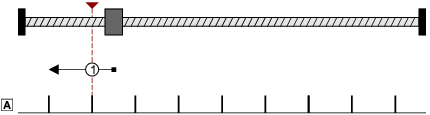
Procedure:
- Movement in negative direction with profile data set 1 and activation of the touch probe recognition.
- The following edge set for the touch probe sensor sets the reference.
- Further action ( HomeStopMode ) can be selected:
- Drive stops (default setting)
- Relative positioning by a set target position.
- Absolute positioning to a set target position.
HomeMode 34: CwTP
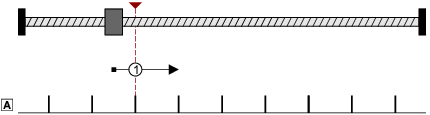
Procedure:
- Movement in positive direction with profile data set 1 and activation of the touch probe recognition.
- The following edge set for the touch probe sensor sets the reference.
- Further action ( HomeStopMode ) can be selected:
- Drive stops (default setting)
- Relative positioning by a set target position.
- Absolute positioning to a set target position.
HomeMode -1: CcwTorqueLimit

Procedure:
- Movement in negative direction with reduced torque and profile data set 1.
- The reference is set if the two following conditions for the blocking time set are met at the same time:
- Current speed is lower than the threshold set for standstill recognition.
- Current torque is higher than the torque limit set ("Homing to end stop").
- Further action ( HomeStopMode ) can be selected:
- Drive stops (default setting)
- Relative positioning by a set target position.
- Absolute positioning to a set target position.
HomeMode -2: CwTorqueLimit

Procedure:
- Movement in positive direction with reduced torque and profile data set 1.
- The reference is set if the two following conditions for the blocking time set are met at the same time:
- Current speed is lower than the threshold set for standstill recognition.
- Current torque is higher than the torque limit set ("Homing to end stop").
- Further action ( HomeStopMode ) can be selected:
- Drive stops (default setting)
- Relative positioning by a set target position.
- Absolute positioning to a set target position.