L_MC4P_PathRefFromFile
This function block (FB) reads an existing path file (*.txt) and makes the "MC_PATH_REF" data available to the application. The FB is an interface of type MC_PATH_REF and can be connected directly to an input of type MC_PATH_REF of another FB, e.g. via the PathData input of the FB MC_MovePath.
Inputs
|
|
|
|
L_MC4P_PathRefFromFile |
|
|
|
|
|---|---|---|---|---|---|---|---|
|
BOOL |
- |
xExecute |
xDone |
- |
BOOL |
||
|
STRING |
- |
sFileName |
xBusy |
- |
BOOL |
||
|
BOOL |
- |
xAbort |
xDecoding |
- |
BOOL |
||
|
DWORD |
- |
dwSkipMask |
xCommandAborted |
- |
BOOL |
||
|
LINT |
- |
iBlockSearchLineNo |
|
xError |
- |
BOOL |
|
|
|
|
|
eErrorID |
- |
L_IE1P_Error |
||
|
|
|
|
liLineNoDecoded |
- |
INT |
||
|
|
|
|
|
sLineDecoded |
- |
STRING |
|
|
|
|
|
|
|
|
|
|
|
Name Data type |
Info/adjustment options |
|
|---|---|---|
|
xExecute BOOL |
FALSE ä TRUE |
The rising edge of the xExecute input starts the reading and decoding of the file from the sFileName input. |
|
sFileName STRING |
Name of the railway file The path file is a sequence of motion tasks with boundary conditions that is stored in an ASCII file on the controller. Please use the standard extension *.lpp for the file name, these letters stand for 'LenzePathProfile'.
How to save and access a path file is described in the sections
Tip: Once decoding is complete(xDone = TRUE), another path file defined via sFileName can be appended to xExecute with a new rising edge. In this way, several files can be run one after the other. |
|
|
xAbort BOOL |
FALSE ä TRUE |
Cancel processing of the FB |
|
dwSkipMask DWORD |
Bit-coded control input for blanking levels. |
|
|
iBlockSearchLineNo LINT |
Input = 0 : block search is deactivated (default) Input <> 0 : Linenumber of the block
|
|
Outputs
|
Name Data type |
Value/meaning |
|
|---|---|---|
|
xDone BOOL |
TRUE |
Processing is complete |
|
xBusy BOOL |
TRUE |
Processing in progress. |
|
xDecoding BOOL |
TRUE |
Decoding of the ASCII file is active. |
|
FALSE |
The decoding of the web file was stopped because:
Tip: A maximum of 30 driving jobs can be prepared in advance. |
|
|
xCommandAborted BOOL |
TRUE |
The decoding of the ASCII file was cancelled because:
|
|
xError BOOL |
TRUE |
An error has occurred. See ErrorID for details. |
|
eErrorID |
If Error= TRUE: Error number for the error that has occurred. Reference manual "FAST technology modules": Here you will find information on error or warning messages. |
|
|
liLineNoDecoded INT |
Display of the currently decoded line number from the ASCII file
|
|
|
sLineDecoded STRING |
Display of the programme line that has already been decoded. Different display in the event of a syntax error: If a syntax error is contained in a programme line, only this will be displayed. Check for the following syntax errors in the programme:
|
|
Saving a path file on the control unit
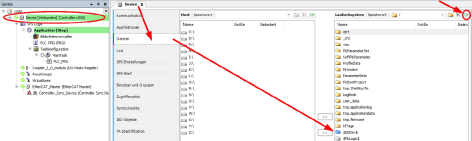
It is possible to access the SD card directly via the "PLC Designer". Save the path file you have created in this directory, depending on the type of Lenze controller:
|
Lenze controller with Windows CE operating system, e.g. c3200: /USBStorage/IPC/PLC/MovePathData/
Lenze controller with Linux operating system, e.g. c5xx: /sdcard/plc/MovePathData/
|
|---|

Access to the railway file
The path file is accessed via L_MC4P_PathRefFromFile.sFileName:
- When using the standard extension *.lpp, it is sufficient to enter the file name here without specifying the path. Example:
- If the file extension is different (e.g. Path2.txt), you must also specify the complete access path. Example on a c5xx:
Cyclical call by the PLC programme
- The FB must be called cyclically if the ASCII file is read or decoded while the application is running.
- The FB does not have to be called cyclically when the decoding of the ASCII file has been completed.
Linking the FB
The FB can be connected directly to an input (type MC_PATH_REF) of another FB.
Example:
-
MC_MovePath.PathData:= L_MC4P_PathRefFromFile1
Link to the PathData input of the FB MC_MovePath
Transfer programme for decoding
The programme is transferred via the sFileName input. The name of the programme is expected at the sFileName input in the STRING data type.
The programme should be stored on the controller under the path "USBStorage\IPC\PLC\MovePathData", alternatively on the SD card under "\IPC\PLC\MovePathData\".
Starting decoding
The operator can track the current status of the ASCII file processing via the liLineNoDecoded output. The liLineNoDecoded output shows which line number is currently being decoded in the ASCII programme at address "N" (e.g. N010).
The decoding of an ASCII file is started via the rising edge of the xExecute input. The xDecoding output is set as long as the decoding of the ASCII file is running in the background. A maximum of 30 motion tasks can be prepared in advance. In this case, decoding is stopped and the output xDecoding= FALSE is set. The subsequent movement orders are processed one after the other as soon as the existing movement orders have been processed by MC_MovePath.
Prepare several programmes
By using several instances of the FB L_MC4P_PathRefFromFile, it is possible to decode several path files without interruption and to run them via MC_MovePath.
The decoding of the programme has a lead time of up to 30 travel orders compared to the interpolation in the MC_MovePath.
When the path file has been decoded to the end, the output xDone= TRUE is set. At this time, the already decoded motion tasks are interpolated by MC_MovePath.
With the status xDone= TRUE, a new or the same path file can be sent to the input sFileName and with the rising edge xExecute for decoding.
The FB L_MC4P_PathRefFromFile decodes the travel orders and appends them to the travel orders from the last path file.
In the MC_MovePath, the movement orders from the old path file and the movement orders from the new path file are interpolated as a whole without interruption.
Syntax according to DIN 66025
A path file is an ASCII file that is stored in the controller's memory. The path file contains commands and instructions that describe a path for a kinematic system. This chapter explains the programming syntax of the path file "PathFile". The programme structure and the commands and instructions required to define a path are described.
Structure of a programme
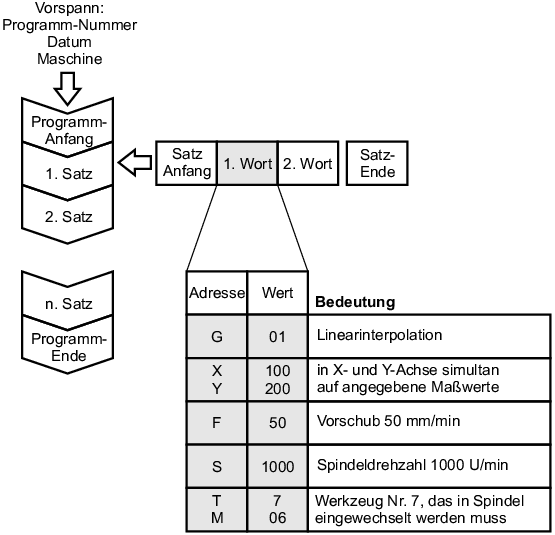
The ASCII interpreter decodes the intended words in the syntax according to DIN-66025, which means that the structure of the programme in the ASCII file is fixed.
A programme starts when a start character is read. If such a start character is missing in the entire programme, the programme starts with the first line of decoding.
Decoding is terminated when an end character is read. If an end character is missing in the programme, the programme ends with the last line.
A sentence consists of several words and an end-of-sentence character. The end-of-sentence character is the so-called line break character, which is invisible in the text editor.
The words are separated from each other by a space or tab. A word always consists of an address and a numerical value. For example, the word for the line number "N10" is made up of the address "N" and the numerical value "10". Leading zeros are always ignored, i.e. N0010 and N10 are equivalent.
The decoding of addresses and other syntax is not case-sensitive, i.e. n10 and N10 are treated equally.
Each word has a self-holding function. This means that if an address letter is given a numerical value, this value remains valid until the value is changed. The number of words in a block is not limited according to the standard. Furthermore, any words may be programmed in any combination in a block. The block length may contain a maximum of 255 ASCII characters including comments.
If there are ambiguous statements such as a circular interpolation and a straight line interpolation in a record, this case is interpreted as a syntax error.
|
|
Structure of a programme
Syntax check
The syntax is checked at runtime during decoding. This means that a syntax error is only recognised when the corresponding line is read and decoded in a motion task.
A syntax error is interpreted in the following cases:
-
An invalid word/command appears in the programme
-
No separators introduced between words
-
ambiguous instructions are programmed in a block (e.g. circle and straight line interpolation)
-
an invalid variable name is read.
In the event of a syntax error, the output xError= TRUE is switched and the corresponding error identification is output via the output eErrorID. The line in which the syntax error was interpreted is displayed without comments at the sLineDecoded output. The corresponding line number is output at the liLineNoDecoded output.
Programme start and start signal
The start character is defined as a percentage sign (%) in the DIN 66025 standard. The start character can be preceded by any information and text. A programme starts when a start character is read. If such a start character is missing in the entire programme, the programme starts with the first line of decoding.
End of programme
The end of the programme is marked with a function command. There are three ways to end a programme. The programme is ended with the command word "M2" or "M30". All lines after the end of the programme are no longer read and decoded. If there is no command to end the programme, the programme ends with the last line in the ASCII file.
Comments
A comment is written between two round or curly brackets. A complete sentence can be commented out with the slash character (/). Each comment is skipped and not decoded.
The following example shows the use of comments in a programme:
-
(Programme) (Comment)
-
%(Programme Max) (start of programme)
-
/N000 G01 X100 F100 NC block with comments
-
N001 G01 X200 (Y100) Z100 (Y100 is commented out)
-
N002 G02 X300 R50(Radius=50mm) (So a comment can be used to describe the words)
Exceptions are mathematical expressions within the line. In this case, slashes and brackets are mathematical characters. Comments within mathematical expressions are therefore not permitted.
Control skip levels via dwSkipMask
A fade-out level is a comment that can be activated/deactivated from within the application. A fade-out level consists of a "/" followed directly (no space or other ASCII character) by an integer number from 0 ... 31 or a variable that returns a value from 0 ... 31. By setting dwSkipMask.<x> := TRUE, all lines marked with /<x> are treated as comments and hidden, as shown in the following example:
-
%(Programme Max) (start of programme)
-
N000 G01 X100 F100
-
(The following line N001 is executed if dwSkipMask.3 := FALSE)
-
(The following line N001 is hidden if dwSkipMask.3 := TRUE)
-
/3 N001 G01 X200 Y100 Z100
-
N002 G02 X300 R50
dwSkipMask is read by the FB at the time of decoding the respective line and can therefore also be changed at runtime.When adjusting the skip layers at runtime, it is strongly recommended to ensure the synchronization of decoding and application via an acknowledged-interpreter stop (G75).
Hiding levels can be positioned anywhere within a line.
Several different fade-out levels can be used within the same line.
Invalid skip level syntax (e.g. outside the value range /38 N001 G1 X0 Y0) is evaluated as a normal comment and always completely ignored.
Variables (e.g. /$Var1$ N001 G1 X0 Y0) can be used as a masking level, but not equations.
Start set search
The start block search enables an NC programme with N words to be executed from a defined line number.
Typical applications include testing partial sections of NC programmes or continuing programme execution after an interruption.
It is also possible to perform a syntax check of the NC programme before interpolation using the start block search function
When searching for the start block, it is necessary to restore the entire programme context of the PLC programme, i.e. the configuration commands (M commands, loop off/on, other movement parameters, etc.) are also taken into account before the start block as in normal operation. Only the movement commands (G00 ... G04) are ignored or not interpolated during the start block search.
M functions requiring acknowledgement must also be acknowledged on the MC_MovePath before the start record.
Using the start record search
The start record search is operated via the FBs L_MC4P_PathRefFromFile and MC_MovePath.
The input L_MC4P_PathRefFromFile.liBlockSearchLineNo is used to specify the line number from which the NC programme is to be interpolated. Until the specified line number is found, all NC commands are marked by the L_MC4P_PatzhRefFromFile with an internal identifier. In FB MC_MovePath, all commands marked in this way are processed without interpolation.
If the start block is found, this is output at MC_MovePath.SourceLine, together with the status MC_MovePath.WaitingForAckBlockSearch. If the start of the programme is acknowledged at MC_MovePath.AckBlockSearch, processing of the NC programme begins from the start block found.
-
Checking the syntax of an NC programme without movement.
-
By specifying a line number that does not occur in the NC program (e.g. L_MC4P_PathRefFromFile.liBlockSearchLinNo := -1), a complete NC program can be decoded without moving the axis group and thus checked for syntax errors.
Properties of the start record search
-
To use the start block search, the NC programme must be provided with unique line numbers Nxxx.
-
Modally effective commands (e.g. G90/G91: absolute / relative positioning, coordinate words X, Y, Z, ..., the selection of a coordinate system, etc.) that are specified before the start record are taken into account accordingly when the file is run from the start record.
-
M functions requiring acknowledgement are also output before the start record and must be acknowledged on the MC_MovePath.
-
The first occurrence of the specified line number Nxxx in the *.lpp file is found and selected. It is strongly recommended that the N words for this are assigned monotonically in ascending order and are unique.
-
During the start block search, subroutine calls and GOTO commands are executed as if the movement commands were being executed normally. Exception: Jump conditions that are dependent on axis variables (e.g. actual positions).
-
The start block can also be specified within a sub-programme.
-
If no start record is found (e.g. no N-words in the NC file or the start record liBlockSearchLineNo is negative or greater than the largest N-word in the NC file), the MC_MovePath reports Done := TRUE, as the entire file has been processed.
-
The start record search can also be combined with the single-step mode of the MC_MovePath. In this case, records are automatically acknowledged before the start record.
Geometric instructions
All location and orientation information in coordinate space is referred to as geometric instructions. All geometric data is defined in the DIN-66217 standard.
Coordinate system according to DIN-66217:
-
A Cartesian right-hand coordinate system is used. The linear axes are defined with the variables X, Y, Z and the rotary axes with the variables A, B and C. The A axis describes the rotation around X, the B axis around Y and the C axis around Z. The sequence of rotations is specified in the parameterization of the axes group.
-
AUX1 to AUX6 describe coordinates for the auxiliary axes of the kinematics. The address letters U, V, and W can alternatively be used to describe coordinates for the auxiliary axes Aux1 to Aux3 of the kinematics.
-
The interpolation in the X, Y and Z directions is defined with the variables I, J and K. The addresses are used accordingly in the DIN-66025 standard. The number after the axis is assigned directly to the address as the value of the axis.
Location and orientation:
-
The geometric instructions are necessary for orientation in space.
-
The coordinates are specified according to the standard with the address letters (X, Y, Z, A, B, C, U, V, W), which are defined in DIN-66217, and the coordinate value.
-
The negative sign of a value must be specified after the address letter and before the value.
-
The positive sign for the positive values can be omitted. The coordinate value is a floating point number. A dot (.) is used as the decimal separator.
The following example defines a location in space:
|
X100 Y-25 Z10.54 (corresponds to the coordinate point X= 100Unit, Y= -25Unit and Z=10.54Units) |
Layer selection
According to the standard, a plane specification is required for a specific movement instruction. A total of three basic planes are defined with normal vectors in the X, Y and Z directions. The X-Y plane is selected with the G17 word, the X-Z plane with the G18 word and the Y-Z plane with the G19 word.
Absolute and relative dimensions
According to the standard, it is possible to switch between absolute and relative dimensions. With the word G90, all specifications are specified as absolute values. With the word G91, the values are specified as relative values. The dimensional specifications with the words G90 and G91 refer to the coordinates: X, Y, Z, A, B, C, U, V, W.
The following example shows the difference between absolute and relative measurements:
-
N010 X100 (X = 100 units)
-
N020 G90(Absolute) X200 (X = 200 units)
-
N030 G91(Relative) X300 (X = 200 + 300 = 500 units)
If a G91 word is called, the values are specified in relative terms, i.e. the specified values are added to the current values. If no G90 or G91 words exist in a programme, the G90 word is activated by default for the absolute measurement. The order of the words within a block is irrelevant. The words G90 and G91 can be written anywhere in the sentence. If the words G90 and G91 are within a sentence, this is interpreted as a syntax error. For the interpolation coordinates I, J and K, separate words G98 and G99 are used for the absolute or relative dimensions. The word G98 is used to specify the absolute dimension for I, J and K independently of the dimension of the main coordinates. The word G99 is also used for the relative dimension specification independently of the dimension specification of the main coordinates.
Driving instructions Straight line interpolation
A straight line is uniquely defined by two locations. The starting point of a straight line results from the target position of the previous sentence. The end point of a straight line must be specified with the corresponding word and the coordinates. A distinction is made between "straight line interpolation with rapid traverse speed" and "straight line interpolation with feed rate".
Rapid traverse speed: The interpolation with rapid traverse speed is programmed with the word G0. The coordinates of the destination must be specified in a block with the word G0. The interpolation between the start and end position is carried out as a point-to-point movement (PTP). This means that the contour of the straight line between the start and end points is left. The destination is reached as quickly as possible. All axes arrive at the destination at the same time. The axis data (AXIS_REF) of the axes concerned is used for the "Speed", "Acceleration", "Deceleration" and "Jerk" parameters.
-
N010 G0 X100 Y50 Z30 (The position X = 100, Y= 50 and Z=30 is approached directly with rapid traverse)
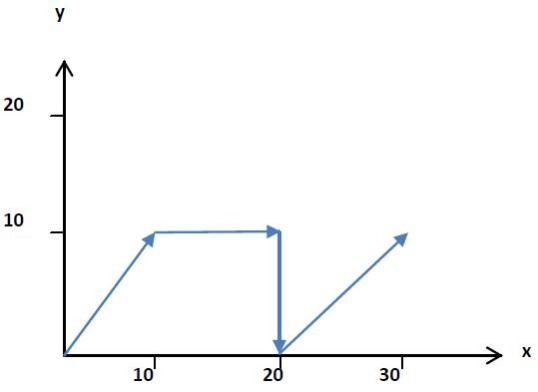
Feed rate (linear): The word G1 stands for linear interpolation with feed rate. The feed rate, acceleration and deceleration defined by the programme are used here. All technological instructions such as grinding in the corners are taken into account. The start point is determined by the previous information and the end point must be specified in a block with the G1 word. Several consecutive G01 blocks create a polygon course that can be travelled in different ways depending on the requirements of the technological instructions. For example, the corners in the points can be ground with the word G51.
-
N010 G1 X10 Y10 G91(relative)
-
N020 G1 X20 G90(absolute)
-
N030 G1 Y0
-
N040 G1 X10 Y10 G91(relative)
|
|
Driving instructions Straight line interpolation
Driving instructions Circular interpolation
A circular interpolation must be programmed in a block using either the G2 word or the G3 word. The G2 word stands for a clockwise arc and the G3 word for an anti-clockwise arc. A maximum of one circular rotation can be programmed in a block.
The end point of the arc is determined using the X, Y and Z coordinates. The specification of the end point can be programmed relatively with the G91 word or absolutely with the G90 word.
It is also necessary to program the centre point or radius for the circular arc. The centre point is specified via the interpolation coordinates I, J and K. The address I defines the X direction, J the Y direction and K the Z direction of the centre point. If nothing else is defined, the interpolation coordinates are always defined as a relative position to the starting point. The interpolation coordinates have a relative reference to the starting point of the arc with the word G99. The word G98 is used to define the absolute point in the coordinate system for the centre point via the interpolation coordinates. As an alternative to the centre point, the radius of a circle can be specified in the address R.
By selecting a plane, the arc is placed in the plane accordingly. The X-Y plane is specified with G17, the X-Z plane with G18 and the Y-Z plane with G19. If there is no plane selection in the program, the plane is spanned by default from the starting point of the arc to the centre point via the I, J and K coordinates. The plane is thus defined by the starting point and the centre point.

|
Note:
If the target point and the center are specified for a circular path, this may result in ambiguous circle radii due to the given starting point. Typically, the accuracy depends on the number of decimal places of the coordinate words x, y, z and i, j, k. The radii are checked for equality using a tolerance. If necessary, an error may be issued in L_MC4P_PathRefFromFile. The value of the tolerance can be read and adjusted via the property L_MC4P_PathRefFromFile.SetCircTargetTolerance. |
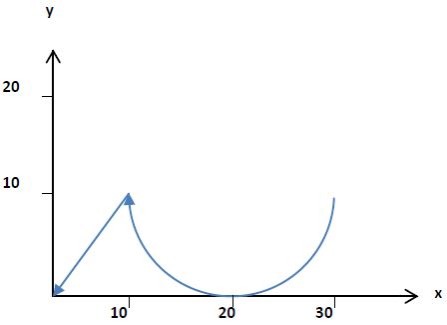
Example 1 for circular interpolation:
-
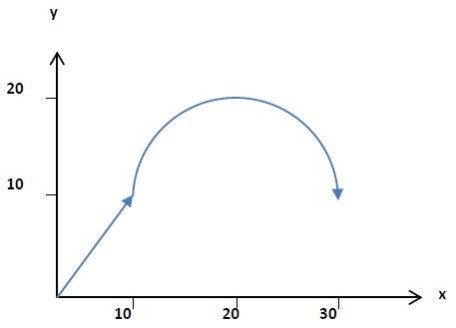
N010 G0 X10 Y10 G90(Absolute)
-
N020 G2(circle URZ) G17(X-Y-plane) X30 Y10 I10(X_centre) J0(Y_centre)
|
|
Example 2 for circular interpolation:
-
N030 G2 X10 Y10 R10(radius)
-
N040 G0 X0 Y0
|
|
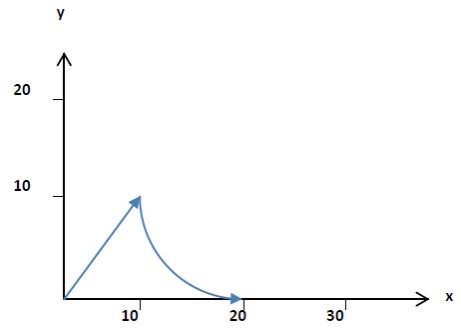
Example 3 for circular interpolation:
-
N050 G1 X10 Y10
-
N030 G3 X20 Y0 R10(radius)
|
|
Example
Example 4 for circular interpolation:
|
|
Note!
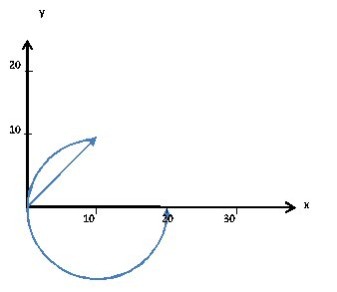
The G16 ijk mode is interpreted in accordance with the PLC-Open standard. The position of the centre point in radius mode is not unique. According to the convention, the choice of the centre point is determined by the direction of the ijk vector. This cannot be supported with G17 as the normal vector points in the positive z direction. The shorter arc is always selected for G17 (analogue for G18/G19). This is why the circles in example 3 and example 4 differ. |
|
N040 G16 I0 J0 K1 N050 G1 X10 Y10 N030 G3 X20 Y0 R10(radius) |
|
|
Example
Example code for circles on any level:
/automatic created File: Here is a descriptive text!
3D circles
G-CODE ACCORDING TO DIN 62012
Programme start:
-
%(3D circles)
-
N001 F50 E+1000 E-1000
-
N002 G50 G98(circular interpolation, I, J, K absolute)
-
N003 G0 X0 Y0 Z0
-
N004 G16 I0 J0 K1 (normal vector in +Z direction ==> XY plane)
-
N005 G2 X100 Y100 Z0 R100 (1st quarter circle XY)
-
N006 G0 X0 Y0 Z0
-
N007 G16 I0 J0 K-1 (normal vector in -Z direction ==> XY plane)
-
N008 G2 X100 Y100 Z0 R100 (2nd quarter circle XY)
-
N009 G0 X0 Y0 Z0
-
N010 G16 I0 J0 K1 (normal vector in +Z direction ==> XY plane)
-
N010 G2 X200 Y0 Z0 R100 (3rd 180 degree circle XY)
-
N012 G0 X0 Y0 Z0
-
N013 G16 I0 J1 K1 (normal vector in +Y/+Z direction)
-
N014 G2 X100 Y70.71 Z-70.71 R100 (4th quarter circle tilted)
-
N015 G16 I0 J1 K1 (normal vector in +Y/+Z direction)
-
N016 G2 X200 Y0 Z0 R100 (continue 5th quarter circle tilted)
-
N017 G0 X0 Y0 Z0
Dwell time
The dwell time in a line is programmed with the word G04. The time is defined with the numerical value under address T. The numerical value is specified in seconds [s]. In the following example, a dwell time of 20 s is programmed.
|
% (start of programme) N001 G01 X200 Y100 Z100 (approaching a position) N002 G04 T20 (dwell time of 20s) N003 M02 (end of programme) |
The interpolation of the path is held at the programmed point for 20 s.
M functions
Machine functions are used to synchronise the processing of the NC program with the PLC.
Syntax: /N001 Myyy
With yyy = 0....65499 (Word).
|
Type of M function |
Value range |
Abbreviation |
Procedure |
|---|---|---|---|
|
Without synchronisation |
xx100 ... xx199 |
MOS |
Message from the M function at the start of the record, no acknowledgement required |
|
Message at record start, acknowledgement at record start |
xx200 ... xx299 |
MVS_SVS |
Reporting the M function and waiting for the acknowledgement when starting the record |
|
Message at record start, acknowledgement at record end |
xx300 ... xx399 |
MVS_SNS |
Message from the M function at the start of the block Wait for the acknowledgement at the end of the block, i.e. after reaching the target position of the route |
|
Message at end of record, acknowledgement at end of record |
xx400 ... xx499 |
MNS_SNS |
Signalling the M function and waiting for the acknowledgement at the end of the block, i.e. after reaching the target position of the route |
|
End of programme |
M2, M30 |
|
The M functions M2 and M30 are equivalent and end the programme, if necessary also from a sub-programme |
|
Sub-programme end |
M17, M29 |
|
The M functions M17 and M29 are equivalent and end the sub-programme. The calling programme level is returned to and continued. |
|
Other M functions |
|
M function not supported |
Syntax error message of the ASCII interpreter. |
An M function is assigned to a type via the number of the M function.
M functions not requiring acknowledgement (Mxx100 ... Mxx199)
M functions that do not require acknowledgement are abbreviated to MOS. In a travel order, an MOS does not cause the train to stop. The MOS is only displayed as long as the travel order is being travelled.
Example 1:
-
% (start character)
-
N010 G51 D10 (grinding activated)
-
N020 G01 X100 Y100 Z0 (approaching a position)
-
N030 G01 Y200 M103 (approaching a position)
-
N040 G01 X200 (moving to a position)
-
N050 M02 (end of programme)
In example 1, the target positions are approached one after the other. The corner points are ground with an overshoot radius of 10. The M103 function is activated when the target point is approached from line N030. It is active until the contouring from block N030 is interpolated into block N040. The M function does not stop the path at the transition from block N030 to block N040.
If an MOS stands alone in a block (without a travel order), this is interpreted as a stopping point. The railway stops for one PLC cycle in this block and then continues with the following block.
Example 2:
-
% (start character)
-
N010 G51 D10 (activated during sleep)
-
N020 G01 X100 Y100 Z0 (approaching a position)
-
N030 M103 (MOS)
-
N040 G01 Y200 (moving to a position)
-
N050 G01 X200 (moving to a position)
-
N060 M02 (end of programme)
In example 2, the target positions are also travelled to one after the other. After reaching the target position from line N020, the path is stopped for one PLC cycle in block N030. The M function M103 is displayed for this one PLC cycle. The path then continues with the following block.
Parallel active M-functions
A maximum of 10 M functions may be active in parallel in a set and only one of these M functions may be subject to acknowledgement. There is no restriction on the maximum number of M functions in separate sets.
Example 3:
-
% (start character)
-
N010 G01 X100 Y100 Z0 (moving to a position)
-
N020 M101 (M function message, no acknowledgement)
-
N030 M10 (M function message, no acknowledgement)
-
N040 G01 Y200 M104 M105 (moving to a position)
-
N050 G01 X200 (moving to a position)
-
N090 M02 (end of programme)
In example 3, blocks N020 and N030 are each stopped for one PLC clock cycle in order to display the M functions M101 and M102.
Two parallel M functions (M104 and M105) are activated with the N040 record. Only one active M function is displayed on the MC_MovePath via the MFunction output.
An additional function block is required for the parallel representation of the M functions: The FB L_MC4P_MFunctionFromPathRef is connected in parallel to MC_MovePath with the PathRef. The M function is called via the wMCommand specification at the input of the FB L_MC4P_MFunctionFromPathRef. The status of the defined M function is displayed at the output of the FB.
M functions requiring acknowledgement
Several M functions requiring acknowledgement can be used in one transport order. However, only one M function requiring acknowledgement is permitted per record. This means that no M functions requiring acknowledgement are permitted in parallel.
If two M functions requiring acknowledgement are programmed in one record, the FB L_MC4P_PathRefFromFile will output a syntax error.
A distinction is made between three types of M functions requiring acknowledgement:
MVS_SVS (value range Mxx200 ... Mxx299)
If the MVS_SVS occurs in a block together with a motion task, the M function is signalled at the start of the block. The path is always stopped at the start of the block. Only after the M function has been acknowledged via the MAcknowledge input of the MC_MovePath FB does the motion task start according to the programmed block.
Example 4:
-
% (start character)
-
N010 G01 X100 Y100 Z0 (moving to a position)
-
N020 G01 Y200 M204 (approaching a position)
-
N030 G01 X200 (moving to a position)
-
N040 M02 (end of programme)
In example 4, an M function of type MVS_SVS with a motion task is programmed in block N020. After reaching the target point from block N010 at X = 100, Y = 100 and Z = 0, the path is stopped. The M function 204 is issued at output MFunction on the MC_MovePath. Only after M function 204 is acknowledged via the MAcknowledge input of the MC_MovePath is the path continued with the motion task from set N020.
If an MVS_SVS is programmed alone without a motion task in a block, the path performs an exact stop at this point (target position of the preceding motion task). The path is only moved on to the next motion task after the M function has been acknowledged via the MAcknowledge input of the MC_MovePath.
Example 5:
-
% (start character)
-
N010 G01 X100 Y100 Z0 (moving to a position)
-
N020 M202
-
N030 G01 Y200 (moving to a position)
-
N040 G01 X200 (moving to a position)
-
N050 M02 (end of programme)
In example 5, an M function of type MVS_SVS without motion task is programmed in block N020. After reaching the target point from block N010 at X = 100, Y = 100 and Z = 0, the path is stopped. The M function 202 is output at output MFunction on the MC_MovePath. Only after acknowledgement of M function 202 via input MAcknowledge of the MC_MovePath is the path continued with the motion task from set N030.
MVS_SNS (value range Mxx300 ... Mxx399)
If the MVS_SNS occurs in a record together with a travel order, the M function is signalled at the input of the record.
The travel order is travelled with the active M function until the target position is reached. The M function can be cancelled at any time up to this point.
If the acknowledgement is made before the target position is reached in the current block, an interpolation is installed at the end of the block and the next block is run without a breakpoint.
If the M function is not acknowledged prematurely, the system stops in the target position without moving to the next block. After acknowledgement in the target position of the block, the next block from the path file is started.
Example 6:
-
% (start character)
-
N010 G01 X100 Y100 Z0 (moving to a position)
-
N020 G01 Y200 M305 (approaching a position)
-
N030 G01 X200 (moving to a position)
-
N040 M02 (end of programme)
In example 6, an M function of type MVS_SNS with a travel order is programmed in block N020. The M function 305 is already signalled after reaching the target position from block N010 and when approaching the target position N020. The path is stopped at the destination point from block N020 at X = 100, Y = 200 and Z = 0.
The M function 305 is output at output MFunction on the MC_MovePath. The path is only continued with the travel order from the N030 record after the M function has been acknowledged via the MAcknowledge input of the MC_MovePath.
If an MVS_SNS is programmed alone without a motion task in a block, this M function is treated like an MVS_SVS alone without a motion task. The path is stopped at this point (target position of the preceding motion task). The path is only moved on to the next motion task after the M function has been acknowledged via the MAcknowledge input of the MC_MovePath FB.
MNS_SNS (value range Mxx400 ... Mxx499):
With an MNS_SNS together with a motion task in a set, the M function is signalled when the target position is reached. The path is always stopped at the target position. The M function may only be acknowledged once the target position has been reached. After acknowledgement, the next block is started.
Example 7:
-
% (start character)
-
N010 G01 X100 Y100 Z0 (moving to a position)
-
N020 G01 Y200 M407 (approaching a position)
-
N030 G01 X200 (moving to a position)
-
N040 M02 (end of programme)
In example 7, an M function of type MNS_SNS with a motion task is programmed in block N020.
When this file is run via MC_MovePath, the path is stopped at X = 100, Y = 200 and Z = 0 when the target point from record N020 is reached. The M function 407 is output on the MC_MovePath. The path is only continued with the motion task from set N030 after M function 407 has been acknowledged.
If an MNS_SNS is programmed alone without a motion task in a block, this M function is treated like an MVS_SVS alone without a motion task. The path is stopped at this point (target position of the preceding motion task). The path is only moved on to the next motion task after the M function has been acknowledged via the MAcknowledge input of the MC_MovePath FB.
M functions with parameters
M functions requiring acknowledgement can be provided with parameters. The parameter designation begins with a "P" followed by a letter "A ... Z". This means that up to 26 parameters can be defined for each M function.
Example 8
-
% (start character)
-
M200 PA4711 PB=4712 PC$GVL.g_VAR1$ PD=$GVL.g_VAR2$
-
The FB L_MC4P_MFunctionFromPathRef is used to read out the data.
Switching functions
Switching functions can be defined along the track. A switching function is programmed via the address H together with a parameter O or L.
Switching functions always require a movement order (generally G00 to G04). If switching functions are programmed in a block without an M command and without a movement order, they are assigned to the following line.
The status of all switching functions can be read for each axis group via the central FB <<LINK>> L_MC4P_GroupDigitalSwitchHandler. This must be enabled so that state changes of the switching functions can be evaluated synchronised with the interpolation.
For programming switching functions via the NC programme:
H: Switching function
-
A positive address value H1...H32767 activates the respective switching function
-
A negative address value H-1 ... H-32767 deactivates the respective switching function
O: relative switching position on the segment
-
O0: Switching at the beginning of the set
-
O1: Switching at the end of the set
L: Distance to the start or target point in mm
-
L>0: Distance to the starting point of the set
-
L<0: Distance to the target point of the set
It is not possible to move a switching function beyond the definition range of a set. The parameter O is internally limited to the value range [0...1]. The parameter L is internally limited to [-segment length ... +segment length].
A total of 32676 different switching functions can be programmed
A maximum of three switching points can be defined for each movement set.
Example:
% (start character)
N010 G01 X0 Y0 Z0 (Move to start position)
N020 G01 X100 Y100 Z0 H1 O0.5 H2 L-10(activate switching functions 1 and 2)
N030 G01 z100 H-1 O1 H-2 O0 (deactivate switching functions 1 and 2)
N040 M30 (end of programme)
In set N020, switching function H1 is activated at the halfway point, switching function H2 is activated 10 mm before reaching the target position x100, y100, z0
The switching functions are switched off in block N030. H1 at the end of the block (O1), H2 is deactivated at the beginning of the block (O0).
Behaviour of the switching functions within blending
If blendings are programmed, the blending is geometrically assigned to the following block. The switching positions programmed with O or L therefore refer to the total length of theblending path + subsequent geometry.
Example:
|
NC code |
Movement |
|---|---|
|
% (start character)
N010 G51 D20 (ground on)
N020 G1 <P1> H1 O0...O1 (switching point at P0...P11)
N030 G2 <P2> H2 O0...O1 (switching point at P11...P21)
N040 G1 <P3> H3 O0...O1 (switching point at P21...P3)
N050 M30 (end of programme)
|
|
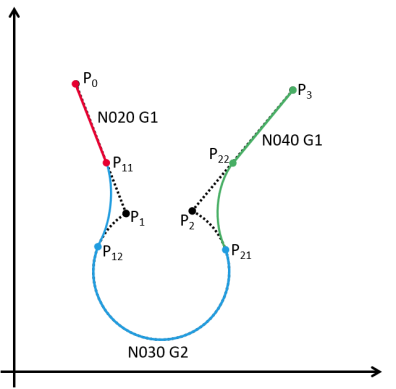
The following applies accordingly for H-functions with L-parameters for ground movements
The reference points for the distances are:
For L>0 (distance to the starting point) the start of the previous grind
At L<0 (distance to the target point) the start of the subsequent grinding, end of the "original geometry"
Switching functions for rapid traverse movements G00 and waiting times G04
No Cartesian path is defined for movements G00. The drive axes are moved synchronised in time.
Programming of switching points is only permitted for G00 with relative switching parameter O.
The travel time is used as the basis for the relative progress of the movement in G00.
Switching functions for Cartesian movements G01..G03 without Cartesian distance
If only rotation axes (A, B or C) or auxiliary axes (Aux1 ... Aux6 or U, V, W) are positioned in a Cartesian movement, the following rules apply:
-
If parameter O is used, the relative time of the movement is used (see G00 or G04)
-
If the parameter L0 or L<0 is used, switching takes place immediately at the start of the segment
-
If the parameter L>0 is used, switching takes place at the end of the segment
Interpreter maintenance - synchronisation of the interpreter with the interpolation (MC_MovePath)
The interpreter is stopped with the word G75 until all records read from the ASCII file have been processed.
Interpreter preservation without synchronisation from the application
The interpreter is stopped with the word G75. As soon as the MC_MovePath has travelled through all the records in the memory and the axes are stopped, the interpreter is restarted.
-
% (start character)
-
N010 G01 X100 Y100 Z0 (moving to a position)
-
N020 G75 (Interpreter hold, axis hold point)
-
N030 G01 Z100 (line is only read in when the axes have reached the position X100, Y100, Z0)
-
N040 M02 (end of programme)
Interpreter maintenance with synchronisation from the application
The interpreter is stopped with the word G75 and an M function of type MVS_SVS (Mxx200 to xx299) in a line. The interpretation of records is continued when the M command is acknowledged in the application.
G75 with an M function of a type other than MVS_SVS results in an error message.
-
% (start character)
-
N010 G01 X100 Y100 Z0 (moving to a position)
-
N020 G75 M200 (Interpreter stop, wait for acknowledgement M200)
-
N030 G01 Z100 (line is read in when M200 has been acknowledged)
-
N040 M02 (End of program)
Access to PLC variables in G-code
Global variables of the PLC can be accessed from the interpreter via $..$ bracketed expressions. The variables must be specified with the full path and made accessible via the symbol configuration.
-
% (start character)
-
N010 G01 X$GVL.glrXPos$ Y$GVL.glrYPos$ (Moving to a variable position)
-
N020 M02 (End of program)
Use of mathematical expressions in G-code
In many cases, it is helpful to calculate certain values for e.g. speeds, positions or logical conditions for programme jumps (see GOTO command) within the G-code, instead of permanently passing them on.
The following applies:
-
Equations must be put in brackets.
-
PLC variables (from the symbol configuration) can be accessed within equations using $..$ brackets.
-
PLC variables can only be accessed read-only. Write access is not permitted.
-
It is possible to write calculation results to M function parameters (see example). These values can be analysed in the PLC using the function module L_MC4P_MFunctionFromPathRef.
-
Equations are neither case-sensitive with regard to variable names nor with regard to commands.
-
Comments in any syntax <(comment)>, </comment> or <{comment}> are NOT permitted within equations. The brackets and / are semantically relevant characters.
Example of a rectangle with variable edge length:
-
% (start character)
-
N001 F1000 E1000
-
N002 G0 X0 Y0
-
N003 G1 X0 Y'100+$lrOffsetY$'
-
N004 G1 X'100+$lrOffsetX$' Y'100+$lrOffsetY$'
-
N005 G1 X'100+$lrOffsetX$' Y0
-
N006 G1 X0 Y0
-
N007 G75 M202 PX'100+$lrOffsetX$' PY'100+$lrOffsetY$' (Interpreter receipt and output of XY coordinates subject to acknowledgement)
-
N008 M02 (end of programme)
The following range of functions is available:
|
Function |
Command |
Data type of the operands |
Data type of the result |
|---|---|---|---|
|
Algorithmic functions |
|||
|
Addition |
+ |
LREAL,LREAL |
LREAL |
|
Subtraction |
- |
LREAL,LREAL |
LREAL |
|
Multiplication |
* |
LREAL,LREAL |
LREAL |
|
Division |
/ |
LREAL,LREAL |
LREAL |
|
Exponent calculation |
^ |
LREAL,LREAL |
LREAL |
|
Modulo calculation |
MOD |
LREAL,LREAL |
LREAL |
|
Absolute value formation |
ABS |
LREAL |
LREAL |
|
Square root |
SQRT |
LREAL |
LREAL |
|
e-function |
EXP |
LREAL |
LREAL |
|
Natural logarithm |
LN |
LREAL |
LREAL |
|
Tens - Logarithm |
LOG |
LREAL |
LREAL |
|
Trigonometric functions (in degrees) |
|||
|
Sine wave |
SIN |
LREAL |
LREAL |
|
Cosine |
COS |
LREAL |
LREAL |
|
Tangent |
TAN |
LREAL |
LREAL |
|
Arc sine wave |
ASIN |
LREAL |
LREAL |
|
Arkus cosine |
ACOS |
LREAL |
LREAL |
|
Arc tangent |
ATAN |
LREAL |
LREAL |
|
Functions for rounding |
|||
|
Truncate the decimal places = round to the smaller amount |
TRUNC |
LREAL |
LREAL |
|
Rounds |
ROUND |
LREAL |
LREAL |
|
Round up |
CEIL |
LREAL |
LREAL |
|
Round off |
FLOOR |
LREAL |
LREAL |
|
Logical operators |
|||
|
AND operation |
AND |
BOOL,BOOL |
BOOL |
|
OR link |
OR |
BOOL,BOOL |
BOOL |
|
Exclusive OR link |
XOR |
BOOL,BOOL |
BOOL |
|
NON-operator |
NOT |
BOOL |
BOOL |
|
Comparison operators |
|||
|
Equality |
EQ |
LREAL,LREAL |
BOOL |
|
Inequality |
NE |
LREAL,LREAL |
BOOL |
|
greater than or equal to |
GE |
LREAL,LREAL |
BOOL |
|
less than or equal to |
LE |
LREAL,LREAL |
BOOL |
|
smaller |
LT |
LREAL,LREAL |
BOOL |
|
larger |
GT |
LREAL,LREAL |
BOOL |
|
Other operands |
|||
|
Sign |
SIGN |
LREAL |
LREAL |
|
Bracketing |
(...) |
|
|
|
unary minus (sign) |
- |
LREAL |
LREAL |
|
unary plus (sign) |
+ |
LREAL |
LREAL |
|
Constants |
|||
|
Pi |
PI |
|
LREAL |
|
True |
TRUE |
|
BOOL |
|
Wrong |
FALSE |
|
BOOL |
Programm jumps
The GOTO command can be used to execute jumps within the same ASCII programme.
-
The jump target is a line number labelled Nxxx.
-
If the jump target Nxxx is smaller than the current line number, the jump target is searched for in the file in the direction of the start of the file.
-
If the jump target Nxxx is greater than the current line number, the jump target is searched for in the file in the direction of the end of the file.
-
It follows from this: If jumps are used, the line number must be uniquely assigned and (strictly) monotonously ascending in the code. There is no check for monotony.
-
If line numbers are assigned more than once, the first hit is used.
-
If the jump target is not found, an error is displayed.
Example of unconditional programme jump:
-
% (start character)
-
N010 G01 X100 Y100 Z0 (Move to a position 1)
-
N020 GOTO40 (skip position 2)
-
N030 G01 X110 Y100 Z0 (Move to a position 2)
-
N040 G01 X100 Y110 Z0 (approaching a position 3)
-
N050 M02 (end of programme)
Conditional programme jumps
The IF command can be used to specify a condition as to whether a jump should be executed.
-
Syntax: IF <condition> GOTO <line number>.
-
If the condition = TRUE or is not equal to zero, the jump is executed.
-
If the value under Condition = FALSE or equals zero, the next line in the programme is read in.
-
Conditions must be enclosed in inverted commas. See equations in the G-code.
-
The permitted auxiliary expressions are listed in the table on the range of functions for using mathematical expressions in G-code.
Example of conditional programme jump:
-
% (start character)
-
N010 G01 X100 Y100 Z0 (Move to a position 1)
-
N020 G01 X110 Y100 Z0 (approaching a position 2)
-
N030 G01 X100 Y110 Z0 (approaching a position 3)
-
N040 IF '$x$ LE 10' GOTO10 (Repeat the three records 10..30 as long as the variable $x$ is less than or equal to 10)
-
N040 M02 (end of programme)
Use of sub-programmes
Frequently used movements can be outsourced as macros in sub-programmes. By specifying the subroutine in the main programme, the content of the subroutine file is integrated into the sequence of the main programme.
-
The word G22 initiates the call of a sub-programme.
-
The address L is used to specify the name of the sub-programme in brackets, for example:
-
N010 G22 L'Subroutine.lpp' (subroutine call)
-
The sub-programme must be stored as a file in the same folder as the main programme on the SD card.
-
A subroutine may not call itself; recursive calls are not permitted.
-
A maximum nesting depth of five is supported.
-
Modal functions (feed, acceleration, positions, ...) are taken from the valid values of the calling programme level when entering the subroutine.
If modal functions are changed in the sub-programme, these changes also have repercussions on the superimposed level after the end of the sub-programme
-
Sub-programmes must be ended with M17 or M29. If the programme end M2 or M30 is used within a sub-programme, this ends all sub-programmes and the main programme.
-
It is permissible to execute sub-programmes independently. In this case, the sub-programme end M17, M29 acts as a programme end M2, M30.
Example:
-
File name: <<main programme.lpp>>
-
% (start character)
-
N010 G01 X200 Y100 Z0 (approaching a position)
-
N020 G04 T20 (dwell time of 20s)
-
N030 G22 L'Subroutine.lpp' (subroutine call)
-
N040 G04 T20 (dwell time of 20s)
-
N050 M02 (end of programme)
-
File name: <<subroutine.lpp>>
-
% (start character)
-
N010 Z100
-
N020 X200 Y200
-
N030 Z0
-
N040 M29 (end of sub-programme)
Overview of addresses
|
Sign |
Meaning |
Remark |
|---|---|---|
|
% |
Programme start |
|
|
M2, 30 |
End of programme |
|
|
M17, M29 |
Sub-programme end |
|
|
Line break |
End of sentence |
|
|
() |
Comment |
|
|
/ |
Comment of a whole line |
|
|
/xx |
skip level |
xx = 0 ... 31 |
|
. <point> |
Decimal separator |
|
|
, <comma> |
Not supported-> Syntax error |
|
|
` <upbeat> |
Labelling of equations Identification of the sub-programme identifier for L-word |
|
|
= <equal sign> |
Optional equal sign for better readability |
Example: G1 X2 and G1 X=2 are equivalent |
|
$Variable$ |
Read access to PLC variable. |
Variables must be stored in the symbol configuration |
|
N, N00, N010 etc. |
Line number |
|
|
A |
Rotation around X-axis |
|
|
AUX1 … AUX6 |
Coordinate of the auxiliary axes Aux1...Aux6 The coordinate words U, V, W can also be used instead of AUX1 ...AUX3 |
For better readability, an equals sign should always be used between AUX<i> and the target position. |
|
B |
Rotary movement around Y-axis |
|
|
C |
Rotary movement around Z-axis |
|
|
E |
Acceleration |
|
|
E- |
Negative deceleration (braking) If there is no E specification in the programme, the acceleration value is used for the deceleration |
|
|
F |
Feed -> web speed |
|
|
G |
Removal condition |
|
|
H |
Not supported |
|
|
I |
Interpolation parameters - to determine the circle in the X direction |
|
|
J |
Interpolation parameters - to determine the circle in the Y direction |
|
|
K |
Interpolation parameters - to determine the circle in the Z direction |
|
|
L |
Identifiers for sub-programmes |
|
|
M |
M30, M2 is supported as programme end |
|
|
O |
Not supported |
|
|
P |
Parameters of M functions |
|
|
Q |
Not supported |
|
|
D |
The blending radius for the segments is defined together with G51 |
|
|
R |
In G02 and G03, R stands for the radius of the circular interpolation. |
|
|
S |
Not supported |
|
|
T |
Specification of the time for the dwell time G04 |
|
|
U |
Aux1 auxiliary axis |
Equivalent to AUX1 |
|
V |
Aux2 auxiliary axis |
Equivalent to AUX2 |
|
W |
Aux3 auxiliary axis |
Equivalent to AUX3 |
|
X |
Movement in the direction of the X-axis in the reference coordinate system |
|
|
Y |
Movement in the direction of the Y-axis |
|
|
Z |
Movement in the Z-axis direction |
|
Overview of the geometric instruction
|
Sign |
Meaning |
Remark |
|---|---|---|
|
G00 |
Rapid traverse (PTP movement) 4Point-to-point movementsand Cartesian path movements |
Fastest movement; all axes arrive simultaneously (no defined path) |
|
G01 |
Straight line interpolation |
|
|
G02 |
Clockwise circular interpolation The target point is defined via X, Y and Z. The centre point is defined with addresses I, J and K. As an alternative to the centre point, the radius can be specified with the address R. |
|
|
G03 |
Circular interpolation anti-clockwise The target point is defined via X, Y and Z. The centre point is defined with the addresses I, J and K. As an alternative to the centre point, the radius can be specified with the address R. |
|
|
G04 |
Specification of the dwell time (pause) The dwell time is programmed in seconds under parameter T. |
Example: G04 T10 à Perform a pause of 10 s at this point in the programme. |
|
G16 |
Spatial circular interpolation |
Definition of the plane in space via I, J, K |
|
G17 |
Selection of main level XY |
|
|
G18 |
Selection of main level ZX |
|
|
G19 |
Selection of main level YZ |
|
|
G22 |
Sub-programme call |
|
|
G50 |
Switch off blending of corner points via a blending radius. |
|
|
G51 |
Switch on the blending of corner points via a blending radius. The blending radius is programmed via address D. |
|
|
G53 |
Cancel postponement èSwitch on WCS coordinate system |
|
|
G54 |
Switch on PCS 1 coordinate system |
|
|
G55 |
Switch on PCS 2 coordinate system |
|
|
G56 |
Switch on the PCS 3 coordinate system |
|
|
G57 |
Switch on PCS 4 coordinate system |
|
|
G58 |
Switch on the PCS 5 coordinate system |
|
|
G59 |
Switch on MCS coordinate system |
|
|
G75 |
Interpreter maintenance - synchronisation of ASCII interpretation with path processing |
s |
|
G90 |
Absolute measurement system for the coordinates X, Y, Z, A, B, C, U, V, W |
|
|
G91 |
Relative measurement system for the coordinates X, Y, Z, A, B, C, U, V, W |
|
|
G98 |
Absolute measurement system for the interpolation coordinates I, J and K |
|
|
G99 |
Relative measurement system for the interpolation coordinates I, J and K |
|