Circular arc mode (CircMode)

The CircMode input serves to select the circular arc mode, i.e. how the circular arc is defined mathematically:

CircMode

Circular arc definition

Description

BORDER

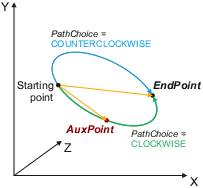
Circular interpolation with intermediate and end point

  • AuxPoint defines a point that is located on the circle and is passed during the path motion from the starting point to the end point.
  • AuxPoint and EndPoint have to be defined as relative positions (with reference to the starting point).
  • PathChoice defines the orientation:
    • CLOCKWISE: Path via AuxPoint
    • COUNTERCLOCKWISE: Path that does not lead over AuxPoint .
  • The advantage of this mode is that the boundary point AuxPoint can be ususally reached by the machine, i.e. a teaching of this position is possible.

Restrictions:

  • Only angles < 360° are possible with a single command.

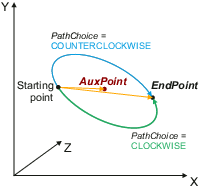
CENTER

Circular interpolation with center and end point

  • AuxPoint defines the center of the circle.
  • AuxPoint and EndPoint have to be defined as relative positions (with reference to the starting point).
  • PathChoice defines the orientation:
    • CLOCKWISE: Shortest path (<180°)
    • COUNTERCLOCKWISE: Longer path (>180°)

Restrictions:

  • Only angles < 360° are possible with a single command.
  • Semicircles (angle = 180°) are not possible in the CENTER mode as in that case starting point, center and target point are placed on one line and the circular plane cannot be detected.
  • The center AuxPoint may possibly not be reached by the machine due to obstacles, i.e. in this case a teaching of this position is not possible.
  • The circular arc is mathematically "overdetermined" as the radius is defined by the starting point and the center. If the EndPoint is not located on the same radius, the angle to be executed will only be defined by the EndPoint . In this case, the EndPoint will not be reached.

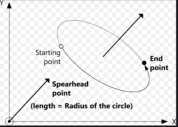
RADIUS

Circular interpolation with normal vector and end point

  • AuxPoint defines the normal vector of the motion plane. The radius of the circle hereby corresponds to the length of the normal vector. The ambiguity of the centre is resolved by the direction of the normal vector.
  • PathChoice defines the orientation.
  • CLOCKWISE : Shorter path (<180°)
  • COUNTERCLOCKWISE : Longer path (>180°)

Restrictions

  • Only angles < 360° are possible with a single command.
  • The direction of the normal vector must be orthogonal to the straight connecting lines of the start point and end point.

Example :

AuxPoint = (50,0,0) circle in the plane parallel to yz with a radius of 50.

The position of the centre allows the circle to move clockwise with a circular arc of £ 180° by using PathChoice = MC_CIRC_PATHCHOICE.CLOCKWISE .