Auxiliary axes
An auxiliary axis is an axis the position of which does not have to be defined with a fixed numerical value for each set transition. The movement of the auxiliary axis is smoothed via several main axis sets. Main axes and auxiliary axes reach their programmed target positions at the same time. Here, the movements times are adjusted automatically.
Example: Pick-and-Place movement
The rotation of the E1 auxiliary axis is started in a defined height after picking and has to be completed in a defined height before placing. In the remaining range of movement, the position of the E1 auxiliary axis is not defined but synchronised to the main axes by the control. Here, the limitations of the main axes and auxiliary axes are considered, i.e. the "faster" processing velocity has to be reduced so that both movements end at the same time.
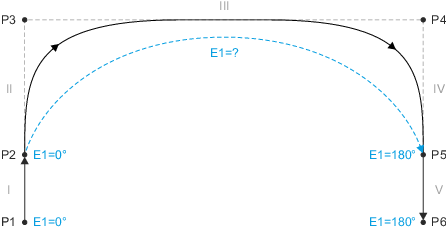
|
Example: Pick-and-Place movement
Instruction of the auxiliary axes
The auxiliary axes are instructed via the same motion-instructing FBs ( MC_MoveLinearAbsolute , MC_MoveLinearRelative , etc.) as the ones used for instructing the main axes.
Example MC_MoveLinearAbsolute :
- The array with the absolute target positions has to be transmitted to the Position input.
- The array elements [1 ... 6] contain the positions of the main axes.
- The array elements [7 ... 12] contain the positions of the auxiliary axes.
- The aeAuxMode input (ARRAY[1..6] OF L_MC4P_AuxMode) serves to define the mode for every auxiliary axis:
|
Name |
Value |
Info |
|---|---|---|
|
Inactive |
0 |
Auxiliary axis coordinates are ignored |
|
Continuous |
1 |
Smoothing the auxiliary axes via several MC_Move blocks |
|
DiscreteAbsolute |
2 |
Auxiliary axis position is set at the end of each motion segment (similar to the main axes). |
|
DiscreteRelative |
3 |
Auxiliary axis mode "Discrete"
In the "Discrete" mode, the position of the auxiliary axes is adjusted at the end of the motion segment. Thus, the intermediate stop points of the auxiliary axes can be placed in a motion sequence or the auxiliary axis can be used by analogy with the main axes.
In the following example, the auxiliary axis in MoveP2 moves from its starting position to target position 180. This position is reached at the same time that the MoveP2 target positions of the main axes are reached.

|
Example: Auxiliary axis mode "Discrete" in MoveP2
Auxiliary axis mode "Continuous"
In the "Continuous" mode, the target position given at the FB is not evaluated. In the following FB, either the "Continuous" mode can be selected again or the sequence is completed with a "Discrete" mode.
In the following example, the movement of the auxiliary axis in MoveP2 is started. The target position 180 reaches the auxiliary axis at the end of MoveP3. This position is reached at the same time the MoveP3 target positions of the main axes are reached.

|
Example: Auxiliary axis mode "Continuous" in Move_P2

|
Note!
A "Continuous" sequence always has to be completed with a "Discrete" request! |
Possible instruction sequences
For auxiliary axes, the following instruction sequences arise:
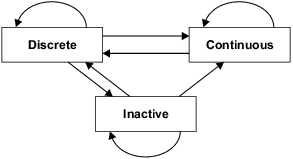
|
Possible instruction sequences
Behaviour in case of blending
If a motion segment is smoothed which contains target positions for one or several auxiliary axes, the target position of the auxiliary axis at the start of the smoothing segment applies. The smoothing element is assigned to the following motion set and this might not contain any auxiliary axis motion. The original target position is not approached anymore due to smoothing. Thus, there is no clearly defined point on the smoothing element that could serve as a target position for the auxiliary axis.
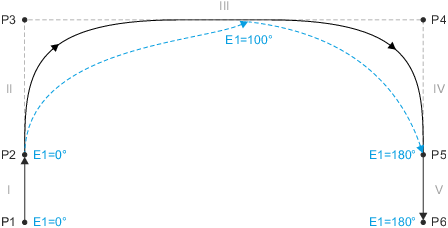
|
Example: Behaviour in case of blending
Behaviour in case of aborting
The movement of the auxiliary axes to the main axes is completed as fast as possible and then continued according to the new specifications of movement.
Time response
If an auxiliary axis movement is programmed, the movement is only started if the complete motion sequence is known. This applies especially if several auxiliary axis movements are programmed so that they overlap in time.
Example 1: Auxiliary axis motion sequence via the FBs MoveP2 ... MoveP10
- MoveP1 is started immediately: TargetVel = 0
- The start of MoveP2 will be delayed until MoveP10 has been processed.
- Depending on the position in MoveP2, MoveP2 TargetVel is boosted in the LookAhead.

|
|
|
|
|---|---|---|---|
|
FB |
Auxiliary axis 1 |
Auxiliary axis 2 |
Auxiliary axis 3 |
|
MoveP1 |
|
|
|
|
MoveP2 |
Continuous |
|
|
|
MoveP3 |
Continuous |
Continuous |
|
|
MoveP4 |
Continuous |
Continuous |
|
|
MoveP5 |
Discrete |
Continuous |
|
|
MoveP6 |
|
Discrete |
Continuous |
|
MoveP7 |
|
|
Continuous |
|
MoveP8 |
|
|
Continuous |
|
MoveP9 |
|
|
Continuous |
|
MoveP10 |
|
|
Discrete |
|
MoveP11 |
|
|
|
|
MoveP12 |
|
|
|
Example 2: Auxiliary axis motion sequence via the FBs MoveP2 ... MoveP5 and MoveP8 ... MoveP10
- MoveP1 is started immediately: TargetVel = 0
- The start of MoveP2 will be delayed until MoveP5 has been processed.
- MoveP6 and MoveP7 are started immediately: TargetVel = 0
- The start of MoveP8 will be delayed until MoveP10 has been processed.
|
|
|
|
|
|---|---|---|---|
|
FB |
Auxiliary axis 1 |
Auxiliary axis 2 |
Auxiliary axis 3 |
|
MoveP1 |
|
|
|
|
MoveP2 |
Continuous |
|
|
|
MoveP3 |
Continuous |
|
|
|
MoveP4 |
Continuous |
|
|
|
MoveP5 |
Discrete |
|
|
|
MoveP6 |
|
|
|
|
MoveP7 |
|
|
|
|
MoveP8 |
Continuous |
|
|
|
MoveP9 |
Continuous |
|
|
|
MoveP10 |
Discrete |
|
|
|
MoveP11 |
|
|
|
|
MoveP12 |
|
|
|

 Tip!
Tip!
The main axes and auxiliary axes are assigned to a kinematics on the Connected drives tab of the corresponding kinematics axes group.
 Commissioning example "kinematics axes group"
|
|
Note!
If the same auxiliary axis is assigned in two directly consecutive FBs of type MC_Move<......> in "DiscreteAbsolute" or "DiscreteRelative" mode, these two segments cannot be ground together. A possibly programmed "blending" is ignored. Background: In this case, the blending segment would have to be assigned to both the first and the second partial movement of the auxiliary axis. This temporal overlay is not supported. |