|
This FB includes the "Friction identification" and "Friction compensation" functions.
|
|
|
|
L_TB1P_FrictionCompensation |
|
|
|
|
|---|---|---|---|---|---|---|---|
|
BOOL |
- |
|
xIdent |
xBusy |
|
- |
BOOL |
|
BOOL |
- |
|
xFollowerActive |
xDone |
|
- |
BOOL |
|
LREAL |
- |
|
lrActReelSpeedIn |
xError |
|
- |
BOOL |
|
LREAL |
- |
|
lrActTorqueIn |
eErrorID |
|
- |
L_IE1P_Error |
|
DWORD |
- |
|
dwSelectCurve |
xStop |
|
- |
BOOL |
|
BOOL |
- |
|
xEnableFrictionCurve |
xEnableFollower |
|
- |
BOOL |
|
LREAL |
- |
|
lrSetReelSpeed |
lrSetReelSpeedOut |
|
- |
LREAL |
|
LREAL |
- |
|
lrFrictionAdapt |
lrSetFrictionTorqueOut |
|
- |
LREAL |
|
BOOL |
- |
|
xInvertOutput |
|
|
|
|
|
LREAL |
- |
|
lrMaxSpeedIdent |
|
|
|
|
|
LREAL |
- |
|
lrAccDecIdent |
|
|
|
|
|
LREAL |
- |
|
lrFilterTimeSpeed |
|
|
|
|
|
LREAL |
- |
|
lrFilterTimeTorque |
|
|
|
|
|
LREAL |
- |
|
lrFilterTimeReelSpeed |
|
|
|
|
|
LREAL |
- |
|
lrLinearCompStart |
|
|
|
|
|
LREAL |
- |
|
lrLinearCompEnd |
|
|
|
|
|
ARRAY [1...66] OF LREAL |
- |
|
alrFrictionCurve1 |
|
|
|
|
|
ARRAY [1...66] OF LREAL |
- |
|
alrFrictionCurve2 |
|
|
|
|
|
ARRAY [1...66] OF LREAL |
- |
|
alrFrictionCurve3 |
|
|
|
|
|
ARRAY [1...66] OF LREAL |
- |
|
alrFrictionCurve4 |
|
|
|
|
|
|
|
|
|
|
|
|
|
|
Name Data type |
Information/possible settings |
|
|---|---|---|
|
alrFrictionCurve[1...4] ARRAY [1...66] OF LREAL |
Friction characteristics 1 ... 4 |
|
|
Name Data type |
Information/possible settings |
|
|---|---|---|
|
xIdent BOOL |
TRUE |
Friction identification: Start identification of the friction characteristic. |
|
xFollowerActive BOOL |
Interface for feedback that setpoint generation has been enabled (e.g. SMC_FollowVelocity.bBusy) |
|
|
lrActReelSpeedIn LREAL |
Current speed of the motor shaft (actual speed value)
|
|
|
lrActTorqueIn LREAL |
Current torque (actual torque value)
|
|
|
dwSelectCurve DWORD |
Friction identification ( xIdent = True) Selection of the memory area in which the friction values identified are stored.
|
|
|
Friction compensation ( xEnableFrictionCurve = TRUE, xIdent = FALSE) Selection of the characteristic for friction compensation.
|
||
|
xEnableFrictionCurve BOOL |
Activate friction compensation. |
|
|
TRUE |
Friction compensation is activated. |
|
|
FALSE |
The friction torque is reset to '0'. |
|
|
lrSetReelSpeed LREAL |
Speed setpoint for the friction characteristic
|
|
|
lrFrictionAdapt LREAL |
Value for the proportional evaluation of the friction characteristic
|
|
|
xInvertOutput BOOL |
TRUE |
The lrSetFrictionTorqueOut output signal is shown in an inverted fashion. |
|
lrMaxSpeedIdent LREAL |
Maximum speed for friction identification
|
|
|
lrAccDecIdent LREAL |
Acceleration for friction identification
|
|
|
lrFilterTimeSpeed LREAL |
Filter time constant for the actual speed value for friction identification
|
|
|
lrFilterTimeTorque LREAL |
Filter time constant for the actual torque value for friction identification
|
|
|
lrFilterTimeReelSpeed LREAL |
Filter time constant for the speed setpoint for friction compensation
|
|
|
lrLinearCompStart LREAL |
Initial friction torque for friction compensation |
|
|
lrLinearCompEnd LREAL |
End friction torque for friction compensation |
|
|
lrLinearCompEndReelSpeed LREAL |
Speed at end friction torque for friction compensation |
|
|
Name Data type |
Value/meaning |
|
|---|---|---|
|
xBusy BOOL |
TRUE |
The "Friction identification" or "Friction compensation" function is active. |
|
xDone BOOL |
TRUE |
The "Friction identification" or "Friction compensation" function has been completed successfully. |
|
xError BOOL |
TRUE |
An error has occurred. For details see eErrorID . |
|
eErrorID |
If xError = TRUE: Error number for the error that has occurred.
|
|
|
xStop BOOL |
xStop is set to TRUE if the friction identification process is aborted and can be used to control an external STOP function. |
|
|
xEnableFollower BOOL |
xEnableFollower is set to TRUE for activating a setpoint interface (e.g. SMC_FollowVelocity). |
|
|
lrSetReelSpeedOut LREAL |
Speed setpoint for friction identification
|
|
|
lrSetFrictionTorqueOut LREAL |
Current friction torque
|
|
How to proceed:
Select the memory location for the characteristic.
Define the memory location (1 ... 4) in which the characteristic is to be saved via the dwSelectCurve input after the identification process has been carried out successfully.
Start identification process.
Set the xIdent input to TRUE.
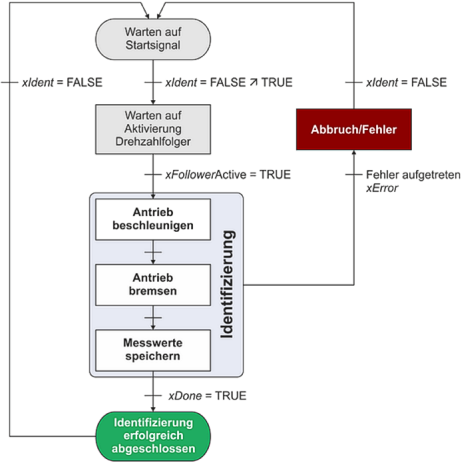
The identification is executed according to the following state machine:
|
|
State machine for the friction identification
If the xIdent input is reset to FALSE, the active identification process is cancelled immediately. Resetting the xFollowerActive input to FALSE also results in the immediate abort of the process.
If incremental encoders are used, it may be required to filter the actual speed value signal.
The time constant for the filter can be set via the lrFilterTimeSpeed input. A setting of '10 ms' is sufficient in most cases.
Filtering the actual torque signal can be also helpful for smoothing the friction characteristic. The time constant for this filter can be set via the lrFilterTimeTorque input.
Friction compensation is active if the xIdent input is set to FALSE and the xEnableFrictionCurve input is set to TRUE.
The current speed is preselected via the lrSetReelSpeed input.
If the actual speed value exceeds the maximum value defined in the characteristic, the characteristic is extrapolated linearly.
If the input dwSelectCurve is = 0 or unassigned, a linear characteristic is used for the friction compensation.
The linear characteristic is defined via parameters lrLinearCompStart , lrLinearCompEnd , and lrLinearCompEndReelSpeed :
If the dwSelectCurve input = 1 ... 4, the friction characteristic saved in the corresponding memory location is used instead of the linear characteristic.
Via the lrFrictionAdapt input, a gain for the characteristic on a percentage basis is specified, for instance in order to compensate changes in the friction torque due to temperature changes.
For smoothing the lrSetReelSpeedOut speed setpoint, a filter time constant can be specified via the lrFilterTimeReelSpeed input.
The precontrol signal generated is provided at the lrSetFrictionTorqueOut output. By setting the xInvertOutput input to TRUE, this signal can be output in an inverted manner (change of direction of rotation).