L_USPP_Curve
This FB represents a characteristic or curve function y = f(x), the input signal corresponding to the x axis and the output signal corresponding to the y axis.
The characteristic can consist of up to nine interpolation points which are defined by inputs.
Between the points a linear interpolation takes place.
The characteristic can be entered along the whole value range. By selecting the corresponding characteristic mode in dwMode , the characteristic can also be created symmetrically to the y axis or zero point.
|
|
|
|
L_USPP_Curve |
|
|
|
|
|---|---|---|---|---|---|---|---|
|
LREAL |
- |
|
lrIn |
lrOut |
|
- |
LREAL |
|
DWORD |
- |
|
dwMode |
xError |
|
- |
BOOL |
|
ARRAY [1...9] OF LREAL |
- |
|
alrXValues |
eErrorID |
|
- |
L_IE1P_Error |
|
ARRAY [1...9] OF LREAL |
- |
|
alrYValues |
|
|
|
|
|
|
|
|
|
|
|
|
|
Inputs
|
Name Data type |
Information/possible settings |
|
|---|---|---|
|
lrIn LREAL |
Input signal |
|
|
dwMode DWORD |
Characteristic mode |
|
|
0 |
Entire range (initialisation) |
|
|
1 |
Symmetrical to the Y axis |
|
|
2 |
Symmetrical to the zero point |
|
|
alrXValues ARRAY [1...9] OF LREAL |
X values of the characteristic function
|
|
|
alrYValues ARRAY [1...9] OF LREAL |
Y values of the characteristic function
|
|
Outputs
|
Name Data type |
Value/meaning |
|
|---|---|---|
|
lrOut LREAL |
Output signal |
|
|
xError BOOL |
TRUE |
An error has occurred. For details see eErrorID . |
|
eErrorID L_IE1P_Error |
If xError = TRUE: Error number for the error that has occurred.
|
|
Selection of the characteristic
The characteristic can consist of up to nine interpolation points which are defined by the arrays of alrXValues and alrYValues .
The same array numbers of alrXValues[n] and alrYValues[n] correspond to one pair of values/interpolation point (X n , Y n ).
The first pair of values ( alrXValues[1] and alrYValues[1] ) always applies.
The X values of the characteristic must be entered in ascending order (X1 < X2 < ... < X9).
If the ascending chain of X values is interrupted, this corresponds to the end of the characteristic (see the following examples).
Based on the pair of values that was valid last, extrapolation takes place on both sides.
In characteristic modes 1 and 2, only the range of the characteristic entered in quadrants I. and IV. is used.
Characteristic mode 0: Entire range
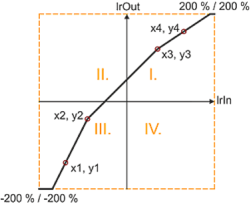
If "Entire range" is selected in dwMode , the entire characteristic range (quadrants I...IV) applies.
|
|
1 |
2 |
3 |
4 |
5 |
6 |
7 |
8 |
9 |
|---|---|---|---|---|---|---|---|---|---|
|
x |
-140 % |
-90 % |
70 % |
130 % |
0 % |
0 % |
0 % |
0 % |
0 % |
|
y(x) |
-140 % |
-40 % |
120 % |
160 % |
0 % |
0 % |
0 % |
0 % |
0 % |
|
|||||||||
Example: Characteristic in characteristic mode 0 (entire range)
Characteristic mode 1: Symmetrically to y axis
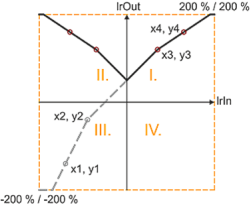
If "Symmetrically to y axis" is selected in dwMode , the resulting characteristic is mirrored along the y axis in quadrants I. and IV..
|
|
1 |
2 |
3 |
4 |
5 |
6 |
7 |
8 |
9 |
|---|---|---|---|---|---|---|---|---|---|
|
x |
-140 % |
-90 % |
70 % |
130 % |
0 % |
0 % |
0 % |
0 % |
0 % |
|
y(x) |
-140 % |
-40 % |
120 % |
160 % |
0 % |
0 % |
0 % |
0 % |
0 % |
|
|||||||||
Example: Characteristic in characteristic mode 1 (symmetrically to y axis)
Characteristic mode 2: Symmetrically to zero point
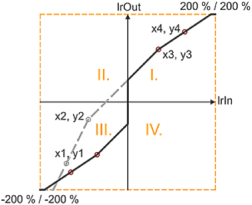
If "Symmetrically to zero point" is selected in dwMode , the resulting characteristic is mirrored along the zero point in quadrants I. and IV..
|
|
1 |
2 |
3 |
4 |
5 |
6 |
7 |
8 |
9 |
|---|---|---|---|---|---|---|---|---|---|
|
x |
-140 % |
-90 % |
70 % |
130 % |
0 % |
0 % |
0 % |
0 % |
0 % |
|
y(x) |
-140 % |
-40 % |
120 % |
160 % |
0 % |
0 % |
0 % |
0 % |
0 % |
|
|||||||||
Example: Characteristic in characteristic mode 2 (symmetrically to zero point)
Special cases
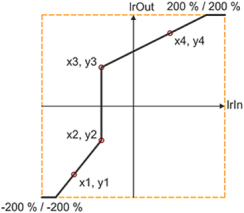
- Jumps or discontinuities can be displayed by parameterising two successive X values the same way. A jump is only valid if it is followed by a valid pair of values; otherwise the extrapolation is executed starting from the last valid pair of values.
|
|
1 |
2 |
3 |
4 |
5 |
6 |
7 |
8 |
9 |
|---|---|---|---|---|---|---|---|---|---|
|
x |
-130 % |
-70 % |
-70 % |
80 % |
0 % |
0 % |
0 % |
0 % |
0 % |
|
y(x) |
-150 % |
-75 % |
85 % |
160 % |
0 % |
0 % |
0 % |
0 % |
0 % |
|
|||||||||
Example: Characteristic in characteristic mode 0 (whole range) with jump
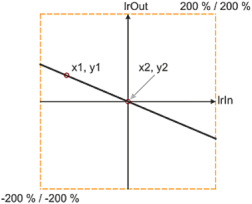
- If only one interpolation point X1 is defined in the negative range, X2 is provided as valid interpolation point (X2 > X1) with the standard setting '0 %', and both points form a line.
|
|
1 |
2 |
3 |
4 |
5 |
6 |
7 |
8 |
9 |
|---|---|---|---|---|---|---|---|---|---|
|
x |
-130 % |
0 % |
0 % |
0 % |
0 % |
0 % |
0 % |
0 % |
0 % |
|
y(x) |
40 % |
0 % |
0 % |
0 % |
0 % |
0 % |
0 % |
0 % |
0 % |
|
|||||||||
Example: Characteristic in characteristic mode 0 (whole range) with only one defined point and X1 < 0
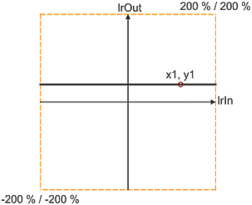
- If only one point X1 is defined in the positive range, a line is extrapolated.
|
|
1 |
2 |
3 |
4 |
5 |
6 |
7 |
8 |
9 |
|---|---|---|---|---|---|---|---|---|---|
|
x |
120 % |
0 % |
0 % |
0 % |
0 % |
0 % |
0 % |
0 % |
0 % |
|
y(x) |
40 % |
0 % |
0 % |
0 % |
0 % |
0 % |
0 % |
0 % |
0 % |
|
|||||||||
Example: Characteristic in characteristic mode 0 (whole range) with only one defined point and X1 > 0