Brake holding load
Depending on the application, a torque at the motor may be required at speed "0" of the motor shaft:
–
In order to hold loads in vertical applications and prevent "sagging".
–
In order to prevent a position loss in horizontal applications.
For this purpose, a brake holding load can be set. The brake holding load can be optionally generated via a ramp to reduce a vibration stimulation that may be caused by the brake holding load.
Preconditions
Ensure that the inverter builds up a sufficient torque in the motor when releasing and applying the holding, in order to hold the load.
–
For this purpose, a V/f voltage boost can be set for the V/f characteristic control.  Set voltage boost
Set voltage boost –
The parameters for the V/f voltage boost are automatically set when you carry out an automatic identification of the motor.
Details
Relevant parameters:
–
0x2820:008 (P712.08): Brake holding load
–
0x2820:013 (P712.13): Holding load ramptime
Setting notes:
–
In case of applications with constant load, a constant value is suitable for the brake holding load.
–
If the load changes, an approximate value for the brake holding load has to be considered.
–
Start with the setting "0 %" if you do not know the correct direction, otherwise with, for instance, "30 %". Afterwards change the setting upwards or downwards in 10-% steps.
Parameter
|
Address
|
Name / setting range / [default setting]
|
Information
|
|
|
0x2820:008
(P712.08)
|
Holding brake control: Brake holding load
(Brake control: Holding load)
-500.0 ... [0.0] ... 500.0 %
–
Setting can only be changed if the inverter is disabled.
|
By setting a holding load, the load can be held against the force of gravity in case of vertical applications, and a position loss can be prevented in case of horizontal applications.
–
The setting of "100 %" approximately corresponds to rated motor torque and slip frequency.
Note!
The torque for creating the holding load depends on the selected motor control type and its settings. Before using this function, make sure that you have set the motor control type correctly.
|
|
|
0x2820:013
(P712.13)
|
Holding brake control: Holding load ramptime
(Brake control: HoldLoad ramptim)
0 ... [0] ... 100 ms
–
Setting can only be changed if the inverter is disabled.
–
From version 03.00
|
By setting a ramp time, a vibration stimulation can be reduced that might be caused by the brake holding load 0x2820:008 (P712.08).
|
|
General mode of operation
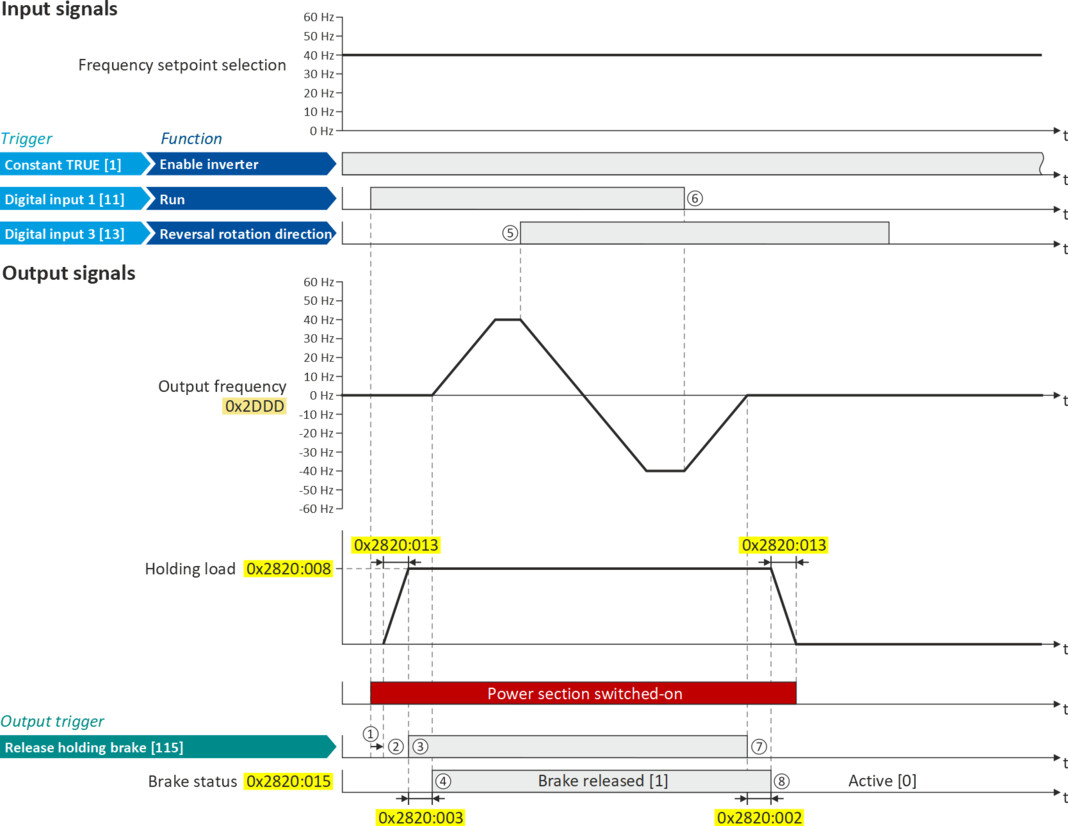
The following diagram demonstrates the general functioning in automatic operation:
|
|
|
|
①
|
If the inverter is enabled and no error is active, the motor can be started with the "Run" function in forward rotating direction.
The power section is switched on and the motor is magnetized first.
|
|
②
|
The brake holding load set in 0x2820:008 (P712.08) is build up via the ramp set in 0x2820:013 (P712.13).
|
|
③
|
The holding brake is released. In this case, the output trigger "Release holding brake [115]" is set to TRUE. This trigger must be assigned to a digital output or, in the simplest case, to the relay which then switches the brake supply.
|
|
④
|
After the release time 0x2820:003 (P712.03) has elapsed, the motor is accelerated to the setpoint.
In 0x2820:015 (P712.15), the brake status "Brake released [1]" is displayed.
|
|
⑤
|
In case the direction of rotation reverses, the holding brake remains released.
|
|
⑥
|
If "Run" is set to FALSE, the motor is stopped with the stop method set in 0x2838:003 (P203.03). In the example: Stop with standard ramp.
|
|
⑦
|
Then the holding brake is closed again.
|
|
⑧
|
After the closing time 0x2820:002 (P712.02) has elapsed, the brake status "Brake closed [0]" is displayed in 0x2820:015 (P712.15).
The brake holding load is reduced again via the ramp.
|