Error history buffer
For purposes of diagnostics, the error history buffer contains the last 32 error and warning messages of the inverter, which have occurred during operation. The error history buffer can be read out using the keypad via P155.00 and provides a limited view on the logbook.
Details
–
For each event that is recorded, the error history buffer contains the message text, the error code, the time of occurrence as well as a counter for successive, identical events. If an event that has already been recorded occurs repeatedly, only the counter is incremented.
–
The error history buffer can be reset by the user. In order to prevent the buffer from being reset by the user, this function can be protected by means of a password.
–
Observe that the error history buffer only presents a snapshot at the time the data are read out. If a new event occurs, the error history buffer must be read out again via P155.00 so that the new event becomes visible.
Accessing the error history buffer with the keypad
|
|
1.
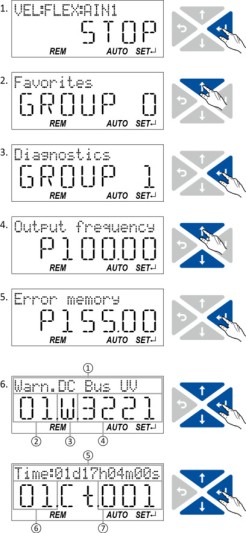
Use the key in the operating mode to navigate to the parameterisation mode one level below.
You are now in the group level. All parameters of the inverter are divided into different groups according to their function. Note: By using the key you can navigate one level upwards again anytime. 2.
Use the navigation key to select group 1 ("Diagnostics").
3.
Use the key to navigate to one level below.
You are now in the parameter level of the group selected. 4.
Use the and select the P155.00 parameter.
5.
Use the key to navigate to one level below.
You are now in the error history buffer. 6.
Use the and navigation keys you can now scroll through the error history buffer entries.
Use the key, you can switch over the display. Information displayed (page 1): ① Message text ② No. of the entry (01 = latest event) ③ Response (W = warning, T = trouble, F = fault) ④ Error code Information displayed (page 2): ⑤ Time of occurrence ⑥ No. of the entry (01 = latest event) ⑦ Counter for successive, identical events Note: By using the key you can exit the error history buffer again. |
 key in the operating mode to navigate to the parameterisation mode one level below.
 key you can navigate one level upwards again anytime.
 navigation key to select group 1 ("Diagnostics").
 select the P155.00 parameter.
Parameter
Structure of the messages
The following example shows the detailed structure of one of the following messages (parameter 0x2006:006 ... 0x2006:037):
|
Message:
|
|
|||||
|
|
|
|
|
|
|
|
|
Meaning:
|
Diag code
|
Message type
|
Text ID
|
Time stamp in [ns]
|
Flag param. 1
|
Parameter 1
|
|
Data type:
|
U32
|
U16
|
U16
|
U64
|
U16
|
U8
|
|
Hex value:
|
0x4310 E000
|
0x0112
|
0x0099
|
0x0001 FC73 040B 5200
|
0x0005
|
0x01
|






Notes:
–
The upper 16 bits of the "Diag Code" contain the error code (in the example "0x4310").
–
Bit 0 ... 3 of the message type contain the error type (0: Info, 1: Warning, 2: Trouble, 3: Fault).
–
Convert time stamp: 0x0001 FC73 040B 5200 = 559045896000000 ns = 6 days, 11 hours, 17 minutes, 25 seconds
–
The flag for parameter 1 has no meaning for decoding the message.
–
The parameter 1 contains the counter for successive, identical events.