Select motor from motor catalog
The following describes how to parameterise your drive system by selecting a Lenze motor from the motor catalogue. Several processes are started invisibly in the background to load/calculate the settings for the relevant parameters.
Preconditions
–
Access to a Lenze engineering tool (e. g. »EASY Starter«).
–
Parameters can be set online or offline (with or without connected motor).
Required steps
1.
Open the Lenze engineering tool that provides for the functionality of a “Motor catalog".
2.
Click the Select motor... button. In case of the »EASY Starter«, you find the Select motor... button on the "settings". tab.
3.
Select the motor used in the "Select motor" dialog:
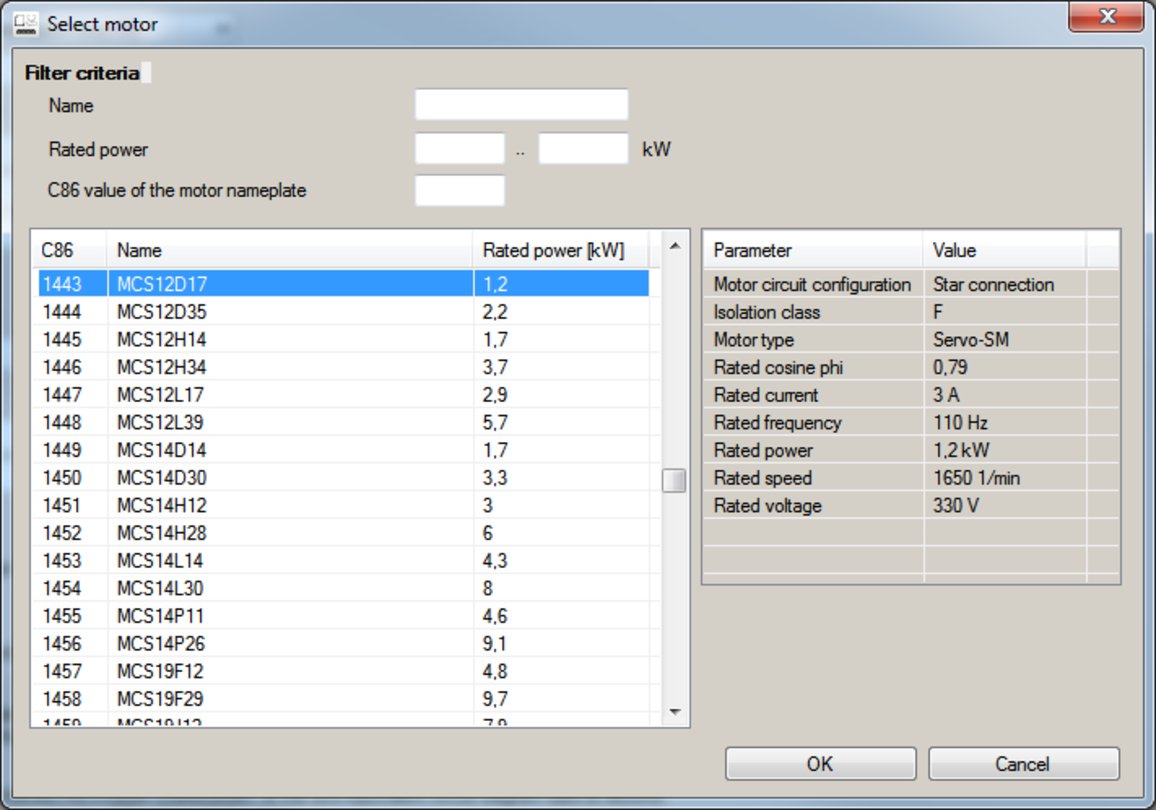
By entering filter criteria, you can restrict the selection.
Name (e. g. "MCS..."), rated power and C86 value can be found on the motor nameplate.
4.
Press the Please select button to select the thermal sensor.
This is not required for all motors. For older motors, such as MDSKA056-22 (C86=10), a thermal sensor CANNOT be selected.
This is not required for all motors. For older motors, such as MDSKA056-22 (C86=10), a thermal sensor CANNOT be selected.
Observe the notes on the ? button.
5.
Click the OK button to start the optimisation.
Parameterisation sequence
As soon as the parameterisation has been started, the following steps are initiated by the engineering tool:
1.
The motor rating data and the motor equivalent circuit diagram data are loaded from the motor catalogue.
2.
The motor controller settings and the speed controller settings are automatically calculated based on the previously loaded data.
Notes:
–
The data involved in this parameterisation are provided be the motor catalog alone. Further user data is not required.
–
The inverter characteristic is not changed by this optimisation.
Parameter