Optical device identification
For applications including several interconnected inverters it may be difficult to locate a device
that has been connected online. The "Optical device identification" function serves to locate the inverter by means of blinking LEDs.
Details
In order to start the visual tracking,
–
click the button in the toolbar of the »EASY Starter« or
 or
or–
set 0x2021:001 (P230.01) = "Start [1]".
After the start, both LEDs "RDY" and "ERR" on the front
of the inverter synchronously blink very fast.
of the inverter synchronously blink very fast.
|
"RDY" LED (blue)
|
"ERR" LED (red)
|
Status/meaning
|
|
Both LEDs are blinking in a very rapidly synchronous mode
|
"Visual tracking" function is active.
|
|

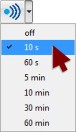
The blinking duration can be set in 0x2021:002 (P230.02) or selected in the »EASY Starter« in the dropdown list field:
Parameter
|
Address
|
Name / setting range / [default setting]
|
Information
|
|
|
0x2021:001
(P230.01)
|
Optical tracking: Start detection
(Optical tracking: Start detection)
|
1 = start optical device identification.
–
After the start, the two LEDs "RDY" and "ERR" on the front
of the inverter are blinking with a blinking frequency of 20 Hz for the blinking duration set in 0x2021:002 (P230.02). The setting is then automatically reset to "0" again.
–
If the function is reactivated within the blinking time set, the time is extended correspondingly.
–
A manual reset to "0" makes it possible to stop the function prematurely.
|
|
|
0
|
Stop
|
||
|
1
|
Start
|
||
|
0x2021:002
(P230.02)
|
Optical tracking: Blinking duration
(Optical tracking: Blink. duration)
0 ... [5] ... 3600 s
|
Setting of the blinking duration for the visual tracking.
|
|