Using the smartphone as "Smart Keypad"
In the default setting, the WLAN settings of the inverters are used. If the WLAN module is plugged onto another inverter, the WLAN connection must be set up again because the replugging causes a change of the network name.
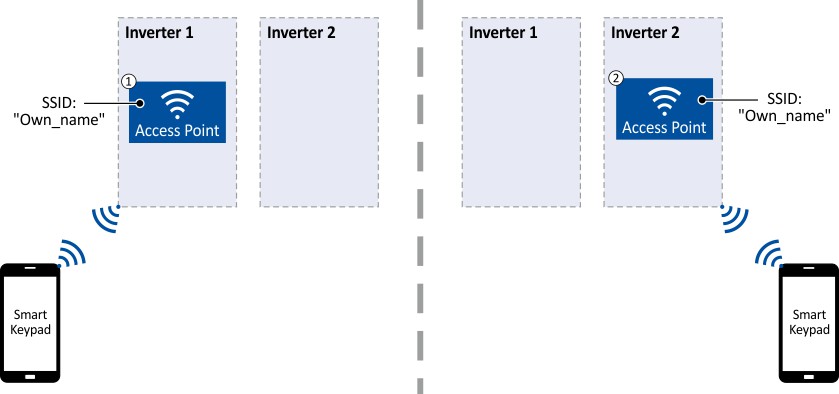
For using the smartphone as "Smart Keypad", the WLAN module can be configured such that the WLAN settings are saved locally in the WLAN module and only these settings are used. In this "standalone" mode, the WLAN module remains permanently coupled to the smartphone because after replugging onto another inverter, the login data for the WLAN network (SSID and password) is the same:
|
①
|
WLAN module is plugged onto the inverter 1. After the connection to the smartphone has been established, the inverter 1 can be diagnosed or parameterised with the Lenze Smart Keypad App.
|
|
②
|
WLAN module is plugged onto the inverter 2. After the WLAN network is restarted, a connection is established again to the smartphone because the WLAN settings are identical. Now, the inverter 2 can be diagnosed or parameterised with the Lenze Smart Keypad App.
|
How to configure the WLAN module for a "Smart Keypad" use:
Requirements:
✓
The WLAN settings of the inverter can be accessed via the Lenze Smart Keypad App or »EASY Starter«.
1.
Define your own network name (SSID) in 0x2441:007.
2.
Define your own password in 0x2441:008.
3.
Set the selection "Save settings in WLAN module [11]" in 0x2440.
The defined network name and the password are saved locally in the WLAN module. The WLAN network is restarted with the current settings.
If the WLAN module is then plugged onto another inverter, the settings that are locally saved in the WLAN module are used (irrespective of the WLAN settings of the inverter).
–
The active mode ("Inverter" or "Standalone") is displayed in 0x2442:004.
–
In order to return to the standard mode "Inverter", the selection "Restart with default values [2]" must be set in 0x2440.