WLAN client mode
The WLAN module can be optionally configured as a WLAN client. In this operating mode, the WLAN module can be implemented into an already existing WLAN network.
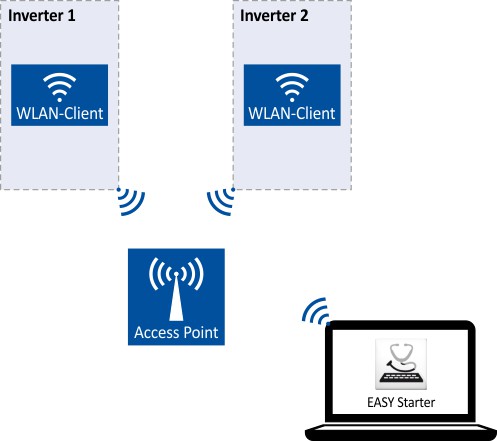
How to configure the WLAN module as WLAN client:
Requirements:
✓
The WLAN settings of the inverter can be accessed via »EASY Starter«.
✓
Name (SSID) and password of the external WLAN network are known.
1.
Set the selection "Client mode [1]" in 0x2441:006.
2.
Set the name (SSID) of the external WLAN network in 0x2441:007.
3.
Set the password of the external WLAN network in 0x2441:008.
4.
Saving the parameter settings. 
Before activating the changed WLAN settings in the next step: Make sure that the name (SSID) and the password of the external WLAN network are set correctly. The restart of the WLAN module in the client mode causes a termination of an existing WLAN connection in the access point mode!
5.
Restart the inverter or remove and replug the WLAN module to activate the changed WLAN settings.
The WLAN module now tries as a client to establish a connection to the set external WLAN network.
Notes:
–
In the default setting, the WLAN client is configured as DHCP client in 0x2441:004.
–
Settings as IP address, subnetwork mask and gateway are automatically made by the DHCP server of the external WLAN network.
–
–
Parameter
|
Address
|
Name / setting range / [default setting]
|
Information
|
|
|
0x2441:001
|
WLAN settings: IP address
0.0.0.0 ... [192.168.178.1] ... 255.255.255.255
–
From version 02.00
|
Definition of the IP address for the WLAN access point.
–
In the client mode, a static IP address can be set here for the WLAN client. In order that the static configuration becomes effective, DHCP must be disabled in 0x2441:004.
–
Byte order is "Big-Endian":
192.168.178.01 = 0x01B2A8C0 (= 28485824) |
|
|
0x2441:002
|
WLAN settings: Netmask
0.0.0.0 ... [255.255.255.0] ... 255.255.255.255
–
From version 02.00
|
Definition of the network mask for the WLAN access point.
–
In the client mode, a static network mask can be set here for the WLAN client. In order that the static configuration becomes effective, DHCP must be disabled in 0x2441:004.
–
Byte order is "Big-Endian":
255.255.255.0 = 0x00FFFFFF (= 16777215) |
|
|
0x2441:003
|
WLAN settings: Gateway
0.0.0.0 ... [192.168.178.1] ... 255.255.255.255
–
From version 02.00
|
Definition of the gateway for the WLAN access point.
–
In the client mode, a static gateway can be set here for the WLAN client. In order that the static configuration becomes effective, DHCP must be disabled in 0x2441:004.
–
Byte order is "Big-Endian":
192.168.178.1 = 0x01B2A8C0 (= 28485824) |
|
|
0x2442:001
|
Active WLAN settings: Active IP address
–
Read only
–
From version 02.00
|
Display of the active IP address.
–
If DHCP is activated, the active IP address usually derives from the configured static IP address of the device.
|
|
|
0x2442:002
|
Active WLAN settings: Active netmask
–
Read only
–
From version 02.00
|
Display of the active netmask.
|
|
|
0x2442:003
|
Active WLAN settings: Active gateway
–
Read only
–
From version 02.00
|
Display of the active gateway IP address.
|
|