Add & Edit instances
NodeClass
The NodeClass parameter of the Mapping Editor corresponds to the NodeClass definition of the OPC UA specification.
The NodeClass parameter defines, which NodeClass shall be added as child to the selected parent Node in the Information Model. The additional attributes for the new instance are NodeClass depending.
-
"Object", adds a new Object that are used to structure the information model.
-
"Variable", adds a new Variable to represent a value.
-
"Method", adds a new Method that can be called by a Client and returns in a result.
-
There are some constraints regarding the possible NodeClass of the addable child nodes. Following table provides an overview with the hierarchical references used by default.
|
Parent / Source NodeClass
|
Child / Target NodeClass |
|||
|---|---|---|---|---|
|
Object |
Variable (DataVariable Type) |
Variable (Property Type) |
Method |
|
|
Object |
Organizes |
HasComponent |
HasProperty |
HasComponent |
|
Variable (DataVariable Type) |
Not allowed |
HasComponent |
HasProperty |
Not allowed |
|
Variable (Property Type) |
Not allowed |
Not allowed |
Not allowed |
Not allowed |
|
Method |
Not allowed |
Not allowed |
HasProperty |
Not allowed |
For more information about the differences between DataVariables and Properties Variables refer to chapter Annex.
Name
The Name parameter is the SymbolicName for the new Node in the Nodeset xml-File. The SymbolicName does not appear in the Server AddressSpace and is intended for use by design tools only. Only letters, digits or the underscore ("_") are permitted.
-
The DisplayName is used to represent the Node in the information model of the Mapping Editor. In general, the DisplayName shall be used by Clients to represent the Node to a user, e. g. via a visualization.
-
The BrowseName is used when browsing the AddressSpace to create paths out of BrowseNames.
-
The DisplayName and BrowseName parameters of the "Add Instance" dialog are automatically taken from this Name parameter, but they can also be overwritten by the user.
Typedefinition
The Typedefinition parameter defines the OPC UA Type definition of the new Instance. The desired type definition can be selected from a type definition hierarchy of all loaded base models.
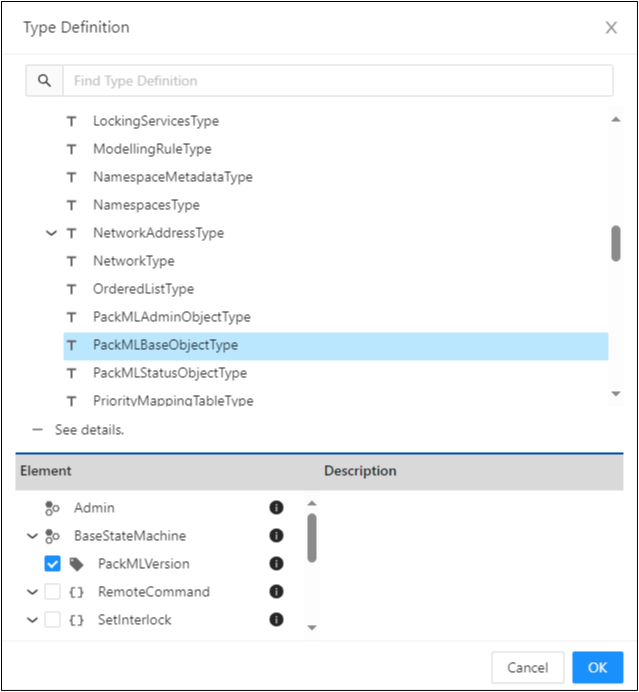
In case of an Object instance the provided type definitions are from the BaseObjectType hierarchy.
In case of a Variable instance the provided type definitions are from the BaseVariableType hierarchy. The first hierarchy level is the decision between DataVariable type and Property type. For more information about the differences refer to chapter 7.2.
Element
If the suitable Type for the new instance is selected, the hierarchical elements of the selected one are listed in a details section. Also optional (markable) and mandatory (greyed out) child nodes of the listed types are presented. If necessary for the use case the customer is able to mark the optional ones. All marked child Nodes will be added to the new Instance.
Description
For further information, the "Description" of the selected Type is presented, if it is provided by the base model.
OPC UA introduces abstract Type definitions. Types, which are abstract are only used to structure the Type hierarchy. It isn't allowed to create an instance from abstract Type definitions. Abstract Type definitions are marked in italic font.
Typedefinition - Select optional components
If the used Type definition provides optional child nodes, a button for a selection dialog appears.
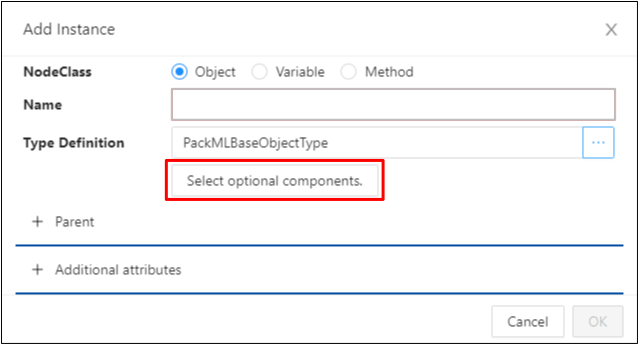
Via this dialog the optional child nodes can be selected to be added under the new instance node. Mandatory nodes are pre-selected and greyed out. The mandatory nodes have to be part of the new instance as specified by the used CompanionSpecification.
It is the same configuration as can be done by the Typedefinition dialog, just with easy access to the selection.
It is the same configuration as can be done by the Typedefinition dialog, just with easier access via the main "Add Instance" dialog.
DataType
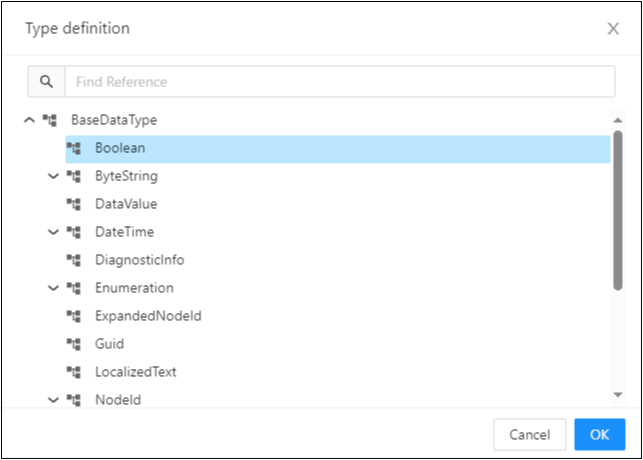
The DataType parameter specifies the type definition of the value of a variable node. OPC UA introduces some BuiltIn DataTypes, structures and enumerations. Also additionally loaded base models bring derived DataTypes with them.
Parent Name
The "ParentName" represents the DisplayName of the selected Node in the information model of the Mapping Editor. Under this node the new instance will be added as child.
Parent Reference
Defines the hierarchical reference from the parent node to the new child node.
Depending on the NodeClass of the parent node following References and their subtypes are supported.
|
Parent NodeClass |
Child NodeClass |
||
|---|---|---|---|
|
Object |
Variable |
Method |
|
|
Object |
Organizes (default) HasComponent |
Organizes HasComponent (default) HasProperty |
HasComponent (default) |
|
Variable |
Not allowed |
HasComponent (default) HasProperty |
Not allowed |
|
Method |
Not allowed |
Not allowed |
Not allowed |
Organizes ReferenceType
Used to organize Nodes in the AddressSpace. The parent node shall be an Object (mainly of FolderType or subtype definition). The Child node can be of any NodeClass.
HasComponent ReferenceType
The semantic of a HasComponent reference is a is -part-of relationship. It is mainly used between Objects as parent node and their containing (Sub-)Objects, DataVariables and Methods.
It is also usable to structure complex variable nodes, see chapter Structured DataType for a complex variable.
HasProperty
The HasProperty reference is only used to identify the Properties of a node. The parent node can be of any NodeClass. The Child node is a Variable defined as Property.
Properties shall not have (Sub-) Properties. Thus, a Property node shall not be the Parent Node of this reference.
For further information about Properties see also chapter Mapping Editor.
Namespace
The Namespace parameter defines the namespace URI in which the new Node shall be added.
Selected base models are fix and can't be modified by the Mapping Editor. Only the customer model can be enhanced or modified.
The namespace URI [String] is a global unique identifier of the namespace.
The namespace URI of the user model is editable as mentioned in chapter User model settings.
If the information model is represented by an engineering tool (e.g. the Mapping Editor) or if the information model is represented "online" in a server AddressSpace, an namespaceIndex [UInt16] is additionally provided. It supports an easier handling, but it is only fix (and unique) on the current tool or server application.
NodeID
The NodeID is used to define a specific unique identifier for the new node. In general, OPC UA introduces four kinds of NodeIds. This is specified by an IdentifierType:
-
NUMERIC (- UInteger)
-
STRING (- String)
-
GUID (- Guid)
-
OPAQUE (- ByteString)
Currently the NodeID is provided with a NUMERIC IdentifierType by the Mapping Editor automatically. Thus, this parameter is not editable by the user.
The formalized NodeID type definition by the OPC UA specification is a structure of
-
namespaceIndex [UInt16],
-
identififierType [Enum: IdType],
-
identifier [depends on the identifierType].
DisplayName
The DisplayName is used to represent the Node in the information model of the Mapping Editor. In general, the DisplayName is the localised name of the node and shall be used by Clients to represent the node to a user, e. g. via a visualization.
The DisplayName parameter of the "Add Instance" dialog is automatically taken from the Name parameter, but it can also be overwritten by the user.
The DisplayName type definition is a LocalizedText. Thus, a LocaleId and a String can be provided.
-
The LocaleID (e.g. "en-US") can be left empty. In this case the corresponding string is the default Displayname, without localization.
-
The Mapping Editor supports currently only one entry for the DisplayName.
-
According to the OPC UA specification, each server shall provide the DisplayName identical to the BrowseName of the Node for the LocaleId "en" (or for empty LocaleIDs).
BrowseName
The BrowseName is used when browsing the AddressSpace to create paths out of BrowseNames.
Unlike NodeIds, the BrowseName cannot be used to unambiguously identify a Node. Different Nodes may have the same BrowseName.
The BrowseName parameter of the "Add Instance" dialog is automatically taken from the Name parameter, but it can also be overwritten by the user.
The BrowseName type definition is a structure. It contains a namespaceIndex and a string. The namespaceIndex is provided to make the BrowseName unique in some cases in the context of a Node, although not unique in the context of the Server.
If various CompanionSpecifications define (equal) BrowseNames for Variables, the namespace of the BrowseName provided by the CompanionSpecifications makes the BrowseName unique, although different CompanionSpecifications may use the same string having a slightly different meaning.
As an example, a Variable node "Manufacturer" shall be added, which is used in the context of the DI - Companion Specification. In this case, the BrowseName of the Node is "Manufacturer" and the namespaceIndex points to the DI - namespace URI.
Description
The Description parameter defines the localized description of the new node.
The Description type definition is a LocalizedText. Thus, a LocaleId and a String can be provided.
The LocaleID (e.g. "en-US") can be left empty. In this case the corresponding string is the default Description, without localization.
The Mapping Editor supports currently only one entry for the Description.
EventNotifier
The EventNotifier is used to indicate if the node is able to fire Events and / or to support reading and writing historic Events. Multiple selections are possible. The supported ability is OPCUA Server target depending.
The current Lenze OPC UA Server on c5xx controller supports "Subscribe to events" since Firmware Version 1.9. Historic Event reading and writing is not supported.
If an EventNotifier is added to an Object by the context menu, this parameter is set automatically.
Value
The Value parameter is used to provide a default value for the Variable node. This default value is part of the nodeset file, like other node parameters. The use case is to present static (default) values in the information model like a manufacturer name. In this case these static values don't need a special data source which has to be mapped.
If the variable node is mapped the value will always be overwritten by the data source.
If the Value "Null" checkbox is deactivated, a static (default) value can be inserted.
It is currently only possible to set a static value for primitive scalar DataTypes.
ValueRank
The ValueRank parameter specifies if the value is a scalar (a single value) or an array (a field of values) with one or more dimensions.
Following Table gives an overview.
|
ValueRank |
Example |
||
|---|---|---|---|
|
Notation |
Description |
||
|
Scalar (-1) |
Int32 |
omitted /empty |
A scalar Int32. |
|
1 Dimension (1) |
Int32[] |
omitted /empty |
Single-dimensional array of Int32 with unknown size. The size will be taken over from the data source if mapped. |
|
|
Int32[3] |
3; |
Single-dimensional array of Int32 with fix size of 3. |
|
2 Dimension (2) |
Int32[][] |
omitted /empty |
Two-dimensional array of Int32 with unknown size. The size will be taken over from the data source if mapped. |
|
|
Int32[5][3] |
5;3; |
Two-dimensional array of Int32 with fix size of 5 for the first dimension and 3 for the second dimension. |
|
3 Dimension (3) |
Int32[][][] |
omitted /empty |
Three-dimensional array of Int32 with unknown size. The size will be taken over from the data source if mapped. |
|
|
Int32[5][3][3] |
5;3;3; |
Three-dimensional array of Int32 with fix size of 5 for the first dimension and 3 for the second and third dimension. |
The OPC UA known ValueRanks Any(-2), ScalarOrOneDimension(-3) and ValueRanks with more than 3 dimensions are currently not supported by the Mapping Editor and Lenze OPC UA Server.
ArrayDimensions
If the ValueRank indicates an array value, the ArrayDimensions parameter specifies the length of each array dimension. If the ValueRank indicates a scalar value the ArrayDimensions parameter can be omitted.
The length of the dimensions is entered as numbers separated by semicolons.
If the variable node will be mapped with a data source variable of the symbol configuration, the ArrayDimensions must not yet be known. The array size will be taken over from the mapped PLC variable by the Lenze OPC UA Server. In this case the value 0 must be entered at the ArrayDimensions parameter.