Push Certificate Management
In this mode the GDS pushes certificates to the Lenze OPC UA Server. The following illustration shows the general procedure for pushing certificates from a Global Discovery Server (GDS).
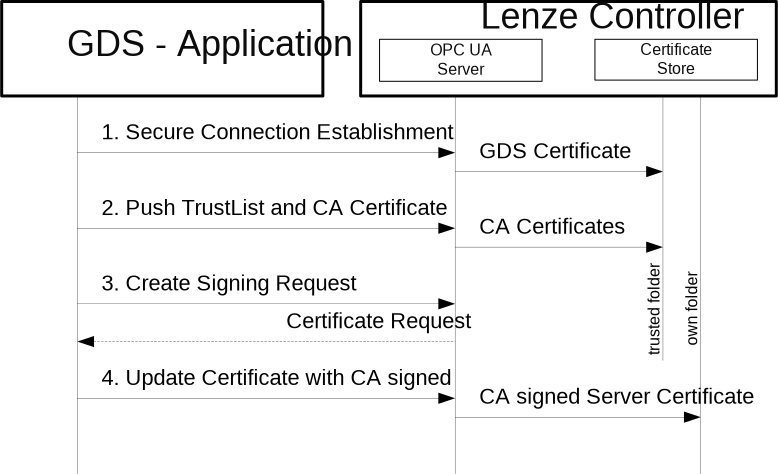
As a secure connection is established between Lenze Controller and GDS, the GDS certificate must be trusted in advance of the process described above. This results in the following procedure for the initial set-up of the certificate management:
-
Secure connection establishment of the GDS with the Lenze OPC UA server
-
With activated Provisioning mode, the GDS certificate will be accepted automatically.
-
With disabled Provisioning mode, the user has to trust the certificate manually.
-
Since the certificate is unknown, it is automatically moved to the quarantine folder by the Lenze server.
-
The connection is rejected by the Lenze server.
-
The user has to trust the certificate via the certificate management (PLC Designer or WebVisu of the controller).
-
Reconnect the GDS to the Lenze server.
-
-
-
The GDS server sends theTrust List including the certificate of the CA (Certificate Manager) to the Lenze server.
-
As theLenze server initially only has a self-signed certificate, the GDS triggers the creation of the CSR (Create Signing Request)
-
The Lenze server creates the signing request with the current private key.
-
The Lenze server sends the CSR back to the GDS
-
-
The GDS server signs the CSR and sends the newly created certificate to the Lenze server.
-
The Lenze server parses the certificate and checks whether the certificate information it contains matches the CSR it has created.
-
If all the information matches, the Lenze server saves the new certificate.
-
Lenze Controller user management is needed
The OPC UA specification defines that the push model may only be used with a client that has the "Security Admin" role.
Thus, the user management on the controller has to be activated. By default, users in the "Certificate Configuration" group have access rights to push certificates and trust lists. The administrator user always has these access rights.
When the trust list is updated by the GDS (push or pull management), previously trusted certificates are deleted from the trusted folder. This means that the trust list is completely managed by the GDS.