Hardware limit
Prerequisite
The axes is released (xReadyForMotion = TRUE).
Execution
A rising edge (FALSE↗TRUE) at the xHWLimitPos or xHWLimitNeg inputs causes the positive or negative hardware limit switch to be reached or approached. The current movement of the axis is brought to a standstill with the deceleration of the "QSP Application". The parameter for the deceleration ramp of the "QSP Application" is set in AXIS_REF.
Up to and including version 3.31.x of the L_MC1P_MotionControlBasic library, only the last instance called up in the application cycle (technology module or single-axis FB L_MC1P_HWLimitSwitchInterface) is evaluated.
From version 3.32.0, all instances called up in the application are evaluated.
Motion diagram
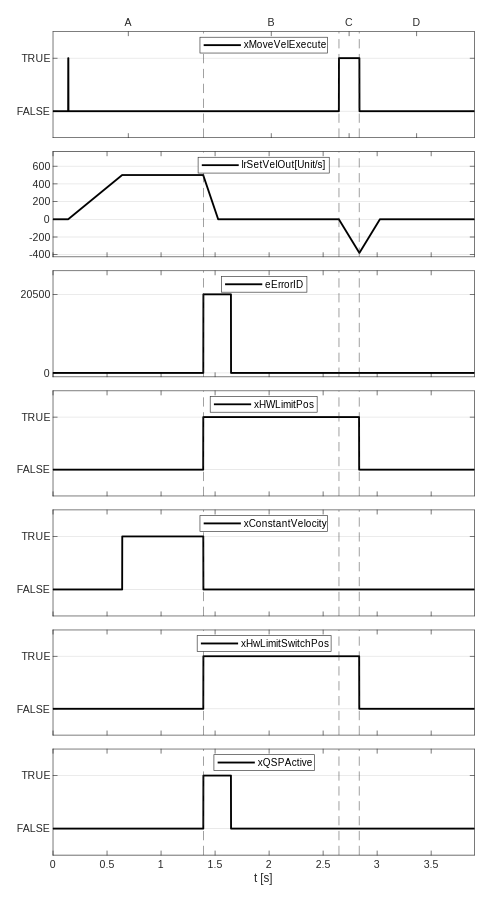
|
No |
xHWLimitPos |
xQSPActive |
xConstant Velocity |
xHwLimitSwitchPos |
eErrorID |
eTMState |
Info |
|---|---|---|---|---|---|---|---|
|
A |
FALSE ↗TRUE |
FALSE ↗TRUE |
TRUE↘FALSE |
FALSE ↗TRUE |
NoError→ HWLimitPos |
MOVEVEL → ERROR |
After the movement, the axis reaches the hardware limit switches in the positive direction and is brought to a standstill via the QSP application deceleration ramp. The axis reports an error. |
|
B |
TRUE |
TRUE↘FALSE |
FALSE |
TRUE |
HWLimitPos → NoError |
ERROR→ STANDBY |
The error in the axis was reset with xResetError. |
|
C |
TRUE↘FALSE |
FALSE |
FALSE |
TRUE↘FALSE |
NoError |
STANDBY → MOVEVEL |
Start speed travel in the negative direction. After leaving the hardware end position, xHWLimitSwitchPos = FALSE |
|
D |
FALSE |
FALSE |
FALSE |
FALSE |
NoError |
MOVEVEL → STANDBY |
The speed drive is brought to a standstill by xAbort = TRUE. |
Parameters to be set
The parameters for the "QSP Application" are located in the AXIS_REF in subindex 48 and 49.
For more configuration instructions, see the function block description L_MC1P_HWLimitSwitchInterface