The Event monitoring type can also be selected for defining an alarm in the alarm group. In contrast to the other monitoring types, which trigger the alarm depending on a condition, you can trigger the alarm with the Event type via a function block call.
-
Create an alarm group.
-
Define an alarm of the observation type Event in the alarm group.
-
In the column Class, select an alarm class with the acknowledgment method ACK or create a new alarm class.
-
Set the cursor at the program position at which the function-block call is to take place.
-
Use the
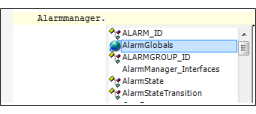
RaiseEventfunction from theAlarmManagerlibrary:Enter "AlarmManager" followed by a period.
A window opens containing a list of all insertable elements ("List components" function).
-
Select
AlarmGlobalsand enter a period. -
In the same way, insert the elements
g_AlarmHandlerandRaiseEvent.You get the following line:
Alarmmanager.AlarmGlobals.g_AlarmHandler.RaiseEvent. -
Now define the transfer variables
AlarmGroup_IDand Alarm_ID. To do this, enter an opening parenthesis.A tooltip appears, showing information about the transfer variables
-
Press F2
The Input Assistant opens
-
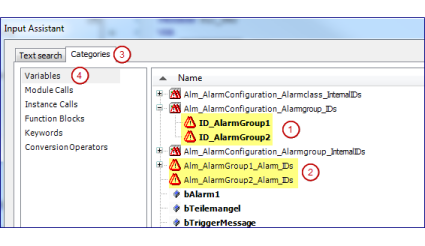
On the Categories tab (3), select the category Variables (4).
-
Select the desired group ID variable (1).
The variable is applied into the program line.
-
Enter a comma and insert the desired alarm ID variable (2) in the same way as in Step 7. Input a closing parenthesis and a semicolon.
You get the following program line:
Alarmmanager.AlarmGlobals.g_AlarmHandler.RaiseEvent(Alm_AlarmConfiguration_Alarmgroup_IDs.ID_AlarmGroup1, Alm_AlarmGroup1_Alarm_IDs.ID_0);