You can declare an interface for parameters for a visualization that is to be referenced. The actual parameters are passed to the interface (similar as in the case of a function block) when the visualization is called at runtime.
First of all, declare the interface variables in the visualization interface editor. Then configure the parameters that are transferred to the interface by assigning a data-type-compliant application variable to each interface variable. The assignment is configured in the References property in the case of a Frame or Tabs element.
Depending on the display variant, the parameter transfer of local variables (with the VAR scope) is limited.
If you execute the visualization as an integrated visualization, you can only transfer local variables having a basic data type as parameters. If the visualization is called as or , then you can also transfer parameters with a user-defined data type.
If you have configured visualization references and then save a change to the variable declaration for one of these visualizations in an interface editor, then the Updating the Frame Parameters dialog appears automatically. The dialog prompts you to edit the references. A list of all the visualizations affected is displayed there, so that the parameter transfers can be reassigned at the changed interface.
When the dialog is closed, the changes are accepted and the elements affected are displayed in the References property.
Requirement: The project contains a visualization and a main visualization. The main visualization contains an element that the visualization references.
-
Open the visualization.
-
Click .
-
Declare a variable in the interface editor.
The visualization has an interface and the Updating the Frame Parameters dialog appears.
-
Assign a type-compliant transfer parameter to the interface variables in all calls by entering an application variable in Value. Exit the dialog.
A transfer parameter is assigned at the points where the visualization is to be referenced. These now appear in the main visualization in the References property.
Example 19. Example
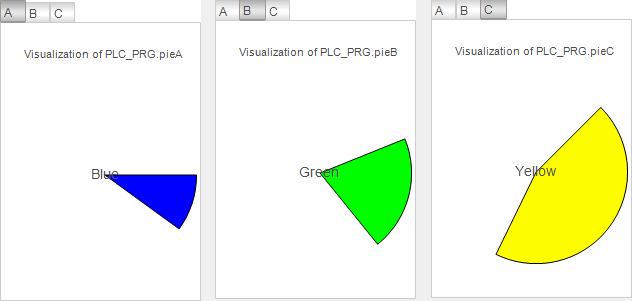
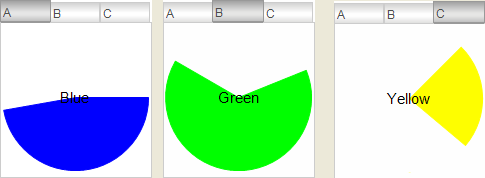
The visPie visualization contains an animated, colored pie. The visMain main visualization calls the visPie visualization multiple times in Tabs. Color information, angle information, and label are transferred via the pieToDisplay interface variable. The pies vary at runtime.
Visualization visPie:
Table 3. Properties of the Pie element:
|
Variable for begin |
|
|
Variable for end |
|
|
|
%s |
|
|
|
|
|
|
Interface of the visualization visPie:
                            VAR_IN_OUT
                            pieToDisplay : DATAPIE;
                            END_VAR
Main visualization visMain:
Table 4. Properties of the "Tabs" element:
|
References |
|
|
visPie |
|
|
Heading |
|
|
|
|
|
visPie |
|
|
Heading |
|
|
|
|
|
visPie |
|
|
Heading |
|
|
|
|
DATAPIE (STRUCT)
TYPE DATAPIE : // Parameter type used in visPie
STRUCT
    dwColor : DWORD; // Color data
    iStart : INT; // Angle data
    iEnd : INT;
    sLabel : STRING;
END_STRUCT
END_TYPE
GVL
{attribute 'qualified_only'}
VAR_GLOBAL CONSTANT
    c_dwBLUE : DWORD := 16#FF0000FF; // Highly opaque
    c_dwGREEN : DWORD := 16#FF00FF00; // Highly opaque
    c_dwYELLOW : DWORD := 16#FFFFFF00; // Highly opaque
    c_dwGREY : DWORD :=16#88888888; // Semitransparent
    c_dwBLACK : DWORD := 16#88000000; // Semitransparent
    c_dwRED: DWORD := 16#FFFF0000;  // Highly opaque
END_VAR
PLC_PRG
PROGRAM PLC_PRG
VAR
    iInit: BOOL := TRUE;
    pieA : DATAPIE; // Used as argument when visPie is called
    pieB : DATAPIE;
    pieC : DATAPIE;
    iDegree : INT; // Variable center angle for the pie element used for animation
END_VAR

IF iInit = TRUE THEN
    pieA.dwColor := GVL.c_dwBLUE;
    pieA.iStart := 0;
    pieA.sLabel := 'Blue';

    pieB.dwColor := GVL.c_dwGREEN;
    pieB.iStart := 22;
    pieB.sLabel := 'Green';

    pieC.dwColor := GVL.c_dwYELLOW;
    pieC.iStart := 45;
    pieC.sLabel := 'Yellow';

    iInit := FALSE;
END_IF
iDegree := (iDegree + 1) MOD 360;
pieA.iEnd := iDegree;
pieB.iEnd := iDegree;
pieC.iEnd := iDegree;
Main visualization visMain at runtime:
In order to obtain and output the instance name of a transfer parameter, you can implement an interface variable (data type STRING) with the pragma {attribute 'parameterstringof'} in the VAR_INPUT scope.
The project contains a visualization and a main visualization. The main visualization contains elements that the visualization references.
-
Open the visualization.
-
Click .
-
Declare an interface variable (
VAR_IN_OUT).pieToDisplay : DATAPIE; -
In the interface editor, declare a variable (
VAR_INPUT) with attribute{attribute 'parameterstringof'}.{attribute 'parameterstringof' := 'pieToDisplay'}sNameToDisplay : STRING; -
Save the changes.
The Updating the Frame Parameters dialog does not open.
-
Insert a Text Field element.
-
In the Texts, Text property, assign an output text to the text field.
Visualization of %s -
In the Text variablesText variable property, assign the interface variable to the text field.
sNameToDisplayvisPiehas a heading.
Example 20. Example
The visPie visualization consists of one pie until now. The visMain main visualization calls visPie in Tabs three times with different transfer parameters.
The visPie is extended with a text field that outputs the name of the parameters actually passed to the visualization. For this, the interface of visPie is extended with a string variable that contains the instance name of the specified transfer parameter. At runtime, each pie is overwritten.
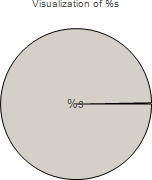
Table 5. Properties of the "Text Field" element:
|
Texts, Text |
|
|
Text variables, Text variable |
|
Interface of the visPie visualization
VAR_INPUT
    {attribute 'parameterstringof' := 'pieToDisplay'}
    sNameToDisplay : STRING;
END_VAR
VAR_IN_OUT
    pieToDisplay : DATAPIE;
END_VAR
Main visualization visMain at runtime: