You can capture user input events in the application. For this purpose, you can implement a function block that is executed when user events occur.

|
Note |
|---|---|
|
The sample project records variable value changes that were triggered by user input within the visualization. In this project, you will also find the implementation of the method |

When the user completes the input of a value (in an input field), an edit control event is closed. You can capture this event in the application as follows.
-
Create a function block that implements the interface
VisuElems.IEditBoxInputHandlerfrom the libraryVisuElemBase. -
Pass the instance to the global event manager
VisuElems.Visu_Globals.g_VisuEventManagerby calling the methodSetEditBoxEventHandler.
Example 4. Example
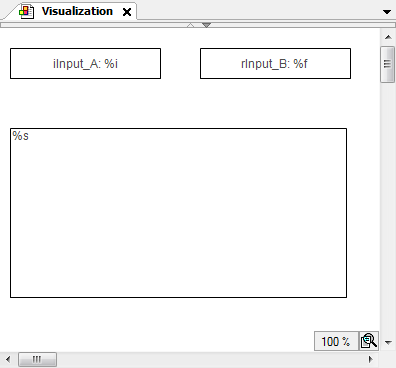
A visualization has two input fields for iInput_A and rInput_B and one text output element.
The input fields are rectangles that the user is prompted to click in order to input text.
The text output element is a rectangle where the contents of the text variable PLC_PRG.stInfo are printed. The text variable contains the last input by a user in one of the input fields and the additional information that was added.
|
Properties of the rectangle |
|
|
|
|
|
|
PLC_PRG.iInput_A |
|
Properties of the rectangle |
|
|
|
|
|
|
PLC_PRG.rInput_B |
|
Properties of the rectangle for the text output |
|
|
|
|
|
|
PLC_PRG.stInfo |
Implementation of PLC_PRG
PROGRAM PLC_PRG
VAR_INPUT
    iInput_A:INT;  (* Used in the visualization as user input variable*)
    rInput_B:REAL; (* Used in the visualization as user input variable*)
    stInfo : STRING;  (* Informs about the user input via the edit control field;
                        String gets composed by method 'VariableWritten;
                        Result is displayed in the lower rectangle of the visualization *)
END_VAR
VAR
    inst : POU;
    bFirst : BOOL := TRUE;
END_VAR

IF bFirst THEN
    bFirst := FALSE;
    VisuElems.Visu_Globals.g_VisuEventManager.SetEditBoxEventHandler(inst);
    (* Call of method VariableWritten *)
END_IF
Implementation of POU
FUNCTION_BLOCK POU IMPLEMENTS VisuElems.IEditBoxInputHandler
(* no further declarations, no implementation code *)
Method VariableWritten assigned to POU
METHOD VariableWritten : BOOL
(* provides some information always when an edit control field is closed in the visualization, that is a variable gets written by user input in one of the upper rectangles *)
VAR_INPUT
    pVar : POINTER TO BYTE;
    varType : VisuElems.Visu_Types;
    iMaxSize : INT;
    pClient : POINTER TO VisuElems.VisuStructClientData;
END_VAR

// String stInfo, which will be displayed in the lower rectangle, is composed here
PLC_PRG.stInfo := 'Variable written; type: ';
PLC_PRG.stInfo := CONCAT(PLC_PRG.stInfo, INT_TO_STRING(varType));
PLC_PRG.stInfo := CONCAT(PLC_PRG.stInfo, ', adr: ');
PLC_PRG.stInfo := CONCAT(PLC_PRG.stInfo, DWORD_TO_STRING(pVar));
PLC_PRG.stInfo := CONCAT(PLC_PRG.stInfo, ', by: ');
PLC_PRG.stInfo := CONCAT(PLC_PRG.stInfo, SEL(pClient^.globaldata.clienttype = VisuElems.Visu_ClientType.Targetvisualization,'other visu', 'targetvisu'));
When the user presses and releases the key, a keyboard event is triggered in the visualization. You can capture this event in the application as follows.
-
Create a function block that implements the interface
VisuElems.IKeyEventHandlerfrom the libraryVisuElemBase. -
Pass the instance to the global event manager
VisuElems.Visu_Globals.g_VisuEventManagerby calling the methodSetKeyEventHandler.
Example 5. Example
A visualization has one text output element. The text output element is a rectangle where the contents of the text variable PLC_PRG.stInfo are printed. The text variable contains information about the last key pressed by the user.
|
Properties of the rectangle for the text output |
|
|
|
|
|
|
PLC_PRG.stInfo |
Implementation of the program PLC_PRG
PROGRAM PLC_PRG
VAR_INPUT
    stInfo : STRING;
END_VAR
VAR
    inst : POU;
    bFirst : BOOL := TRUE;
END_VAR

IF bFirst THEN
    bFirst := FALSE;
    VisuElems.Visu_Globals.g_VisuEventManager.SetKeyEventHandler(inst);
END_IF
Implementation of the function block POU
FUNCTION_BLOCK POU IMPLEMENTS VisuElems.IKeyEventHandler
(* no further declarations, no implementation code *)
Implementation of the method VariableWritten of the function block POU
/// This method will be called after a key event is released.
/// RETURN:
/// TRUE - When the handler has handled this event and it should not be handled by someone else
/// FALSE - When the event is not handled by this handler
METHOD HandleKeyEvent : BOOL
VAR_INPUT
    /// Event type. The value is true if a key-up event was released.
bKeyUpEvent : BOOL;
    /// Key code
dwKey : DWORD;
    /// Modifier. Possible values:
    /// VISU_KEYMOD_SHIFT : DWORD := 1;
    /// VISU_KEYMOD_ALT : DWORD := 2;
    /// VISU_KEYMOD_CTRL : DWORD := 4;
dwModifiers : DWORD;
    /// Pointer to the client structure were the event was released
    pClient : POINTER TO VisuStructClientData;
END_VAR
VAR
END_VAR

PLC_PRG.stInfo := 'KeyEvent up: ';
PLC_PRG.stInfo := CONCAT(PLC_PRG.stInfo, BOOL_TO_STRING(bKeyUpEvent));
PLC_PRG.stInfo := CONCAT(PLC_PRG.stInfo, ', key: ');
PLC_PRG.stInfo := CONCAT(PLC_PRG.stInfo, DWORD_TO_STRING(dwKey));
PLC_PRG.stInfo := CONCAT(PLC_PRG.stInfo, ', modifier: ');
PLC_PRG.stInfo := CONCAT(PLC_PRG.stInfo, DWORD_TO_STRING(dwModifiers));
PLC_PRG.stInfo := CONCAT(PLC_PRG.stInfo, ', by: ');
PLC_PRG.stInfo := CONCAT(PLC_PRG.stInfo, SEL(pClient^.globaldata.clienttype =
    VisuElems.Visu_ClientType.Targetvisualization,'other visu', 'targetvisu'));
All visualization elements that change the value of a variable by user input call the interface IValueChangedListener. With this interface, the value changes can be recorded and then processed programmatically.
|
|
Note |
|---|---|
|
The sample project records variable value changes that were triggered by user input within the visualization. In this project, you will also find the implementation of the method |
-
Implement a function block (example:
POU) that implements the interfaceIValueChangedListener.FUNCTION_BLOCK POU IMPLEMENTS VisuElems.IValueChangedListenerIn the device tree, the ValueChanged method is inserted below the function block.
-
In a program (example: PLC_PRG), implement the IEC code that registers the interface.
VisuElems.g_itfValueChangedListenerManager.AddValueChangedListener(itfValueChangedListener)PLC_PRG gets all value changes by means of the ValueChanged method.
Now you can record and process the value changes.
When a user clicks an element that reacts to input (for example, a rectangle with an input configuration), an event is triggered. You can capture this event in the application as follows.
-
Create a function block that implements the interface
VisuElems.IInputOnElementEventHandlerfrom the libraryVisuElemBase. -
Pass the instance to the global event manager
VisuElems.Visu_Globals.g_VisuEventManagerby calling the methodSetInputOnElementEventHandler.
Example 6. Example
A visualization has a rectangle that reacts to input. For example, the toggling of a variable has been configured with OnMouseDown. When the element is clicked by a mouse or touch input, an event HandleInputOnElementEvent is triggered.
Implementation of the function VisuInit
FUNCTION VisuInit : BOOL
// Set the input on element event handler
VisuElems.VisuElemBase.g_VisuEventManager.SetInputOnElementEventHandler(PLC_PRG.evInputOnElementEventHandler);
Implementation of the function block POU
FUNCTION_BLOCK POU IMPLEMENTS VisuElems.VisuElemBase.IInputOnElementEventHandler
(* no further declarations, no implementation code *)
Implementation of the method HandleInputOnElementEvent of the function block POU
(* This method will be called when an input on a visualization element was executed.
RETURN:
TRUE - When the handler has handled this event and it should not be handled by someone else
FALSE - When the event is not handled by this handler*)

METHOD HandleInputOnElementEvent : BOOL
    VAR_INPUT
    event    : VisuElems.VisuStructInputOnElementEvent;
END_VAR
IF event.eType = VisuElems.VisuEnumInputOnElementType.MouseDown THEN
    SysProcessExecuteCommand('python D:\Beep.py', 0);
END_IF
(* Content Beep.py: import winsound freq=500 duration=200 winsound.Beep(freq,duration) *)